

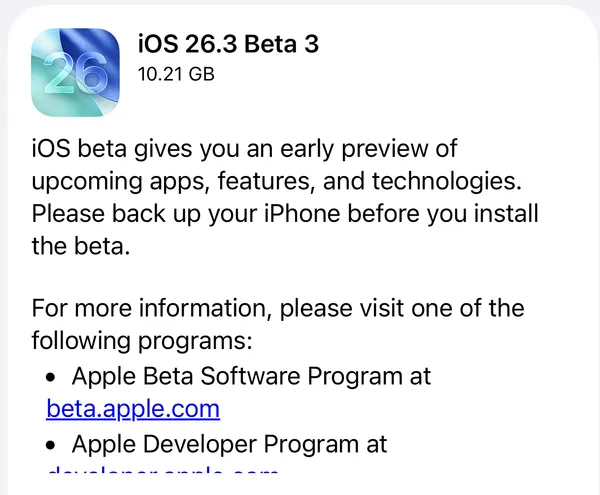
Apple dropped the first developer beta of iOS 26.3, iPadOS 26.3, macOS Tahoe 26.3, watchOS 26.3, tvOS 26.3, and visionOS 26.3 yesterday, just three days after the public release of version 26.2. If you're keeping track, that's impressively fast turnaround—but don't expect this pace to continue. With the holidays approaching and beta 2 unlikely until mid-January, this is probably the last new beta we'll see in 2025.
So what's in 26.3? Well, it depends on which platform you're using.
iOS and iPadOS 26.3: EU Compliance Takes Center Stage
The iPhone and iPad updates are where the action is, though most of the changes are regulatory-driven rather than flashy new features.
Android Gets an Easier Exit
The standout addition is buried in Settings > General > Transfer or Reset iPhone, where you'll now find a new "Transfer to Android" option. This is Apple and Google playing nice at the European Union's request, making it easier for users to switch between platforms. The feature streamlines the process of moving your data to an Android device, which previously required third-party tools or a lot of manual work.
It's worth noting this is an EU-mandated change, but Apple is rolling it out globally rather than maintaining separate codebases for different regions.
Third-Party Wearables Get Some Love
Another EU requirement: iPhone notifications can now be forwarded to third-party smartwatches and fitness trackers. Previously, if you wanted reliable notification delivery on your wrist, you pretty much needed an Apple Watch. That exclusivity is ending with 26.3, though the feature is also launching globally.
Lock Screen Wallpaper Organization
A small but welcome change—Apple has separated Weather and Astronomy wallpapers into their own dedicated section in the lock screen customization menu. If you've been scrolling through the wallpaper picker trying to find these options, this will make life easier.
Network and Modem Updates
iOS 26.3 beta 1 includes modem firmware updates aimed at improving cellular connectivity and network performance. These under-the-hood changes rarely make headlines, but they're often the most impactful fixes for day-to-day usability.
watchOS 26.3: Details Still Emerging
Apple hasn't disclosed specific new features for watchOS 26.3 beta 1 yet. Given that watchOS 26.2 introduced Enhanced Safety Alerts for natural disasters, developers will be watching to see if 26.3 expands on health and safety capabilities. For now, expect stability improvements and bug fixes while we wait for more substantial changes in the spring.
tvOS 26.3: Guest Profiles Get Refined
tvOS 26.3 details are similarly sparse at launch. The previous 26.2 update added support for guest profiles without requiring an Apple ID—a significant quality-of-life improvement for households with shared Apple TVs. Expect 26.3 to polish these features rather than introduce major new functionality.
visionOS 26.3: Developer-Only Territory
visionOS 26.3 beta is limited to registered developers and won't be available to public beta testers. The Vision Pro's 26.2 update expanded Travel Mode to work in cars and buses, addressing one of early adopters' most common complaints about using the headset while in motion. We'll have to wait for developers to dig in and report what's new in this build.
macOS Tahoe 26.3: Consistency Across the Ecosystem
macOS Tahoe 26.3 beta 1 launched alongside the other platform updates, maintaining Apple's commitment to synchronized releases across its ecosystem. Specific features haven't been detailed yet, but macOS typically mirrors iOS capabilities where appropriate—especially when it comes to iCloud integration and cross-platform features.
Bonus: Older macOS Updates
Apple also released release candidates for:
- macOS Sequoia 15.7.4 RC
- macOS Sonoma 14.8.4 RC
These maintenance updates ensure users on previous macOS versions continue to receive security patches and stability improvements.
Why Such a Light Update?
The timing tells the story. Apple's engineering teams are heading into the holiday season, and historically, the second beta of x.3 updates takes longer to arrive than usual—sometimes stretching into early January. This conservative approach makes sense: you don't want to push major features right before everyone goes on vacation.
More importantly, 26.3 is positioning itself as a bridge update. The real action is coming in iOS 26.4, expected in spring 2026, which is rumored to finally deliver the dramatically improved Siri that Apple Intelligence has been promising for over a year. That's the update worth watching.
Should You Install the Beta?
If you're a developer who needs to test app compatibility, go for it. But if you're not debugging code or hunting for bugs, there's little reason to jump on this first beta. The feature set is modest, the holiday testing window means fewer fixes between now and beta 2, and Apple explicitly warns against installing beta software on primary devices.
Here's the availability breakdown:
Available now to developers:
- iOS 26.3 (build 23D5089e)
- iPadOS 26.3 (build 23D5089e)
- macOS Tahoe 26.3
- watchOS 26.3 (build 23S5586d)
- tvOS 26.3 (build 23K5585c)
- visionOS 26.3 (build 23N5588c, developer-only)
Coming soon: Public betas for iOS, iPadOS, macOS, watchOS, and tvOS should arrive within the next few days, assuming no major bugs surface.
Final release: Expect all 26.3 updates to ship in late January or early February 2026, following Apple's standard 6-8 week testing cycle for .3 releases.
What's Next?
iOS 26.3 might be light on features, but it's setting the stage for a busy spring. iOS 26.4 is where Apple Intelligence is supposed to really shine, with significant Siri improvements and potentially other AI-powered features that didn't make the iOS 26 launch window.
For now, most users should stick with iOS 26.2—it's stable, feature-complete, and won't put your daily driver at risk of beta bugs. Let the developers do the testing while you enjoy a smooth holiday season with your devices.



Discussion