

Apple Seeds First Betas of iOS 26.4, macOS 26.4, and More with Encrypted RCS and Enhanced Podcasts
Apple seeds first betas of iOS 26.4, iPadOS 26.4, macOS 26.4, and more with improvements to cross-platform messaging security and a redesigned video podcast experience.


Apple today released the first beta versions of iOS 26.4, iPadOS 26.4, macOS 26.4, and updates across its entire platform ecosystem to registered developers. The release arrives approximately three weeks after iOS 26.3 and includes a substantial collection of new features, security enhancements, and interface refinements.
iOS 26.4 Beta 1 (Build 23E5207q)
Enhanced Video Podcast Experience with HLS Technology
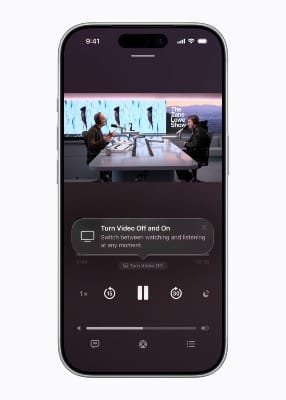
The Apple Podcasts app receives a transformative upgrade leveraging Apple's HTTP Live Streaming (HLS) technology. Users can now seamlessly switch between watching and listening to shows, move to horizontal full display for immersive viewing, and download videos for offline consumption. HLS technology provides automatic quality adjustment across network conditions, ensuring smooth playback on both Wi-Fi and cellular connections.
Podcast creators maintain complete control over their content and monetization through participating hosting providers including Acast, ART19 (Amazon), Triton's Omny Studio, and SiriusXM. For the first time, creators can dynamically insert video ads—including host-read spots—unlocking access to the broader video advertising market. Apple doesn't charge hosting providers or creators to distribute podcasts, but will charge participating ad networks an impression-based fee for delivering dynamic ads in HLS video starting later this year.
End-to-End Encrypted RCS Messaging Testing
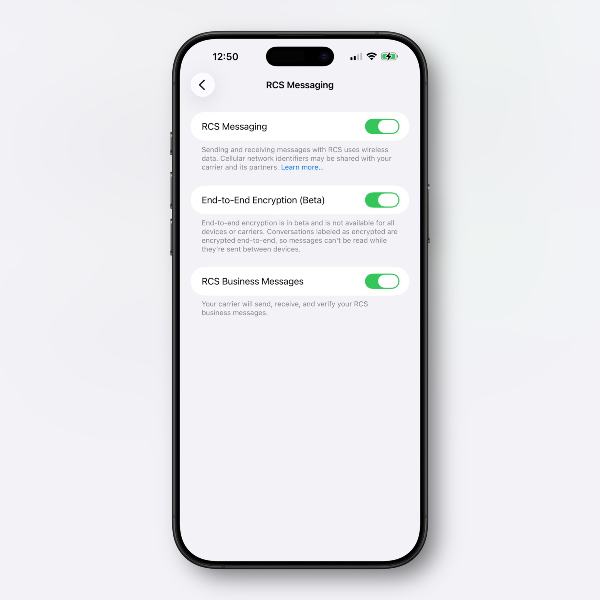
iOS 26.4 introduces a new toggle in Settings allowing users to enable RCS encryption for testing purposes. This opt-in approach reflects Apple's cautious rollout strategy for gathering real-world data before making encrypted RCS available to all users. The feature is being deployed gradually—not all beta testers will see the toggle immediately.
How to enable: Navigate to Settings > Messages and look for the RCS Encryption toggle (availability varies during beta testing).
Messages sent by RCS that have end-to-end encryption will feature a lock icon in the conversation interface, similar to iMessages. Apple is currently testing iPhone-to-iPhone RCS encryption, with the feature set to roll out for iPhone and Android conversations in a future iOS 26 update.
Apple Music Fullscreen Redesign and Concert Discovery
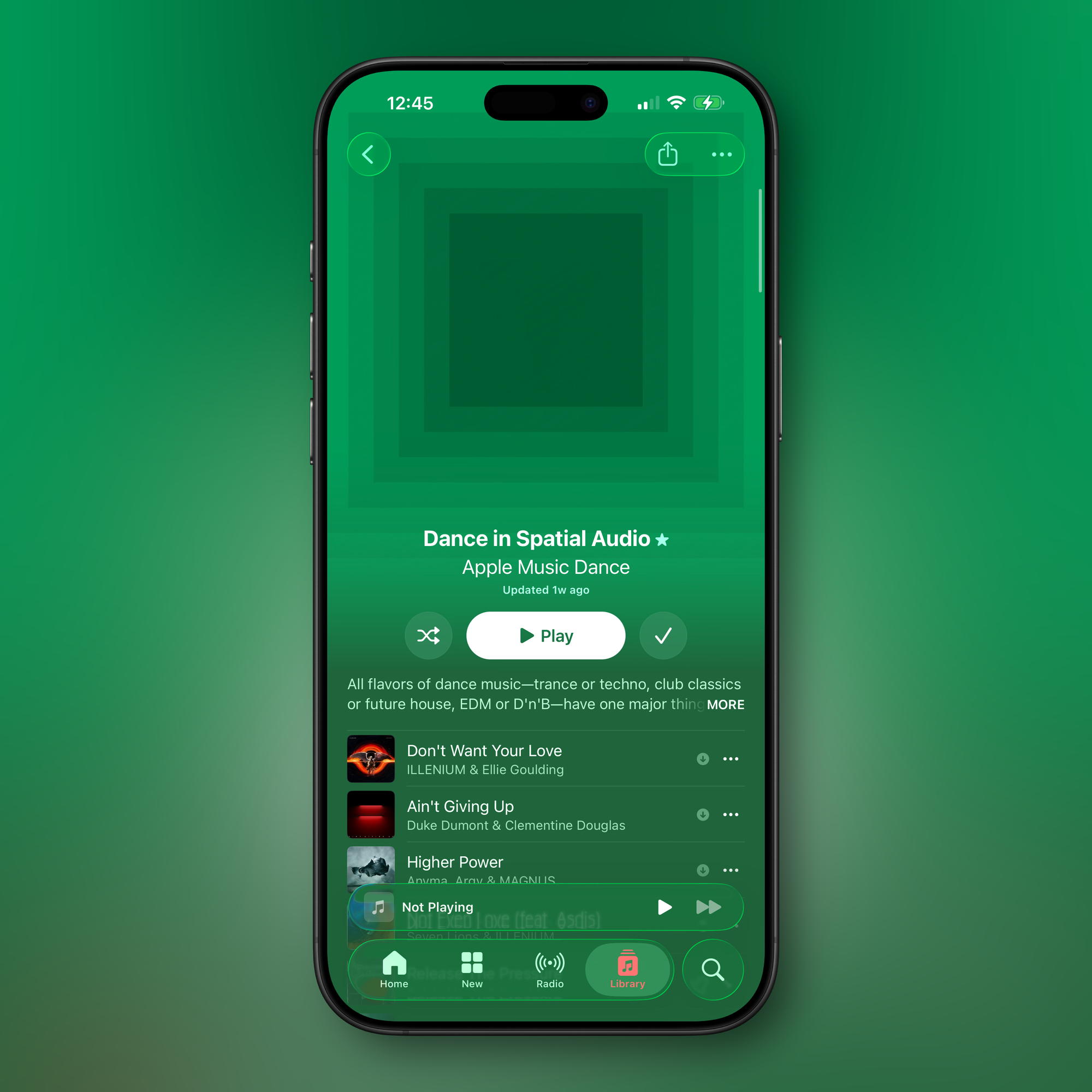
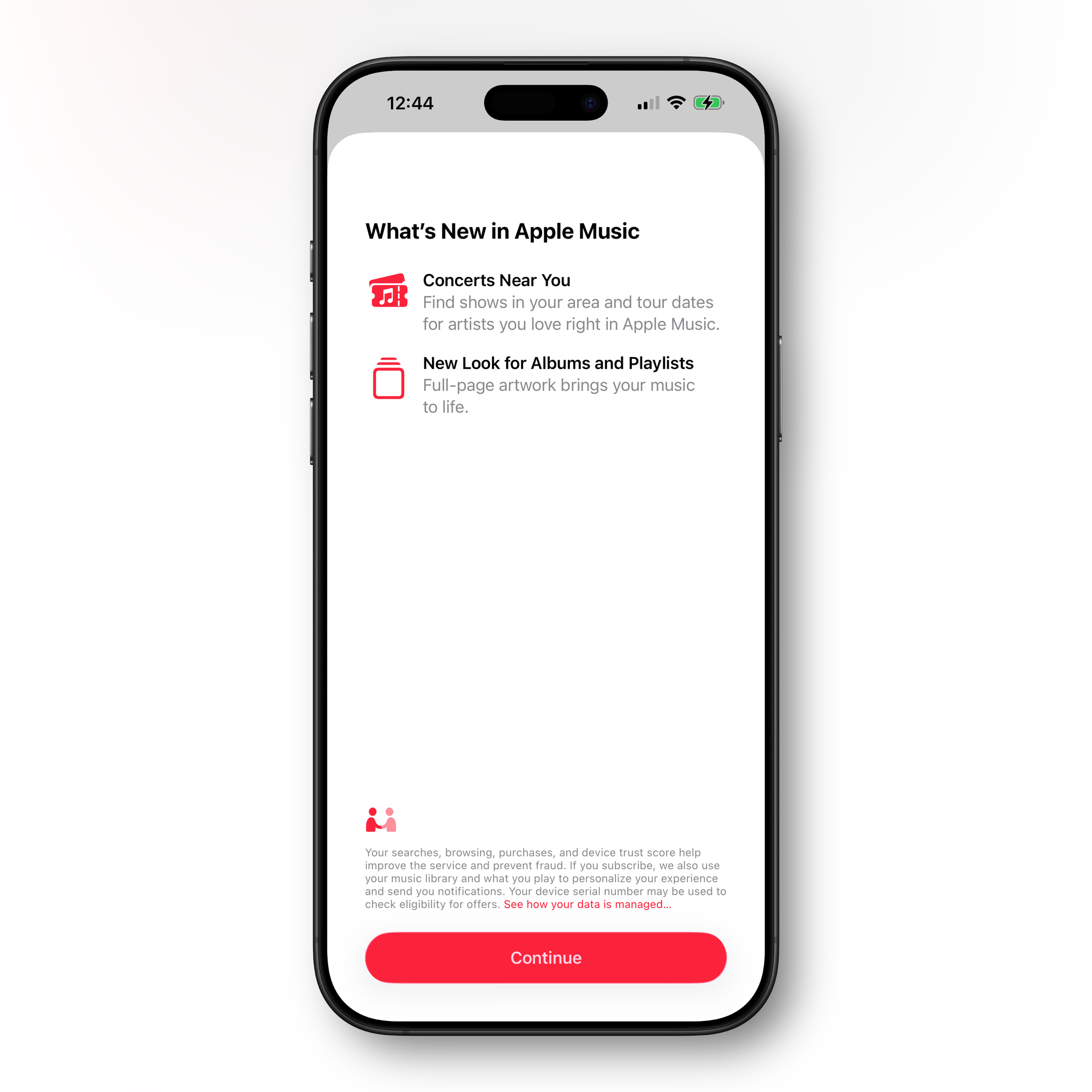
New in Apple Music: Full Page Playlists and Albums.
Apple Music introduces a new fullscreen design for albums and playlists. Track lists now adopt background colors that complement the artwork—not exact matches, but carefully selected hues that evoke the visual identity of each album or playlist. This creates visual cohesion across the screen and enhances the browsing experience.
A new "Concerts Near You" feature helps users discover shows in their area and tour dates for favorite artists without leaving Apple Music.
Playlist Playground AI Feature
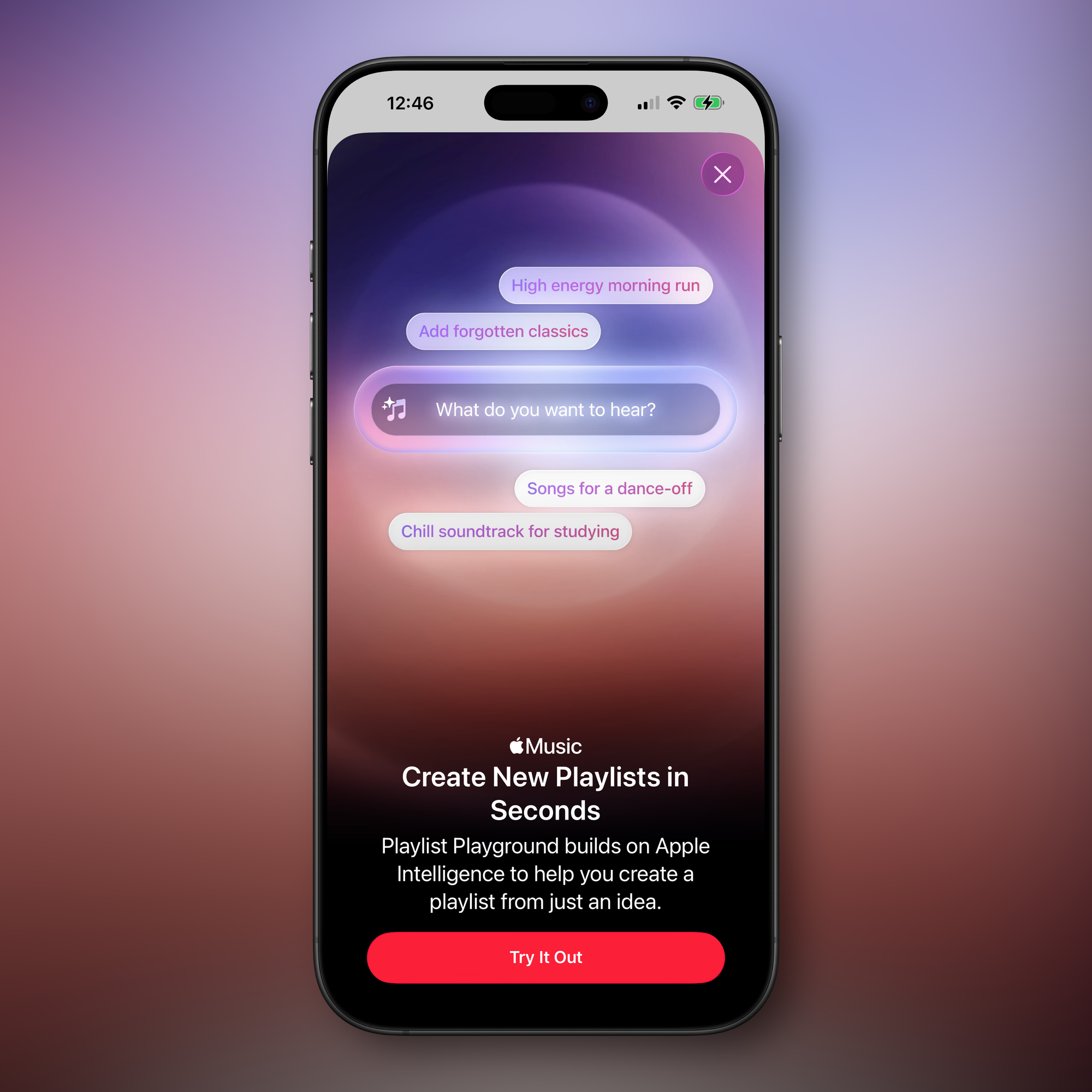
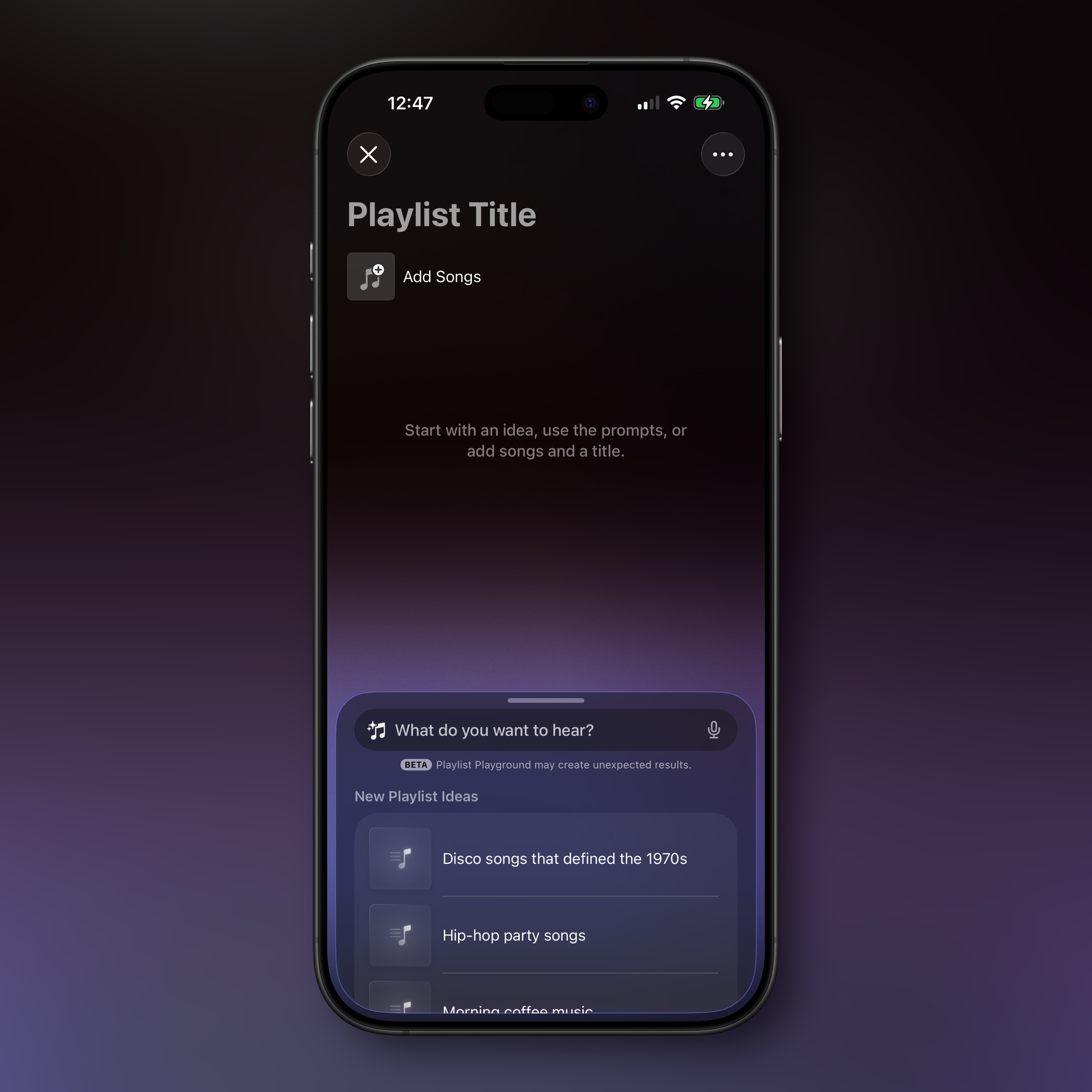
Create a playlist fro a prompt with Playlist Playground
iOS 26.4 introduces "Playlist Playground," an Apple Intelligence feature that generates playlists based on text descriptions. The feature is currently labeled as beta and requires Apple Intelligence-capable devices.
How to use: In the Apple Music app, tap the new playlist icon in the upper-right corner of the Library page, then enter a text prompt or choose from built-in "New Playlist Ideas" like "morning coffee music," "hip-hop party songs," or "disco songs that defined the 1970s." The feature will automatically generate a list of 25 songs with a custom title. Playlists can be customized further with additional text prompts, and you can select a cover and description.
If the feature doesn't appear after updating, check Settings > Apple Intelligence & Siri to verify that new Apple Intelligence models have finished downloading.
Unified Apple Account Hub and iCloud Web Settings
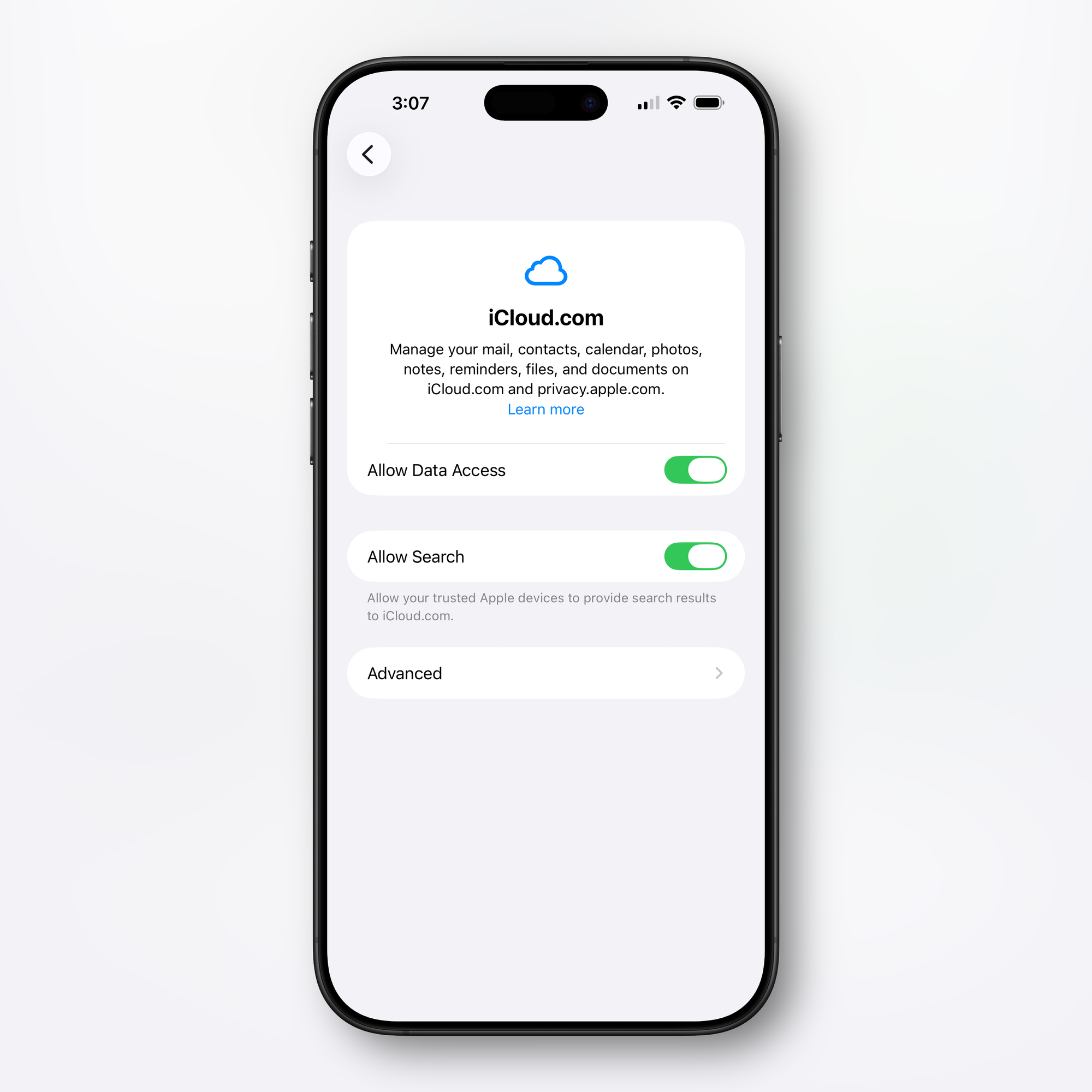
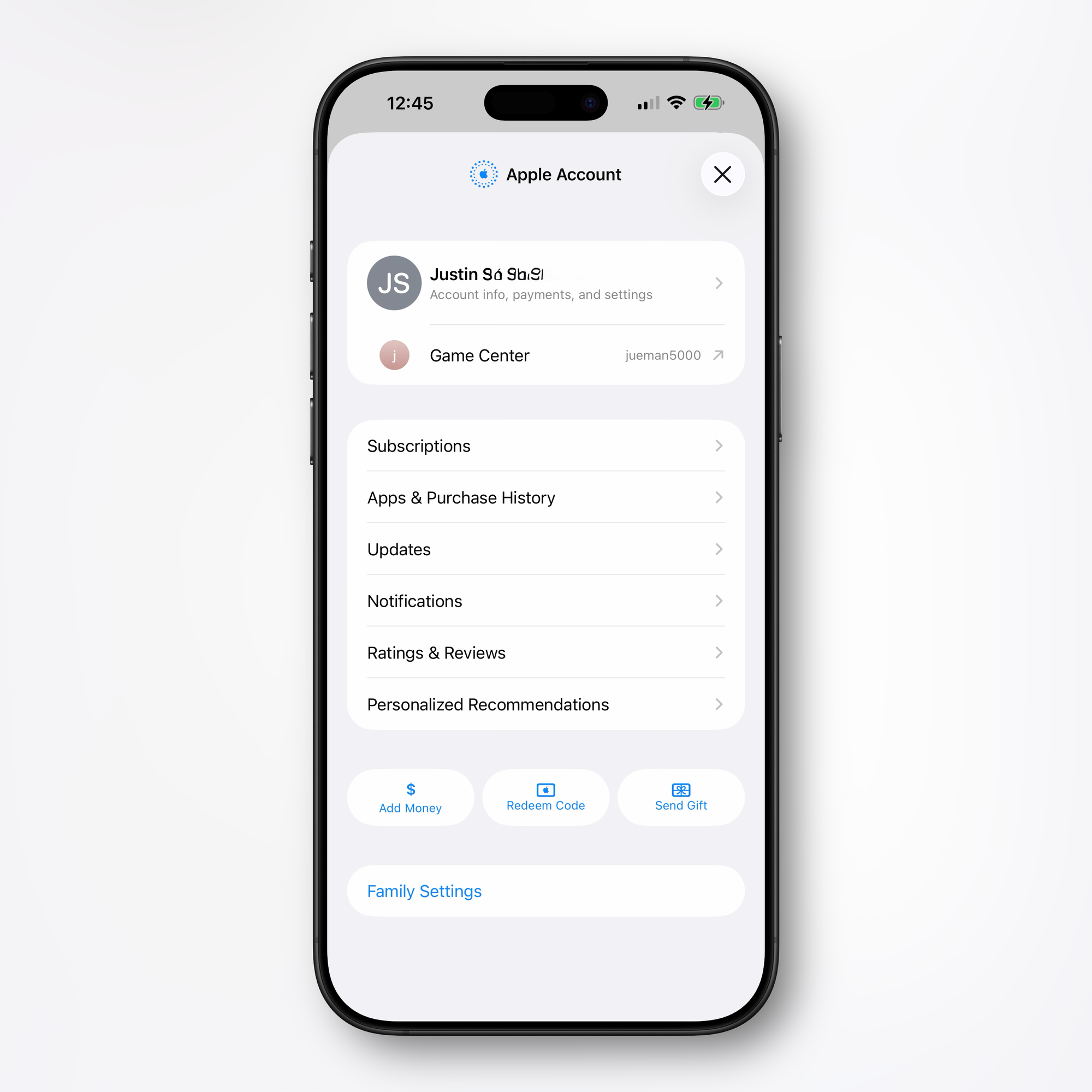
Unified Account Hub and iCloud.com Settings.
In the App Store, Apple Music, Apple Podcasts, Apple TV, and other apps with user settings, there's a new unified Apple Account hub that replaces the existing profile feature. It offers largely the same functionality as prior profile settings for each app, but with a new cohesive design across all Apple services.
How to access: Tap your profile picture or avatar in the top-right corner of supported apps to access the redesigned Apple Account interface.
The App Store implementation merges apps and purchase history, and includes a dedicated section for app updates. App updates now require two taps to access rather than being available at the bottom of the profile page. The App Store's navigation bar also no longer features Search as a separate button—the search bar itself appears at the top when tapped rather than the bottom.
In the iCloud section of the Settings app, there's a new "iCloud.com" option at the bottom of the interface, replacing the simple "Access iCloud Data on the Web" toggle. The setting includes a new "Allow Search" toggle that lets trusted Apple devices provide search results to iCloud.com, improving web-based iCloud functionality.
How to access iCloud web settings: Navigate to Settings > [Your Name] > iCloud, then scroll to the bottom to find the new iCloud.com settings.
Redesigned Wallpaper Gallery
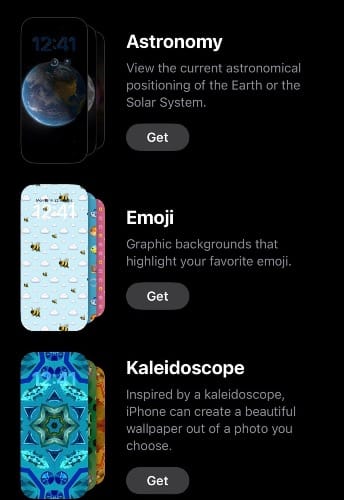
iOS 26.4 completely overhauls the Wallpaper Gallery system with improved organization and performance optimization. Categories appear along the top including Featured, Photo Shuffle, and Spatial Scenes. Collections like Weather, Astronomy, Emoji, Colors and More now use on-demand loading—users tap a "Get" button to download collections, then can remove them with a checkmark button to keep the interface clean.
How to manage: Navigate to Settings > Wallpaper to access the redesigned gallery. Tap "Get" next to any category to download that collection, or tap the checkmark to remove collections you don't use.
This opt-in system addresses wallpaper management bloat by letting users curate only desired collections rather than loading everything upfront. Preloaded collections remain for iOS 26 wallpapers and iPhone hardware-specific options.
Stolen Device Protection Enabled by Default
iOS 26.4 enables Stolen Device Protection by default for all iPhone users. Previously an opt-in feature from iOS 17.3, this security measure now becomes standard infrastructure rather than optional enhancement.
Stolen Device Protection requires Face ID or Touch ID authentication for sensitive features like the Passwords app, Lost Mode, and Safari purchases. High-risk actions require two biometric authentications separated by a one-hour security delay, including:
- Changing Apple ID password
- Updating Apple ID security settings
- Changing iPhone passcode
- Managing Face ID or Touch ID
- Turning off Find My
- Disabling Stolen Device Protection
Users can remove security delays when the iPhone is in familiar locations, allowing full functionality at home while maintaining protection in public spaces.
Battery Charge Limit in Shortcuts
iOS 26.4 brings Battery Charge Limit control to the Shortcuts app, allowing users to automate setting their charge limit. The existing Charge Limit feature, which lets users specify a maximum charge level between 80% and 100% to extend battery health, can now be adjusted programmatically through Shortcuts automation.
How to use: Open the Shortcuts app, create a new shortcut or add to an existing one, search for "Battery Charge Limit," and configure your desired charge percentage or automation triggers.
Ambient Music Widget
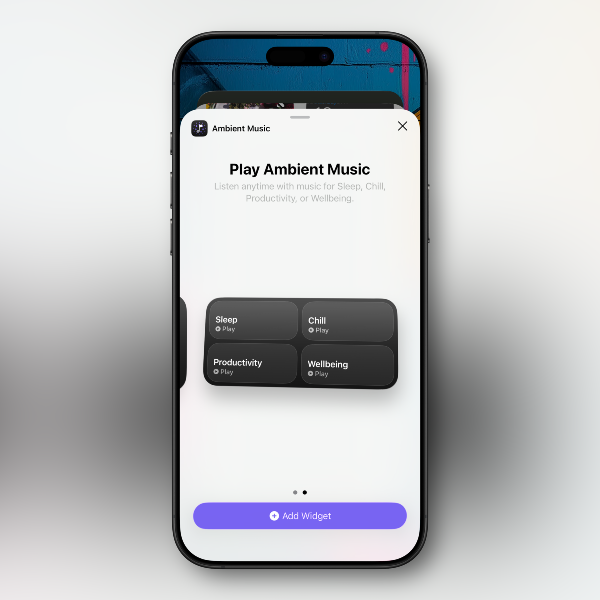
iOS 26.4 introduces a new Ambient Music widget for both the Home Screen and Lock Screen. The widget supports playing different built-in ambient music options designed for sleep, productivity, wellbeing, and more.
How to add: Long-press on your Home Screen or Lock Screen, tap the "+" icon, search for "Ambient Music," and select your preferred widget size and style.
Freeform Creator Studio Integration
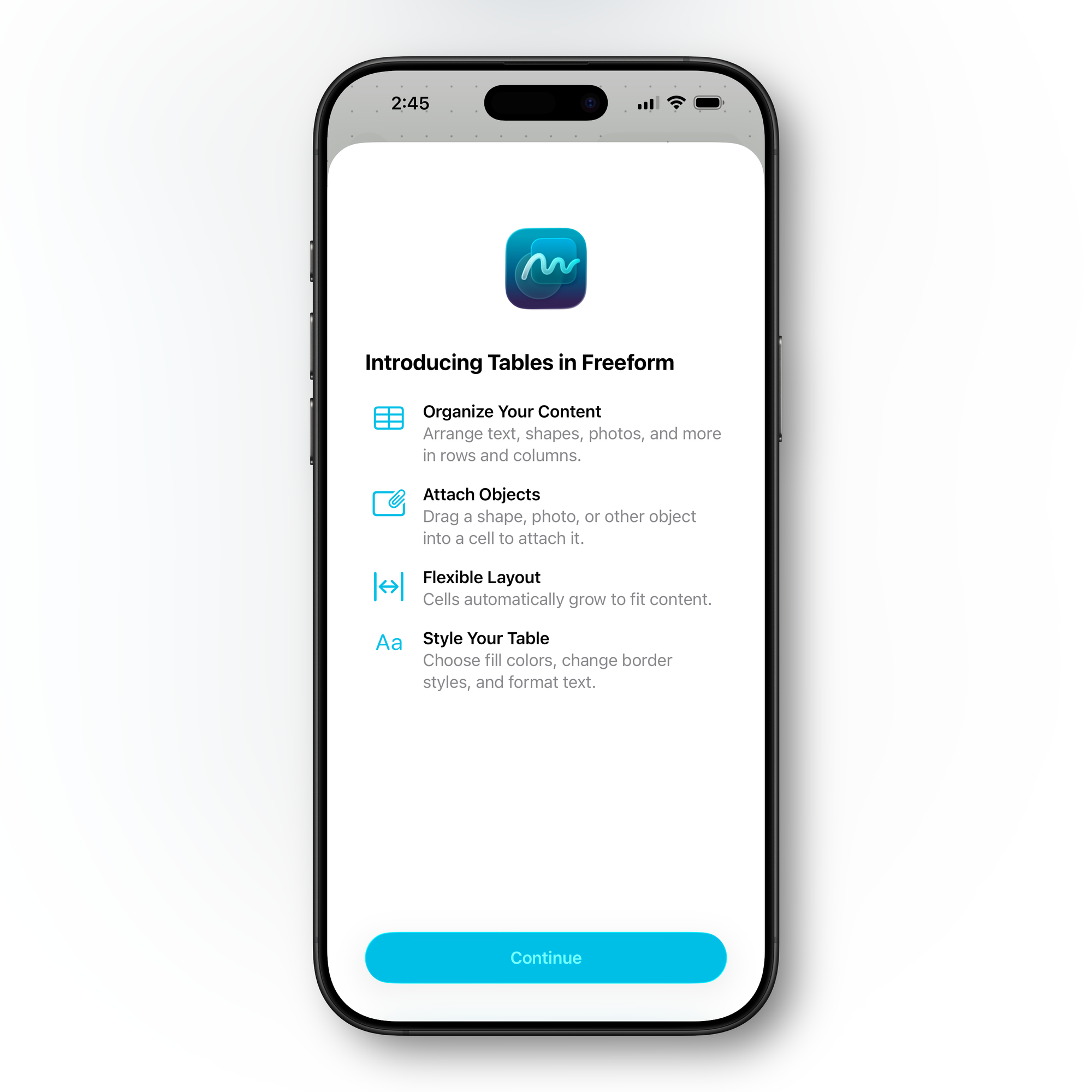
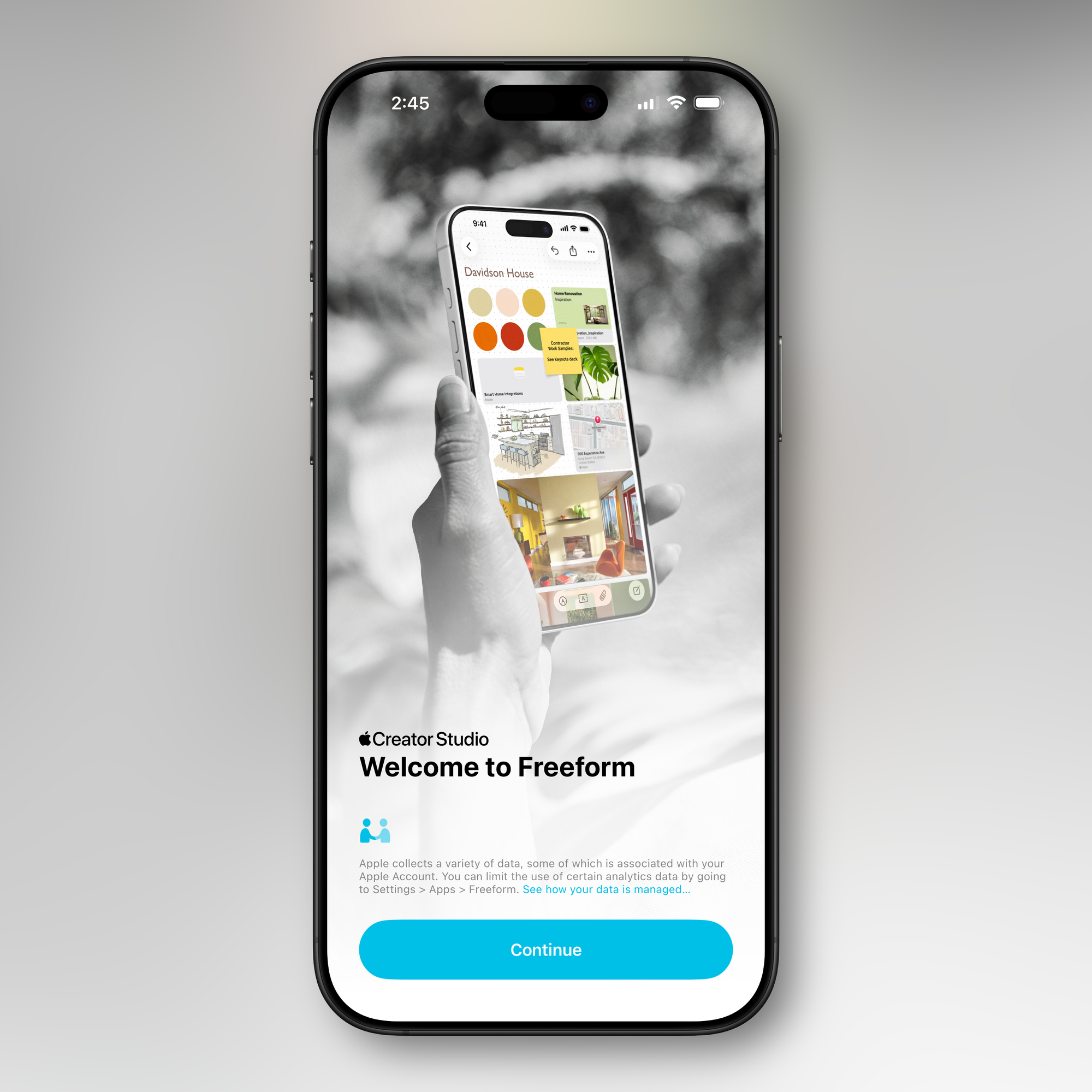
Freeform Creator Studio is now live in iOS 26.4, allowing Creator Studio subscribers to access new Freeform features. Creator Studio for Freeform adds a dedicated Content Hub that houses enhanced shape options, free high-quality content like graphics, photos, and illustrations not available to non-subscribers, plus AI capabilities for creating and editing images.
Freeform also receives a refreshed app icon in this update.
Reminders Urgent Section
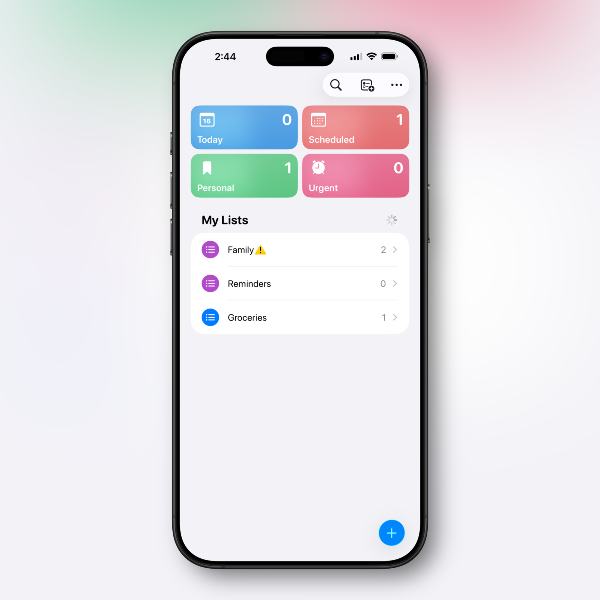
The Reminders app gains a new "Urgent" section. Reminders that have the Urgent toggle enabled during creation will appear in this dedicated section, ensuring important tasks don't get lost among regular reminders.
How to create urgent reminders: When creating or editing a reminder, toggle the "Urgent" option to enable an accompanying alarm that provides clear notification when the reminder is due.
Messages App Animations
iOS 26.4 introduces new animations in the Messages app for various actions, including launching new conversations and transitioning between views.
New Emoji Coming Soon
While iOS 26.4 beta 1 doesn't include new emoji characters, code within the update suggests they'll arrive in a future beta. Expected emoji include trombone, treasure chest, distorted face, hairy creature (Bigfoot/Sasquatch), fight cloud, apple core, orca, landslide, and ballet dancers.
Health App: Average Bedtime and Blood Oxygen Vitals
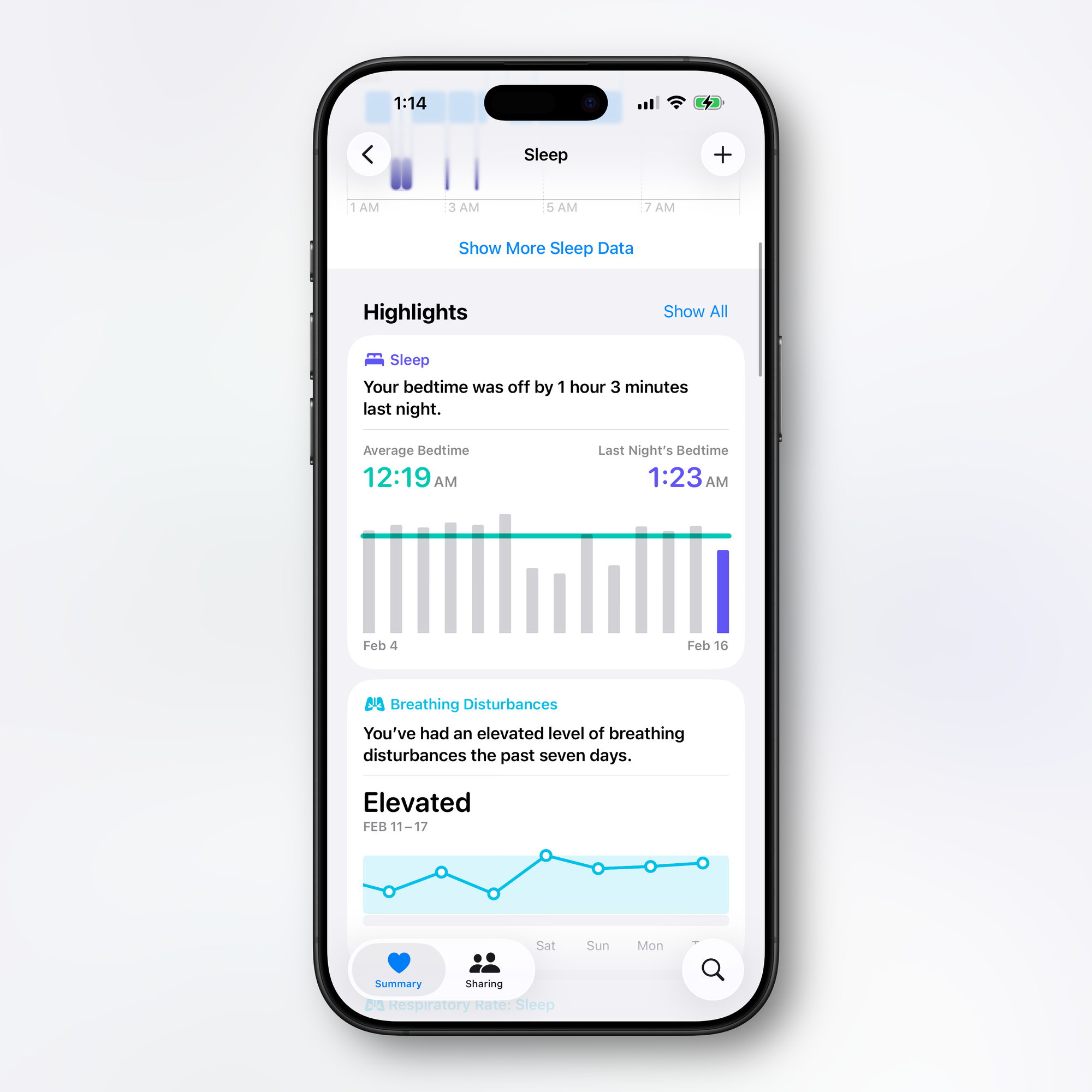
iOS 26.4 adds an Average Bedtime metric to the Sleep section of the Health app, helping users monitor how bedtime consistency impacts sleep quality. Under a new Sleep Highlight, Apple displays your daily bedtime alongside your usual bedtime based on two-week averages. This supplements the existing average sleep time metric that displays seven-day averages.
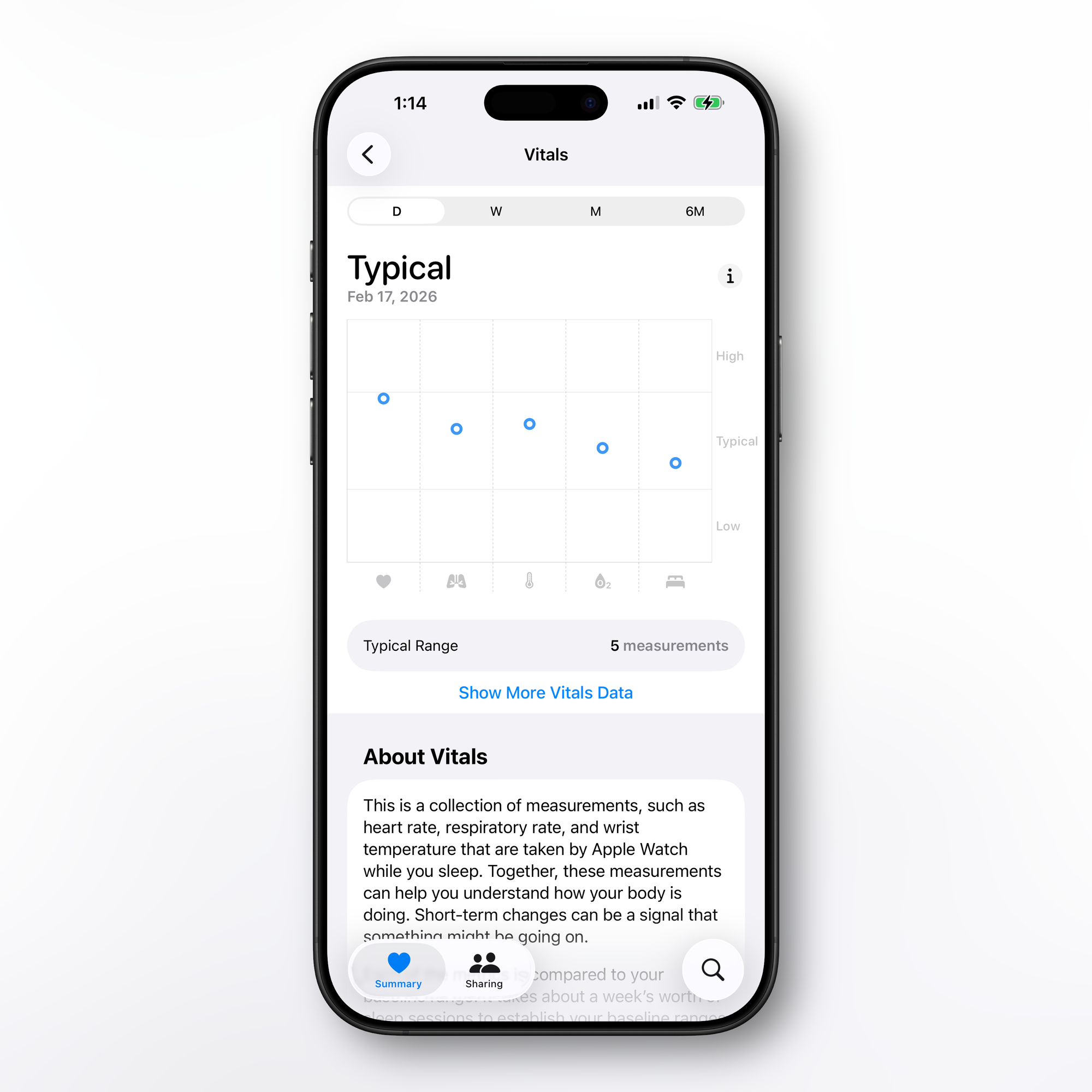
The update also restores blood oxygen level to the Vitals overview graph. While blood oxygen was previously available as a separate metric in the Vitals section, it now appears directly in the daily line graph overview alongside other health metrics. This change follows Apple's legal dispute with Masimo over blood oxygen sensing patents, which resulted in the removal of Apple Watch blood oxygen measurement capabilities in the U.S. starting in early 2024. Blood oxygen readouts were re-added in August 2025, but remain available only on iPhone—not directly on Apple Watch.
How to access: Open the Health app, navigate to Browse > Sleep to view the new Average Bedtime highlight, or check the Vitals section to see blood oxygen measurements integrated into the overview graph.
EU-Only Features: Notification Forwarding and Proximity Pairing
iOS 26.4 includes European Union-exclusive features designed to address antitrust concerns. Notification Forwarding allows incoming notifications on an iPhone to be forwarded to third-party wearable devices like Android smartwatches. Notifications can only be forwarded to a single device at a time—if enabled with a third-party wearable, the Apple Watch won't receive notifications.
Proximity Pairing allows third-party devices to pair with iOS devices using an AirPods-like one-tap method by bringing an accessory close to an iPhone or iPad.
iPadOS 26.4 Beta 1 (Build 23E5207q)
Compact Tab Bar Returns to Safari
iPadOS 26.4 restores the compact tab bar option in Safari that was removed in iPadOS 26's initial release. The feature condenses the Safari tab bar into a single row encompassing the address bar, current tabs, and more.
How to enable: Navigate to Settings > Safari and select the compact tab bar layout option.
Shared iOS Features
iPadOS 26.4 includes all iOS features with the same build number: enhanced Podcasts video experience, Apple Music visual refresh, Playlist Playground AI feature, unified Apple Account hub, redesigned Wallpaper Gallery, Battery Charge Limit in Shortcuts, Ambient Music widget, Freeform Creator Studio integration, Reminders Urgent section, and iCloud web settings. The iPad's larger screen makes it particularly well-suited for video podcast viewing and exploring album artwork.
watchOS 26.4 Beta 1 (Build 23T5209m)
Watch Face Gallery Updates
The Watch Face Gallery in the Apple Watch app receives the same redesigned interface as the iOS Wallpaper Gallery, with on-demand loading for different watch face categories. Users can now download specific watch face collections rather than having everything loaded by default.
How to access: Open the Apple Watch app on iPhone, navigate to Face Gallery, and tap "Get" to download desired watch face categories.
Additional watchOS Features
The Apple Watch receives its corresponding update with performance refinements and bug fixes typical of point releases. Specific watchOS improvements beyond the Face Gallery update haven't been detailed in this initial beta.
macOS 26.4 Beta 1 (Build 25E5207k)
Compact Tab Bar Returns to Safari
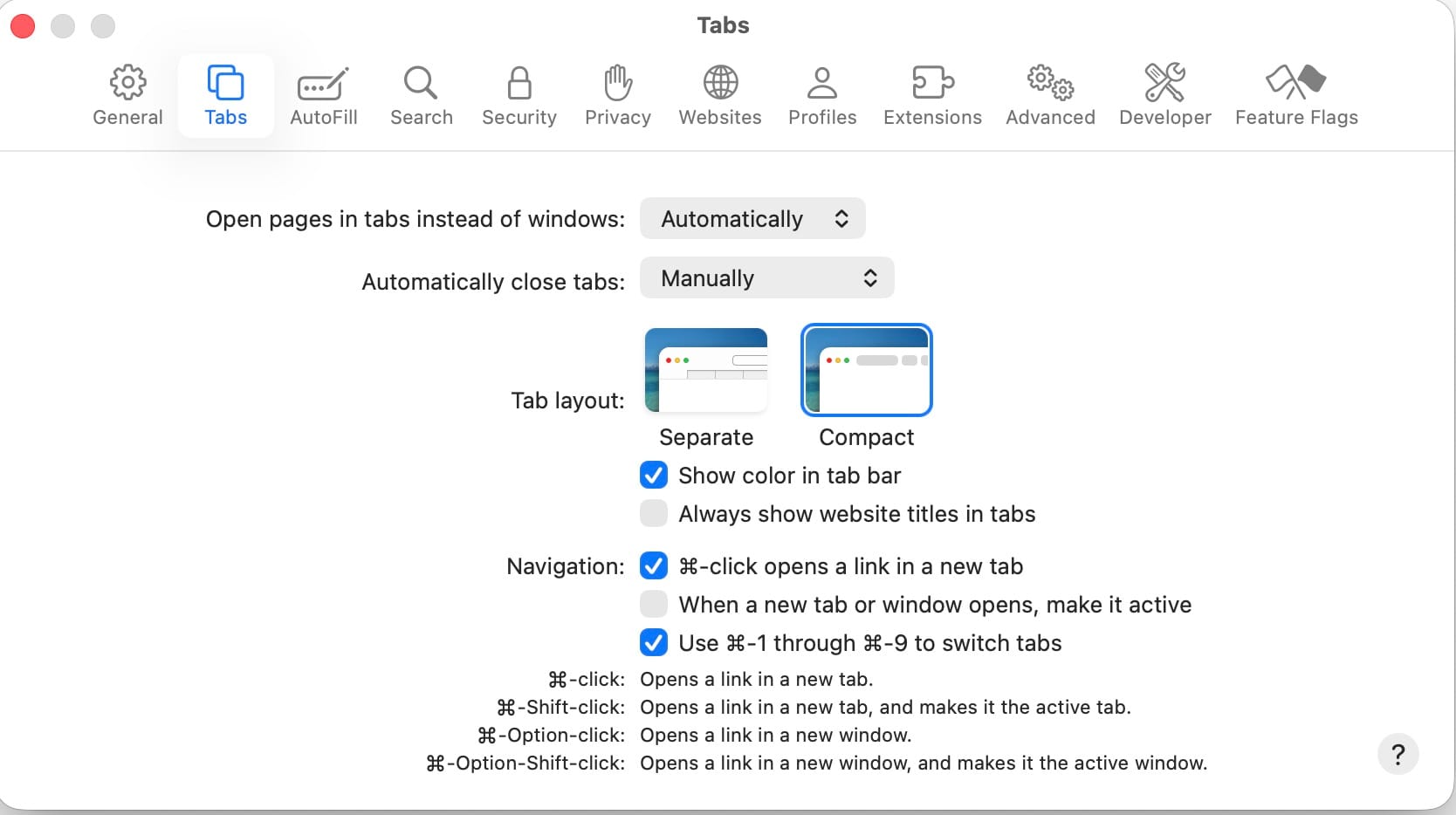
Like iPadOS, macOS 26.4 restores the compact tab bar option that was removed in macOS Tahoe 26's initial release.
How to enable: Navigate to System Settings > Safari and choose the compact tab bar layout option.
Battery Charge Limit for Mac
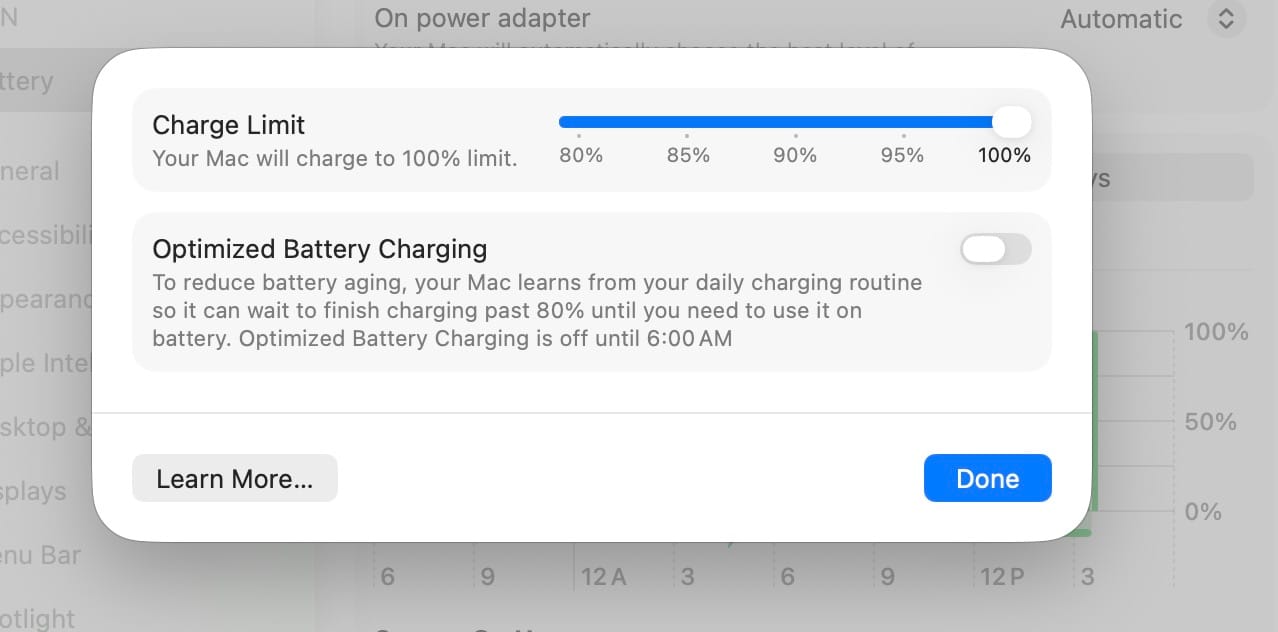
macOS 26.4 brings the Battery Charge Limit feature to Mac for the first time. Previously available only on iPhone and iPad, this feature allows MacBook users to specify a maximum charge level between 80% and 100% to help extend battery lifespan by reducing the strain caused by constantly charging to full capacity.
How to enable: Navigate to System Settings > Battery to configure your charge limit preference.
When enabled, your Mac will stop charging within a few percentage points of the set limit. Apple notes that devices will occasionally still charge to 100% to maintain accurate battery state-of-charge estimates. This feature is particularly useful for MacBook users who frequently work at desk setups where the device remains plugged in for extended periods.
Battery Charge Limit in Shortcuts
Like iOS, macOS 26.4 brings Battery Charge Limit control to the Shortcuts app, enabling automation of charge limit adjustments based on location, time of day, or other triggers.
Rosetta 2 Discontinuation Notifications
macOS 26.4 begins notifying users when launching apps requiring Rosetta 2 that the translation layer will be discontinued. At WWDC25, Apple announced Rosetta 2 would be fully supported through macOS 27, with largely discontinued support starting with macOS 28 (expected fall 2027). Apple will maintain a subset of Rosetta functionality aimed at supporting older unmaintained gaming titles.
The notification serves as advance warning for users to seek updated native Apple silicon versions of their apps and reminds developers who haven't yet updated their software. macOS 26 will be the final release for Intel-based Macs, with Apple providing security updates for three additional years afterward.
tvOS 26.4 Beta 1 (Build 23L5208m)
iTunes Movies and TV Shows Apps Removed
tvOS 26.4 removes the dedicated iTunes Movies and iTunes TV Shows apps that previously listed content available for purchase. All movie and TV show purchasing is now consolidated in the Apple TV app. Apple began phasing out these apps in 2023, redirecting users to the Apple TV app while keeping the old apps available to provide instructions and iTunes Wish List access.
Customers with iTunes Wish Lists have received emails notifying them of the feature's removal and providing links to migrate lists to the Apple TV watchlist feature as an alternative. This completes Apple's multi-year effort to consolidate all movie and TV show viewing and purchasing into a single Apple TV app across all platforms.
The update also revises Apple TV Audio Format settings. Dolby Atmos immersive audio has been replaced with Spatial Audio terminology, and users now have options to convert to Dolby Digital 5.1, select Stereo Only, or enable Auto mode. A new Continuous Audio Connection option is also available for HDMI output.
Cross-Platform Features
macOS 26.4 includes corresponding updates for Apple Podcasts video support, unified Apple Account hub, and other ecosystem features, maintaining consistency across devices.
Legacy macOS Updates
Apple also released Release Candidates for older macOS versions:
- macOS 15.7.5 RC (Build 24G607)
- macOS 14.8.5 RC (Build 23J407)
These updates provide security and stability patches for users who haven't upgraded to the latest release, supporting enterprise environments and users with hardware limitations.
Additional Platform Updates
Apple rounded out today's release with beta builds across its hardware ecosystem:
- HomePod Software 26.4 beta 1 (Build 23L5208m)
- visionOS 26.4 beta 1 (Build 23O5209m)
The identical build numbers for HomePod and tvOS suggest shared architectural improvements. visionOS receives HLS video podcast capabilities alongside iOS and iPadOS, making Vision Pro another premium viewing platform for video podcast content.
Developer Availability and Release Timeline
iOS 26.4 beta 1 and all accompanying platform updates are available now to registered developers through the Apple Developer Program. Public beta versions typically follow within one to two weeks. Based on Apple's release patterns, the final public release of iOS 26.4 could arrive in late March or early April.
The HLS video podcast functionality will launch to the public this spring across iPhone, iPad, Apple Vision Pro, and Apple Podcasts on the web. Podcast hosting providers and creators can learn more about enabling HLS video at podcasters.apple.com.
As always, beta software should be installed only on test devices, not primary hardware, as pre-release versions may contain bugs and stability issues that affect daily use.
Which iOS 26.4 feature are you most excited to test? Will Playlist Playground change how you discover music, or is Battery Charge Limit on Mac the productivity feature you've been waiting for? Share your thoughts in the comments below.
Read us first
See more TBTL when you search Google
Add Tech Between the Lines as a preferred source and our Apple coverage shows up more often in your Top Stories. It takes one tap, and you can change it anytime.
Prefer TBTL on Google