


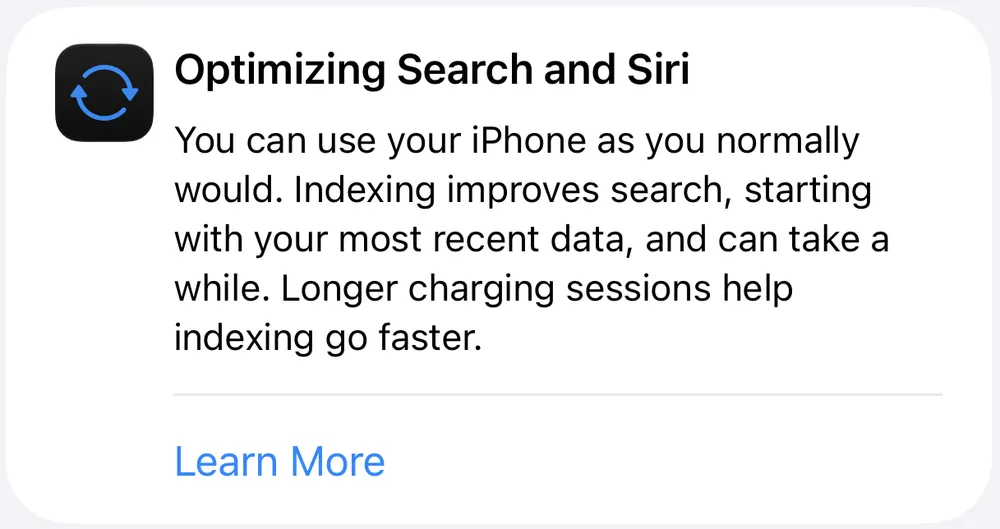


July 23, 2026: Apple renamed the banner to "Optimizing Search and Siri" and added a completion percentage and a last updated time in Settings, so the Mac workaround further down is no longer needed on current builds.
First published June 12, 2026.
If you just installed iOS 27 or set up a new iPhone and opened Settings, you found a banner near the top of the screen reading "Optimizing Search and Siri," with a completion percentage beside it and a line underneath noting when that number last updated. Early iOS 27 betas called this "Indexing in Progress" and showed no number at all. It is the same process wearing a better label, and it finally has a visible finish line.
If you installed iOS 27 after it shipped on September 14, or you are starting fresh on a new iPhone, everything in this article applies to you. You are simply the newest wave to meet it.
When the banner first appeared on June 9 alongside the first developer beta, the forums lit up immediately. MacRumors threads filled with users on iPhone 15 Pro Max, iPhone 16 Pro, and iPhone 17 Pro all asking the same question: is this normal? After 24 hours, after 36, after 48, the banner remained. Reports of phones running warm, battery draining faster than expected, and search behaving strangely piled up alongside the confusion. One user reported their 512GB iPhone 13 Pro Max still indexing after 18 hours while an M5 iPad Pro finished in 12.
Here is what is actually happening, why this process is different from every iOS update before it, and how long you should realistically expect it to take.

This Is Not a Routine Re-Index
Every iOS update has always triggered some background indexing: Spotlight organizing content for faster retrieval, Photos running object and face detection, Mail rebuilding its search database. That process has always caused temporary heat and battery drain. Apple community forums have filled with identical complaints after every major iOS release going back at least a decade, and the answer has always been the same: wait a few days, it will settle.
iOS 27 is doing something categorically different. At WWDC 2026, Apple announced it has rebuilt the search infrastructure powering Spotlight, Photos, and Mail from the ground up. The old system had well-documented problems: older content disappeared from results, the index drifted out of sync and required manual rebuilds, and there was no semantic understanding for the AI-powered search iOS 27 is built around. That foundation had to be replaced before any of the new capabilities could land on it.
The reason the initial build takes so long is that the new system is not just refreshing an existing index. It is generating vector embeddings for semantic search: the technical foundation that allows Siri to understand what you are looking for rather than just match keywords. Instead of typing the exact words from an email, you can describe what you are looking for and have the system understand intent. Building that kind of index requires the device to process every piece of content it has ever stored and generate numerical representations of meaning, not just text. One developer in the MacRumors forums put it plainly: if Apple is generating vector embeddings for the semantic search index, it will take a while, potentially days, depending on your content.
How to Check Your Progress (No Mac Required Anymore)
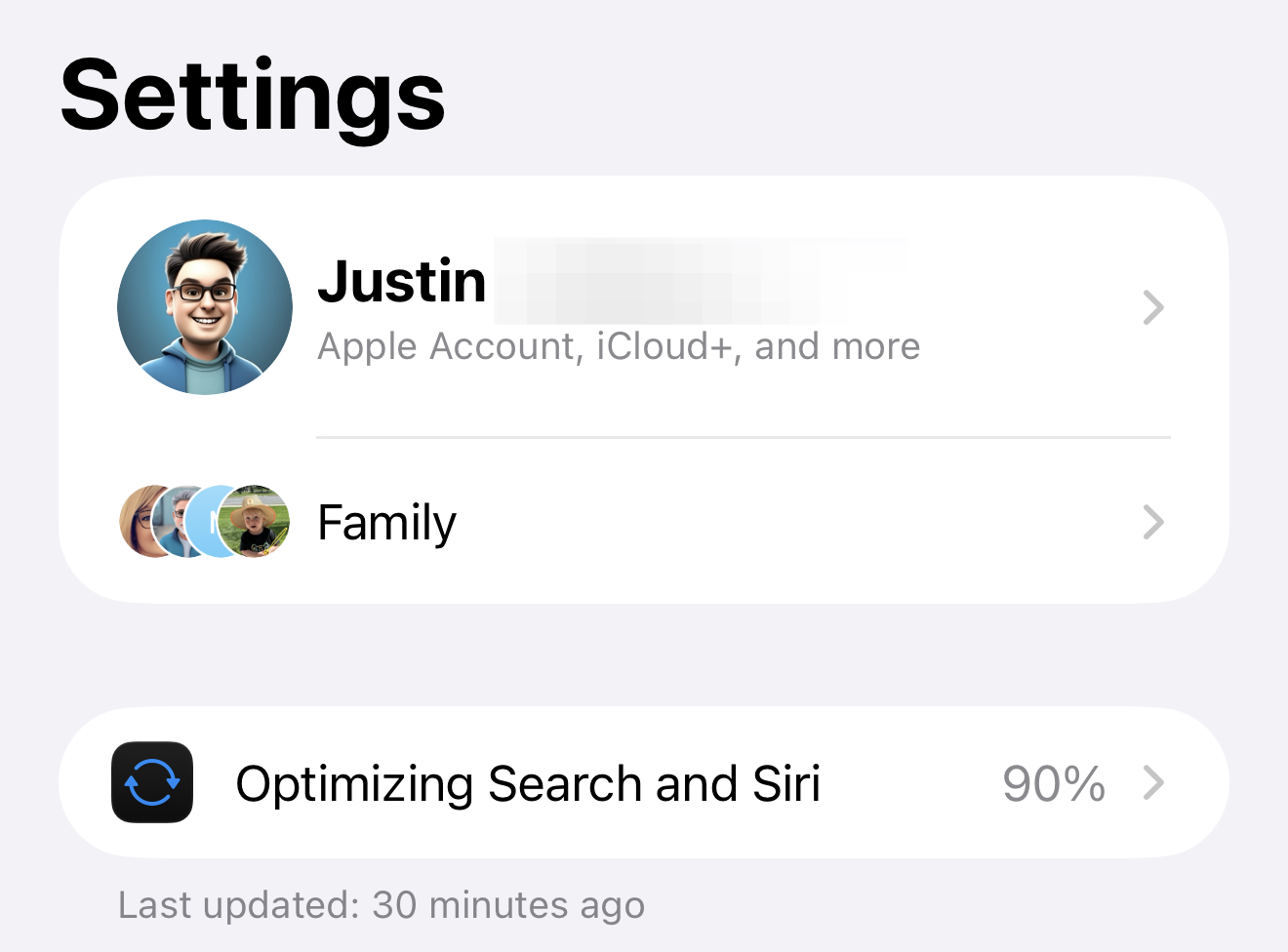
As of the recent betas, checking your progress takes three taps. Open Settings and the banner shows your completion percentage inline. Below it, a timestamp tells you when that number last refreshed. Tap the banner and a detail panel explains what is running.
That panel is worth reading closely, because it discloses something Apple never stated in June. The text reads: "You can use your iPhone as you normally would. Indexing improves search, starting with your most recent data, and can take a while. Longer charging sessions help indexing go faster."
Starting with your most recent data. That single phrase answers one of the most common complaints from the first weeks of the beta: why does search find last week's email instantly while messages from 2021 come up empty? Because the indexer works backward through time. Recent content gets embedded first, so search quality is best for new material and improves toward your archive as the percentage climbs. If old content is still missing from results, the index simply has not reached it yet.
The timestamp matters too. It is your liveness check. A percentage that has not moved in a day but a timestamp that keeps refreshing means the indexer is still working through a dense stretch of content. A frozen timestamp is the thing worth paying attention to, and a restart typically clears it.
Want to see it on an actual iPhone? Our video shows where the indexing status lives in Settings, how long it usually takes and why it can sit at 90% for a while.
How Long Does It Take and What to Expect
Six weeks of beta cycles have made the picture clearer than it was in June. Most devices finish within 24 to 72 hours when kept plugged in and on Wi-Fi, and the early reports of one to two week completion times have stayed at the outer edge, concentrated on heavily loaded phones with years of photos, extensive message history, and multiple Mail accounts. Older hardware takes longer still: the A15 Bionic in the iPhone 13 line is handling a workload Apple's more recent chips were specifically designed to accelerate.
Two things slow or pause indexing entirely. Apple throttles the process when the battery is low or the device is on cellular only. Keeping the phone plugged in and on Wi-Fi is the single most effective way to help it finish. Leaving the screen off while charging also helps, because the indexer works more aggressively when it is not competing with foreground apps.
Now that the percentage is visible, a new question has replaced "how long does this take": why is mine stuck at 90? The short answer is that the final stretch is the slowest by design. The high percentages cover your deepest and oldest content, the material with the least metadata and the most embedding work per item. A device sitting in the high 80s or low 90s with a refreshing timestamp is not stuck. It is grinding through the archive. Watch the timestamp, not the number.
While indexing runs, search will behave strangely. Typing a known term into Settings search and getting no result is the most common complaint: the index is incomplete, so results are incomplete. Your phone will also run warmer than usual and battery drain will be higher than normal. Neither is damaging, and neither tells you anything meaningful about what iOS 27 battery life will actually look like once the device settles. Hold off on conclusions until at least a week after the banner disappears.
One question generating separate confusion: indexing progress and Siri AI activation are completely unrelated. Multiple users have received access to the new Siri while the banner was still active. The waitlist is a server-side capacity gate controlled by Apple. Access arrives via notification when Apple grants it, regardless of where your device is in the local indexing process.
Expect the banner to reappear briefly after each iOS update while the index catches up.
Why Apple Is Showing You This Now
Every previous iOS release ran the same background indexing invisibly. Users who noticed battery drain and heat had to discover the cause through forum posts and support articles. Most never knew it was happening at all.
The explicit banner was Apple acknowledging that this process is more significant than anything that came before. When this article first ran in June, we wrote that a visible percentage was the obvious next step Apple should take, because a number would eliminate most of the forum anxiety playing out at the time. Two betas later, Apple shipped exactly that, along with a plainer name and a panel that tells you the phone is safe to use. The anxiety was never about the process. It was about the missing finish line, and now there is one.
The discomfort that remains is the cost of a genuine infrastructure upgrade. Apple rebuilt search because the previous system was failing, and that foundation had to be replaced before any of the new capabilities could land on it.
Plug in. Stay on Wi-Fi. Let it run. The percentage will climb, the banner will disappear when the work is done, and the search engine on the other side will work in ways the old one never could.
The Original Mac Console Method
Before the on-device percentage existed, the only way to get a concrete number was a workaround discovered by 9to5Mac's Marcus Mendes: connect the iPhone to a Mac, open Console with debug messages enabled, and filter for spotlight indexing progress to read a PipelineCompleteness percentage from the logs. It required Xcode developer tools and a cable, and for the first month of the beta cycle it was the only finish line anyone could see. If you are still on one of the earliest betas for some reason, it remains an option. For everyone else, Settings now does the job.







Comments