


Every New Child Safety Feature Coming to iOS 27, iPadOS 27, and macOS 27
Apple's iOS 27 child safety overhaul adds Ask to Browse, category-based Time Allowances, and violence detection in Communication Safety. Full breakdown.
Apple's iOS 27 child safety overhaul adds Ask to Browse, category-based Time Allowances, and violence detection in Communication Safety. Full breakdown.

Apple's child safety features for iOS 27, iPadOS 27, and macOS 27 arrived with a full keynote segment at WWDC 2026 and a dedicated newsroom post the same day, June 8, 2026, the kind of dual rollout Apple reserves for features it wants treated as a real platform shift rather than a footnote. It's one of the largest parental control expansions Apple has shipped since Screen Time launched in 2018.
The headline change is Ask to Browse, a permission system for Safari that mirrors how Ask to Buy already works in the App Store. Around it, Apple rebuilt Screen Time from a single blunt time limit into category-based Time Allowances, extended Communication Safety to catch gore and violence on top of the nudity detection it already had, and restructured device setup so app restrictions get chosen before a child ever taps the home screen instead of getting bolted on afterward.
Setting Up a Child Account
Every feature below depends on one starting point: a child account, required for anyone under 13 and available up to age 18. Setup happens through the same Setup Assistant flow used for any new device, with Apple asking whether the device belongs to a child 12 or under, a teen between 13 and 17, or an adult.
Creating the account immediately applies system-wide, age-tailored restrictions: adult websites blocked in Safari, age-based media filtering, and App Store content restrictions, all active before the parent ever opens Settings.
What's new is what happens next. Instead of handing over a fully open device and restricting access app by app afterward, Setup Assistant now walks parents through choosing what the device can do from the first screen.
Choosing Which Apps Kids Can Access
Setup Assistant presents three starting points: a small set of essential apps, a broader curated starter set, or a fully custom selection picked app by app. None of these are permanent. Access is meant to expand gradually as a parent decides a child is ready, not as a single decision made on day one.
This pairs with Ask to Buy, which requires parental approval before a child downloads any app, free or paid, or makes an in-app purchase. The request shows up in Messages on the parent's device, approved or denied with one tap.
Ask to Browse Extends the Same Model to Safari
Ask to Browse is the new piece, and it's the one most likely to change daily behavior for families that use it. When enabled, a child needs explicit permission before visiting any new website in Safari, the same way Ask to Buy already gates app downloads. The request lands in Messages; once a parent approves it, the site stays approved without repeating the process.
Apple turns Ask to Browse on by default for children under 13, with parents able to extend it to teens. It works identically across iPhone, iPad, and Mac, and it covers embedded content too: if a website embeds a video from a blocked service, that embed stays blocked even on an otherwise approved page. Apple also blocks known adult websites by default for users under 18 regardless of whether Ask to Browse is on, and parents can pre-approve specific sites or full lists rather than waiting for requests one at a time.
For anyone currently relying on third-party filtering extensions or router-level blocking to manage what kids browse, this closes a gap that's existed in Safari for years, using the same permission model Apple already proved with Ask to Buy.
Managing Who Kids Can Communicate With
Parents get the same ask-first model for contacts that already governs apps and websites. When a child wants to message, call, or FaceTime someone new, parents can require the request route through them for approval first, again handled in Messages.
Communication Safety Now Catches Violence, Not Just Nudity
Communication Safety has blurred nudity detected in Messages and FaceTime by default for users under 18 for several release cycles. iOS 27 adds gore and violent content detection to that same system. When it flags a violent or graphic image or video, it intervenes the way it already does for nudity: a warning before the content displays, rather than showing it automatically.
Detection happens on-device, consistent with how Apple has built this feature since launch, and it stays limited to Apple's own apps. Third-party messaging apps like WhatsApp or Snapchat aren't covered unless those developers build on Apple's SensitiveContentAnalysis framework themselves, which Apple makes available to them.
Time Allowances Replace Generic Screen Time Limits
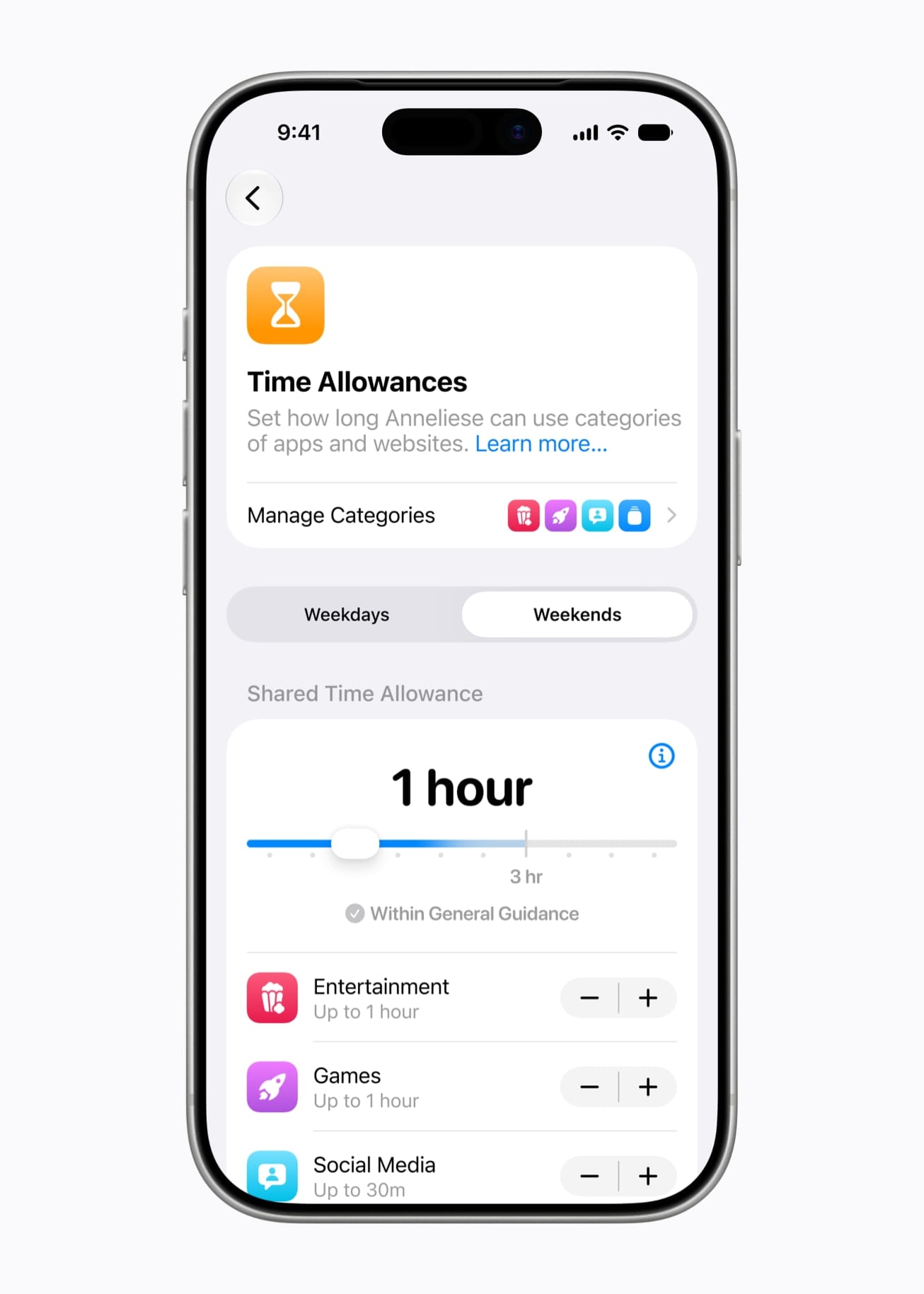
Instead of one daily limit applied across the entire device, Time Allowances let parents set separate time budgets by app category. Apple highlighted three: Entertainment, Games, and Social Media, though the system isn't limited to exactly those.
Apple provides default starting suggestions for each category based on a child's age, drawing on the same expert research that informs the broader feature set, but parents aren't locked into those defaults. The suggestions exist so parents don't have to research age-appropriate limits from scratch, while the actual decision stays in their hands. When a parent approves a new app through Ask to Buy, they can assign it to a category immediately, so the time budget applies from the app's first day on the device.
Schedules Add a Time-of-Day Layer
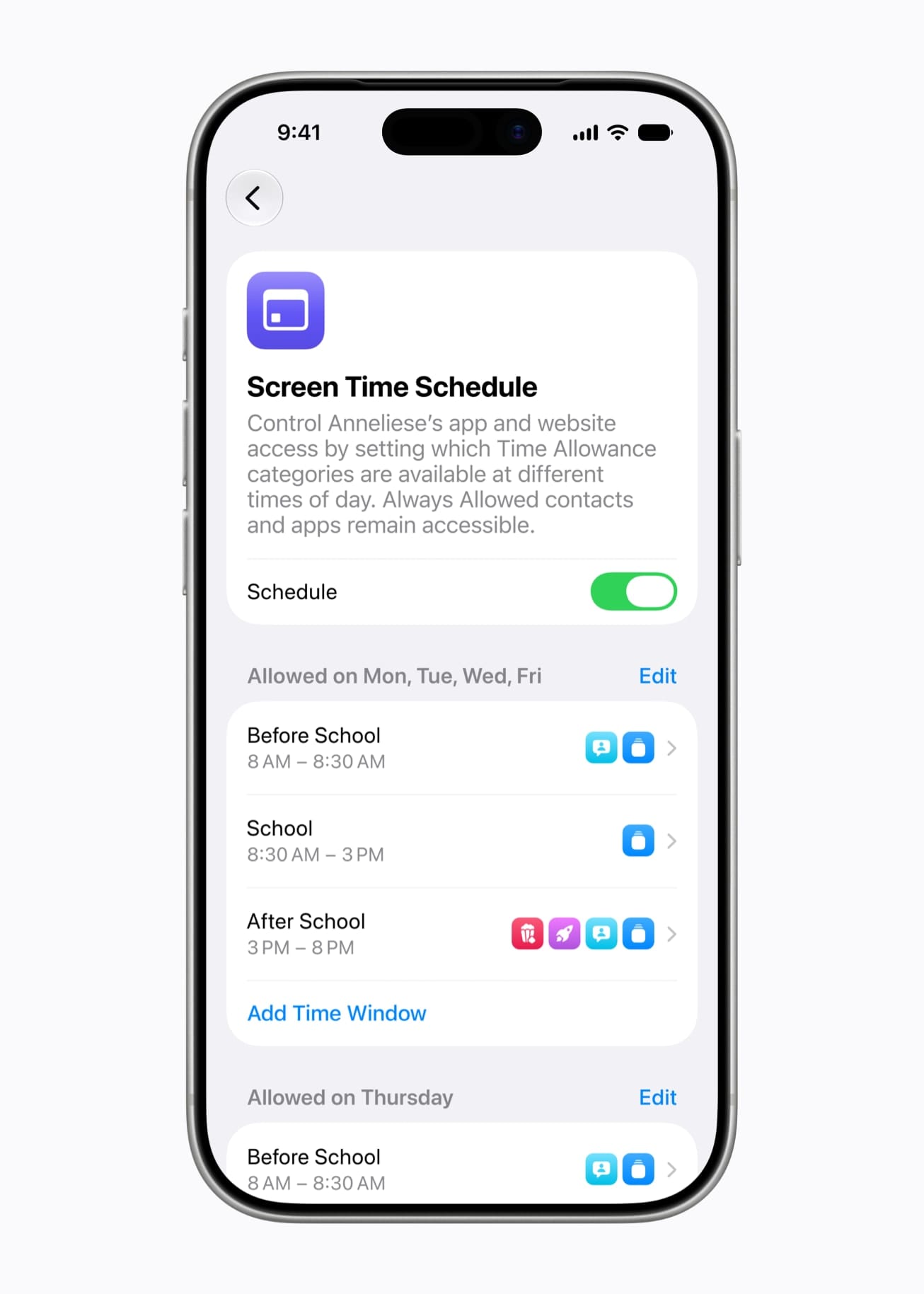
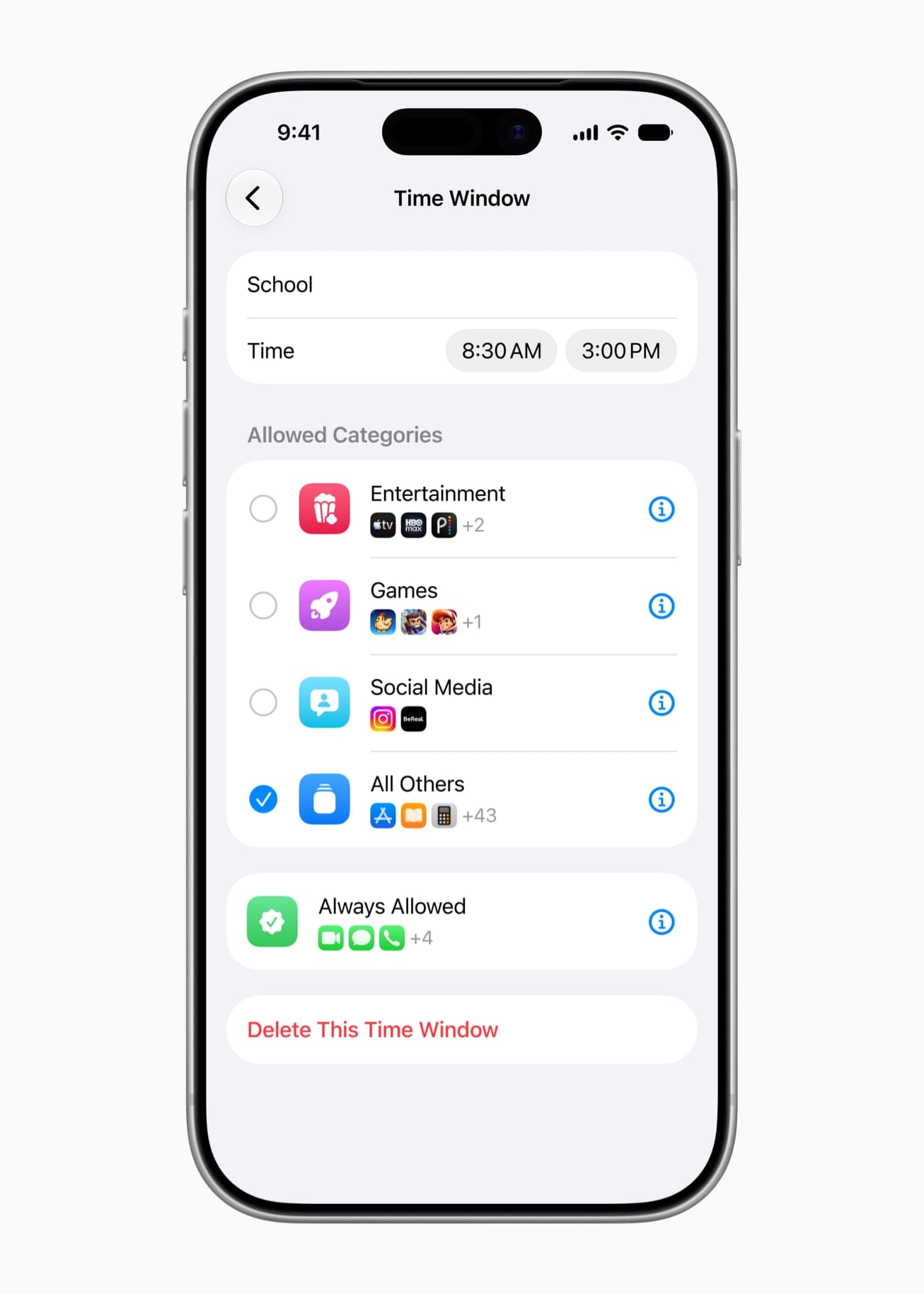
Layered on top of Time Allowances, Schedules control which apps are available at different points in the day or week. Apple's own example splits a day into before-school, school hours, after-school, evening, and nighttime windows, each with its own available apps. Parents can build separate weekday and weekend schedules, or custom ones for holidays and early dismissal days.
The practical effect: a parent can allow educational apps during school hours while keeping social and gaming apps unavailable until the school day ends, without manually toggling restrictions twice a day.
Screen Time Gets a Real Redesign
The Screen Time interface is rebuilt rather than just carrying new toggles on the old layout. The redesigned dashboard gives parents an at-a-glance view of average device usage and the apps a child spends the most time in, without a drill-down through multiple menus.
The more useful change is in-the-moment control. Parents can adjust a child's access to specific apps or websites immediately, with a single tap, instead of navigating into Settings. Apple frames this around protecting specific moments: pausing access during a meal, outdoor play, or any stretch of time that calls for the device to be put away. It works in reverse too. If a child needs a few extra minutes to finish something inside an app, a parent can extend access on the spot instead of forcing a mid-task interruption.
How to Turn These On
These features ship through a Screen Time update bundled into iOS 27, iPadOS 27, and macOS 27, not as a standalone download. Once installed:
- Go to Settings → Screen Time (or System Settings → Screen Time on Mac) on the parent's device, with Family Sharing already configured for the child's account
- Select the child's name to access their individual controls
- Enable Ask to Browse under content restrictions if it isn't already on by default for the child's age
- Configure Time Allowances by category and set up Schedules for time-of-day restrictions
- Review Communication Safety settings to confirm the expanded gore and violence detection is active
Apple's Child Safety website consolidates setup guidance and answers to common questions, alongside existing tools like Screen Time passcode notifications, which alert parents if their passcode gets entered on a child's device, and user reporting tools for flagging harmful content directly to Apple.
What's Different Under the Hood for Developers
None of this is exclusive to Apple's own apps. Apple maintains a set of frameworks for third-party developers building age-appropriate experiences without reinventing the detection work. SensitiveContentAnalysis, which already powered nudity detection, now also covers violent and graphic content, available to any developer who wants the same warning screen Apple uses natively. PermissionKit routes a child's request to add a contact or follow another user through the same one-tap parental approval flow used for Ask to Buy and Ask to Browse, rather than requiring a custom permission system.
The Declared Age Range API lets developers request a child's age bracket without ever receiving an actual birthdate, then tailor the app experience to that range. Parents control whether that sharing happens always, only after being asked each time, or never. For developers building anything aimed at younger users, that's the privacy-preserving path to age-gating content that Apple is steering the App Store toward broadly.
Where This Leaves Apple's Parental Controls
iOS 26 added more detailed App Store age ratings on top of nudity blurring that Communication Safety had already supported for several release cycles, and extended baseline protections like web content filters and Communication Safety to teens aged 13 to 17 by default, regardless of whether their account was formally set up as a Child Account. iOS 27 builds on that with a bigger swing: a permission layer for the open web, a Screen Time system rebuilt around categories instead of one blunt daily limit, and a violence detection layer riding on infrastructure Apple already had in place for nudity. Combined with the Setup Assistant changes, the overall shift is toward configuring restrictions before a child opens the device for the first time, rather than parents discovering gaps and closing them after something already happened.
Apple says this is informed by guidance from online safety and child development experts, and it's working with the American Academy of Pediatrics to adapt the organization's Family Media Plan into Apple-specific guidance for parents. Whether that expert grounding changes how families actually use these settings depends on adoption, the same way Screen Time's original 2018 launch took years to become a default habit rather than a feature buried in Settings.
Ask to Browse, Time Allowances, and the expanded Communication Safety net ship together as part of iOS 27, iPadOS 27, and macOS 27. Apple notes the features are subject to change before final release.