

Google Killed Fitbit. What Replaced It Tells You Everything About Where Google Wants to Go.
Google's Fitbit rebrand isn't a name change -- it's a data strategy. The Google Health app now reads Apple Health on iOS, betting that platform-agnostic health data aggregation beats ecosystem lock-in.


Since this article published, Google has posted a public roadmap of fixes and improvements to the Google Health Community forum. The response is notable for what it acknowledges: data inconsistency between the Today and Health tabs, missing Sleep Scores, broken calorie tracking, and nutrition goal-setting shortcomings that directly reflect the user backlash documented here. Google has also committed to writing data back to Apple Health, not just reading it, which would meaningfully change the integration described in this article. A structured weekly schedule for Fitness Plans is on the roadmap for later this year, addressing another common complaint from former Fitbit users. Some fixes are described as rolling out this week; others are slated for ongoing delivery through summer. The full roadmap is worth reading. It is an unusually candid admission of how much work remains.
Read Google's roadmap post here.
The name "Fitbit" is not on the app anymore. As of May 19, the iOS and Android app that millions of people have used to track their steps, sleep, and calories quietly became "Google Health." The icon changed. The branding changed. The subscription tier formerly known as Fitbit Premium is now Google Health Premium. And if you had an old Fitbit account, not a Google account, you had until that date to migrate or lose access, with full data deletion set to begin July 15.
For longtime Fitbit users, this feels like a funeral with a product launch stapled to it. For Google, it's something more calculated: an attempt to turn a $2.1 billion acquisition into a platform-level play for health data, and an admission that doing so requires playing nice with a competitor's ecosystem they cannot afford to ignore.
What Actually Changed
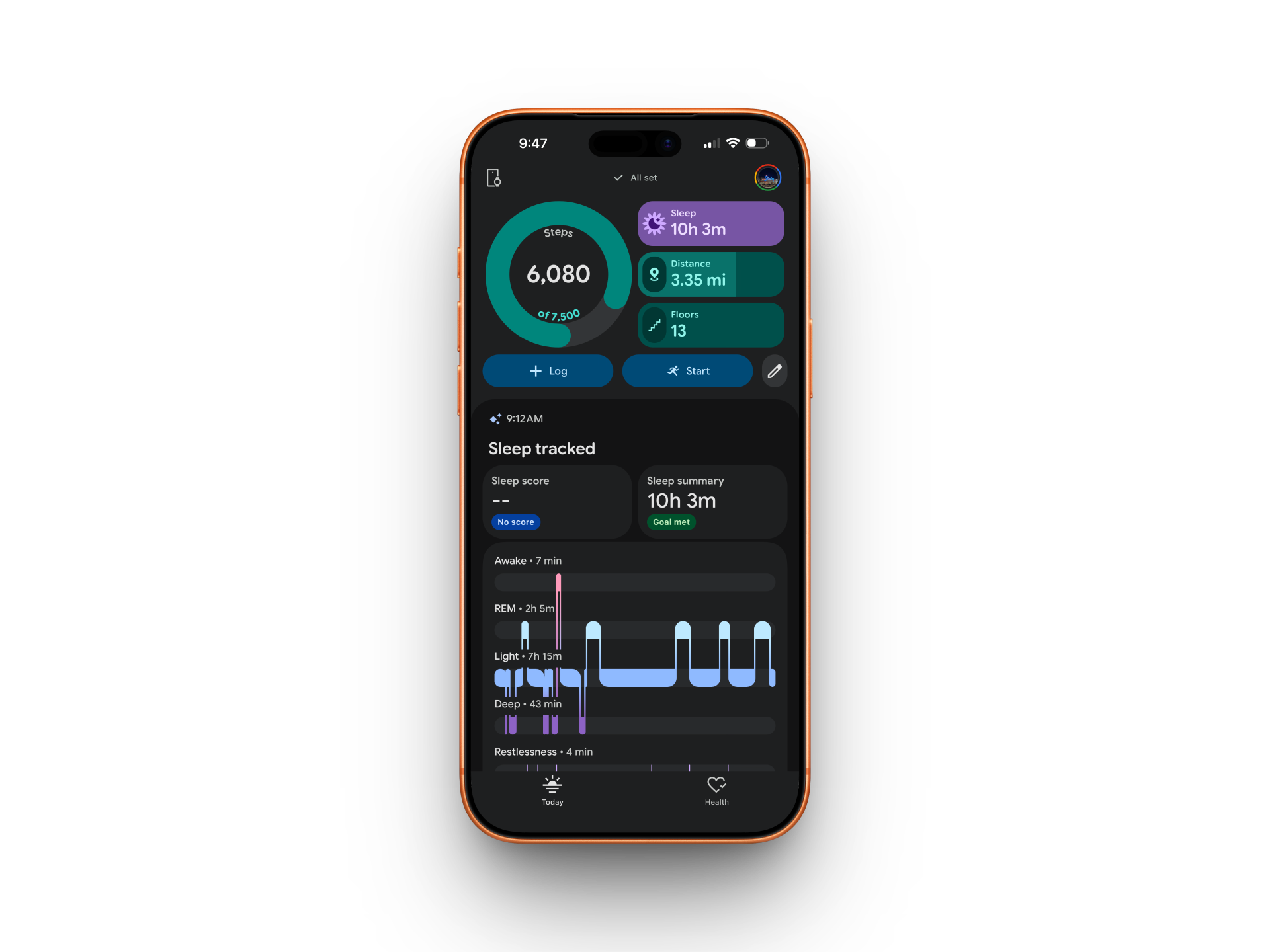
The Google Health app is not a dramatic departure from what Fitbit was. It adds a Gemini-powered AI coach called Google Health Coach for Premium subscribers and rolls up the long-neglected Google Fit into the same platform. Google describes a redesigned four-tab interface, and the App Store screenshots show exactly that. My experience on iPhone tells a different story. The app shows two tabs, Today and Health, not four. That gap between the marketing screenshots and what actually loads on an iPhone is a pretty concise summary of how this launch has gone.
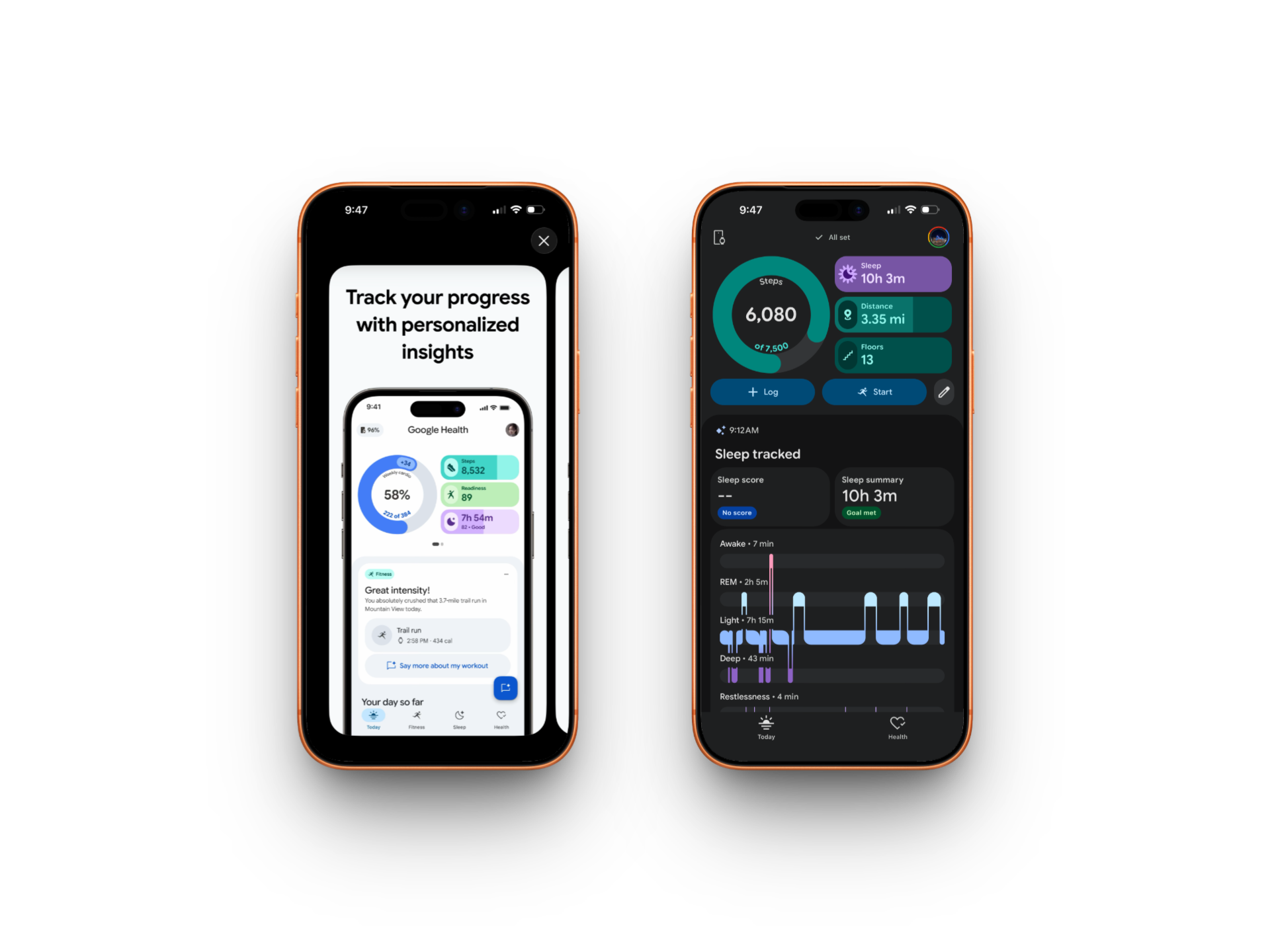
The tab layout is not the only rough edge. Apple Health sync was slow on first connection, data took time to populate, and the overall experience feels noticeably behind what Google has shown in its own promotional materials. The rollout window runs through May 26, so some of this may sort itself out. But for a rebranding Google has been building toward for five years, the iOS launch is not the polished debut the announcement implied.
What the app gains in presentation, it loses in personality. Badges are gone. Sleep animals are gone. The social challenges that made Fitbit feel more like a community than a calorie counter, Workweek Hustle, Adventures tied to virtual trail systems, open groups where strangers competed on step counts, all axed. The Fitbit Community forums have been redirected into the Google Health Community with no clear path to browse older discussions. Years of accumulated user knowledge, essentially gone.
The calorie-deficit tracking has also taken a hit. Fitbit's "Food Plan" automatically adjusted your daily calorie budget based on activity, giving you a real-time running tally of what you had left to eat. Google Health replaced that with a static calorie goal. The dynamic adjustment is gone. For users who built their nutrition habits around that feature, the response on Reddit has been, according to reporting from PiunikaWeb, close to outrage.
These losses are not random. They reflect a deliberate architectural choice: Google is building a health data platform optimized for AI coaching and cross-device aggregation, not a fitness social network. Whether that is the right call depends entirely on which Fitbit user you were.
The iOS Move Is the Real Story
Here is the part that gets underreported in most coverage of this rebrand: Google Health on iOS now reads Apple Health data directly.
That means your Apple Watch workouts, your iPhone step count, your sleep data recorded by third-party iOS apps, all of it can flow into Google Health. I connected Apple Health on my iPhone and the process itself is straightforward: approve the data types you want to share, and Google Health becomes a secondary aggregator of your Apple-generated health data. The sync was sluggish at first, but the data did come through. Google's own support documentation confirms the requirements are minimal: iOS 16.4 or higher and an adult Google account.
This is not technically new territory. Third-party iOS apps have been able to read from Apple Health via HealthKit for years. What is new is Google doing it, at scale, as a strategic pillar of a platform launch. Google Health lead Sandeep Chandra told CNN the company is working to extend AI coaching support to Apple Watch users specifically, not just Fitbit and Pixel Watch owners. "That's my goal," he said.
The implication is significant. Google is not trying to pull iPhone users away from their devices or their Apple Watches. It is building a layer that sits above hardware choices, a health data platform that wants to be relevant regardless of which wrist you use. That is a fundamentally different strategy than the one Apple pursues, where HealthKit data mostly stays in Apple's ecosystem and the Apple Watch is the front door.
There is a caveat, and it matters. The Pixel Watch does not pair directly with an iPhone. If you see Pixel Watch data inside Google Health on iOS, it is because the same Google account is logged in on an Android device that the watch is paired to, and the iPhone is pulling from that shared account. The iPhone reads the data; it does not control the watch. For the Fitbit Air, which ships May 26, the story is cleaner: that device works natively with both Android 11 and iOS 16.4, making it a genuinely cross-platform hardware play in a way that Pixel Watch never was.
Your Doctor's Records, Now in Google's App
Apple Health integration is not the only new data source Google is pushing on iOS. The app also prompts you to sync your medical records directly from your healthcare providers, and it does this early and prominently. It was one of the first things the app surfaced after setup on my iPhone – not buried in settings, but front and center as part of the onboarding flow.
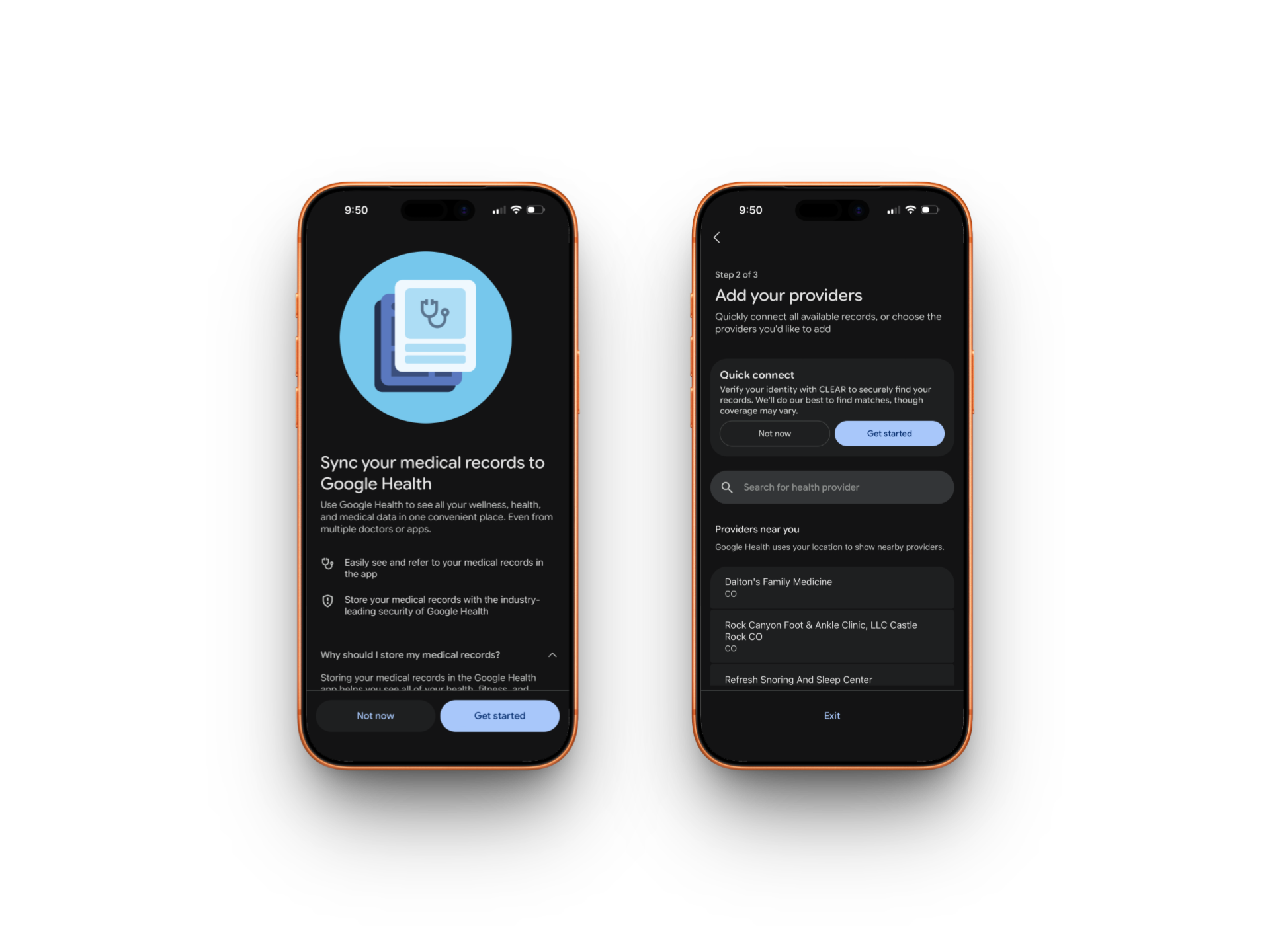
The pitch is framed around convenience: see your wellness, fitness, and medical data all in one place, even from multiple doctors or apps. The setup flow has three steps, and step two is "Add your providers," where Google uses your location to surface nearby practices and lets you search for others manually. There is also a "Quick connect" option that verifies your identity through CLEAR to automatically find records across providers.
[SCREENSHOT: The "Add your providers" screen showing CLEAR Quick Connect and location-based provider list. IMG_6800. Suggested caption: "Step two of the medical records setup: Google uses your location to surface nearby providers, with CLEAR handling identity verification."]
That CLEAR partnership is worth pausing on. CLEAR is best known as the biometric identity verification service used in airports. Using it here means Google is asking you to verify your identity with a third-party service to unlock a faster path to aggregating your medical history. The convenience argument is real. So is the data surface area that creates.
At the bottom of the medical records screen, in smaller text, is a disclosure that deserves more attention than the design gives it: if you previously agreed to share data with Google Health for research and development, your de-identified medical records will be included. That is not a new policy, but surfacing it mid-onboarding, after the "Get started" button is already in front of you, is a notable choice.
None of this is inherently sinister. Apple does something similar with Health Records in the Health app, and the ability to see lab results, medications, and vitals alongside your fitness data in one place is genuinely useful. But Fitbit never asked for your doctor's records. Google Health does, on the first day, on iPhone. That is a meaningful signal about what this platform is actually being built to do.
Google Health and Apple Health Don't Agree on Your Numbers
Here is where the Apple Health integration gets more complicated. Google Health is not simply displaying your Apple Health data in a different interface. It is reprocessing it through its own algorithms, and in my testing, it is producing meaningfully different results.
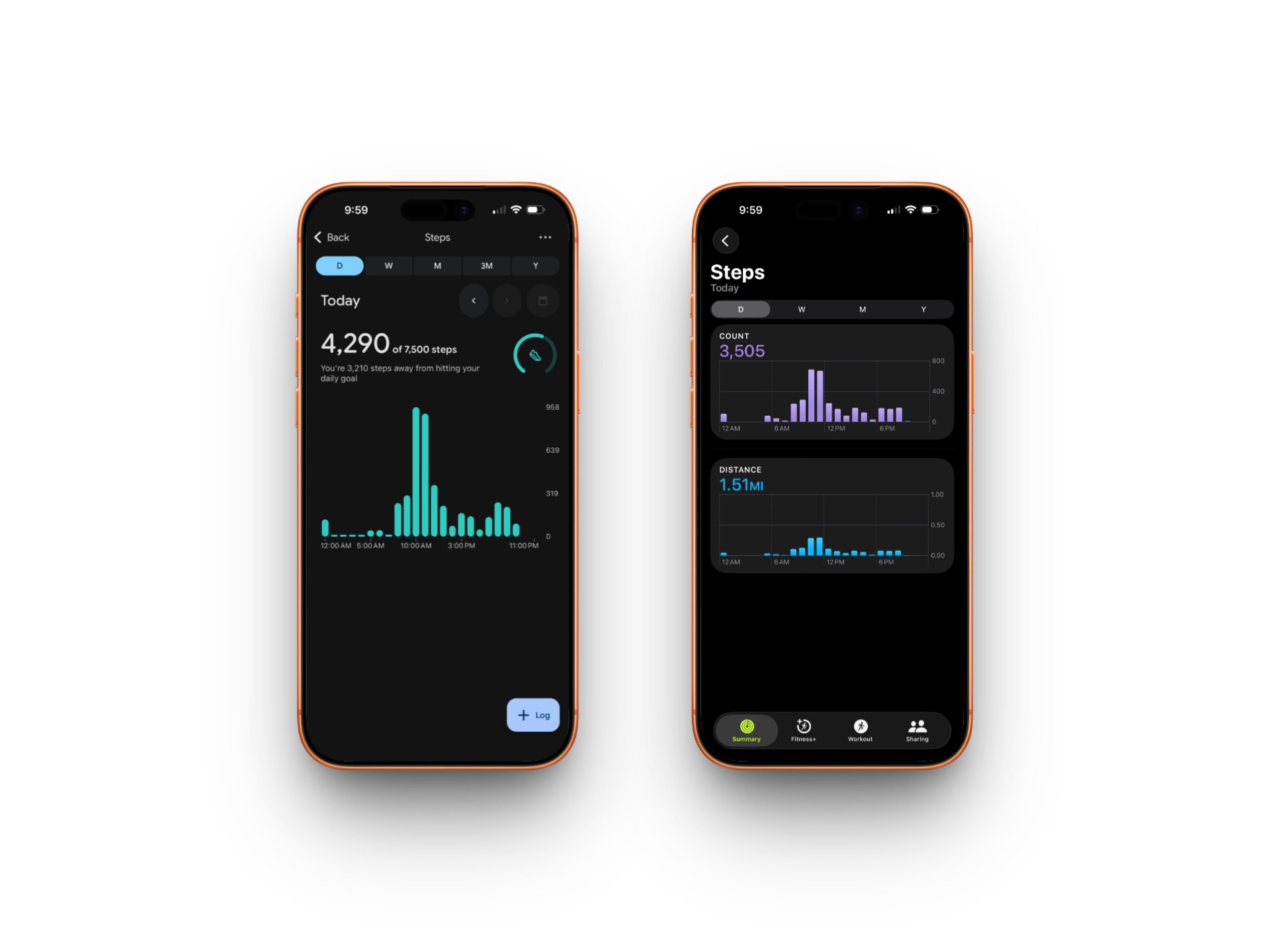
On the same day, Apple Health recorded 3,505 steps and 1.51 miles. Google Health, reading from the same source, reported 4,290 steps and 3.78 miles. That is a gap of 785 steps and more than 2 miles of distance. Not a rounding difference – a substantial divergence on the most basic metrics fitness tracking is built around. The activity distribution looked different too: Apple showed peak movement around late morning, while Google Health showed a pronounced spike around 2pm from the same underlying data.
Sleep showed a similar pattern, though the gap was smaller. Apple Health reported 1 hour 10 minutes of REM sleep; Google Health calculated 1 hour 12 minutes from the same night. Apple used the label "Core" for light sleep stages; Google uses "Light." Those are not equivalent categories -- the terminology reflects different underlying models for how sleep stages are classified. Where Apple simply reported my data, Google added a Benchmarks layer comparing each stage against a "typical range for people like you," flagging my light sleep as "Higher than usual" and deep sleep as "Lower than usual." Apple Health does not offer that kind of population comparison.
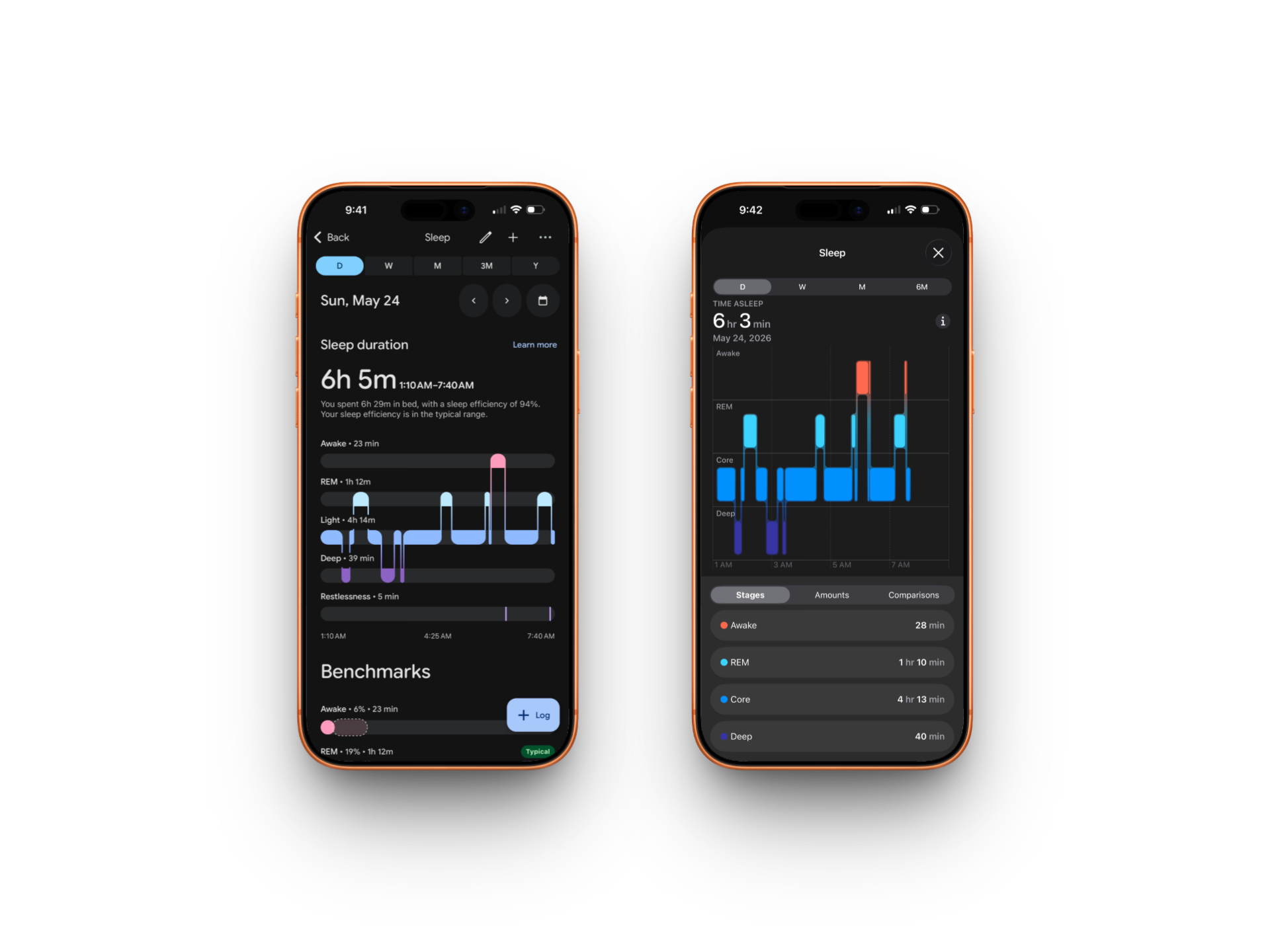
The additions are genuinely useful -- knowing where your sleep sits relative to a broader cohort is more actionable than a raw number. But the step and distance discrepancy raises a harder question: if Google Health is producing different numbers from the same data Apple collected, which set of numbers is accurate? And if you are using those numbers to hit a daily step goal, to track progress over weeks, or to feed Google's AI coaching layer, the answer actually matters. Google Health on iOS is not a second opinion on your health data. It is a reinterpretation of it, and right now there is no clear explanation of why the numbers diverge.
What Google Actually Wants
The health data aggregation play is not really about fitness. It is about building the dataset that makes Gemini-powered health coaching useful.
AI health coaching at any real depth requires knowing what you actually do: how you sleep, how much you move, what your resting heart rate looks like over months, how your activity patterns change across seasons. The more data inputs the platform has, the more the coaching layer can do. Google is making Apple Health a data source not out of generosity but because iPhone users represent too large a portion of the fitness tracker market to leave on the table. Pulling in Apple Health data makes Google Health Coach smarter for iPhone users, which makes the subscription worth paying for, which converts users into Google Health Premium subscribers.
That subscription is $10 per month or $80 per year. Google also bundles it with Google AI Pro and Ultra subscriptions. The Fitbit Air ships with three months included. Google is clearly trying to build recurring health subscription revenue using AI coaching as the primary differentiator, with hardware as the entry point and data breadth as the moat.
The strategy has a historical parallel. When Google acquired Fitbit in 2021, the justification was health data and wearable expertise. Five years later, the Fitbit brand is being absorbed, the community features that defined Fitbit's early success are being stripped out, and the underlying hardware is being repositioned as one of several sensors feeding a Google-managed AI layer. Google Fit, another standalone health app that Google built and then mostly ignored for years, gets folded into the same platform rather than killed outright, primarily to preserve Google Fit users' historical data during migration.
None of this is surprising. It is, in fact, exactly what a company does when it realizes it bought a brand and a user base it plans to eventually eclipse with its own platform. The Fitbit name is not dead yet, it is still on the hardware. But the app is gone, and the community features that made Fitbit feel different from every other fitness tracker are gone with it.
What the Backlash Actually Means
The frustration from longtime Fitbit users is real and understandable, but it is worth being precise about what it represents. The people most upset are the ones who used Fitbit as a social fitness platform: the challenge completers, the badge collectors, the users who showed up every day because their step count affected their leaderboard standing. That cohort almost certainly skews older and more loyal, and it is the cohort Google is most willing to lose.
The users Google wants are the ones who will pay for coaching, integrate their medical records, sync their Apple Watch data, and use Google Health as the central nervous system for their health and fitness life. That is a smaller, but potentially more monetizable, audience.
Whether Google can actually build something compelling enough to win that audience is still an open question. The AI coaching launch is limited: right now it works only with Fitbit and Pixel Watch devices, not with data pulled from Apple Health. Google says broader device support is coming. Until it does, an iPhone user connecting Apple Health data to Google Health gets the aggregation view without the AI layer that justifies the subscription.
That is not a small gap to close. Apple's own health coaching ambitions, well-documented in reporting about the "Quartz" project and increasingly visible in the health features shipping with Apple Watch, are aimed at exactly the same user. Google is competing for attention in a category that Apple treats as a core differentiator for its own ecosystem.
The rebrand from Fitbit to Google Health did not settle anything. It opened the fight.
Read us first
See more TBTL when you search Google
Add Tech Between the Lines as a preferred source and our Apple coverage shows up more often in your Top Stories. It takes one tap, and you can change it anytime.
Prefer TBTL on Google