


What's New in the iOS 27 Weather App: Highlights and New Forecast Views Explained
iOS 27 redesigns Apple Weather with a new Highlights summary and switchable Precipitation and Wind forecast views. Here's what changed and why.

Apple's Weather app has stayed largely the same since its Dark Sky-powered relaunch, but iOS 27 changes that with two visible additions: a redesigned summary section called Highlights, and a way to switch the entire home screen forecast between Conditions, Precipitation, and Wind. If you've installed the iOS 27 developer beta and noticed your Weather app looks different at the top, or spotted new icons above the hourly forecast, this is what changed and why.
What is the new Highlights section in iOS 27's Weather app?
Every version of Apple Weather has included a short written line near the top of the home screen, something like "Rain expected later today." In iOS 27, Apple expanded that single line into a dedicated card called Highlights.
Highlights surfaces specific, near-term conditions worth knowing about over the next day or so: a temperature swing, a rising chance of rain, wind picking up in the afternoon, that kind of thing. It reads less like a generic summary and more like a short list of the things that would actually change your plans.
Apple hasn't said publicly whether Highlights runs on Apple Intelligence, but the early beta builds include a feedback icon in the corner of the card, the same kind of icon Apple has attached to other AI-generated summaries across iOS 27. That placement is the clearest signal so far that Highlights is doing more than pulling a templated sentence from a weather API. Functionally, it reads more relevant than the old summary line did in iOS 26 and earlier, which tended to repeat the same phrasing regardless of how the day actually looked.
You just got the straight answer on what's new. We send a breakdown like this every week, before the rest of the internet catches up.
What are the new Precipitation and Wind forecast views?
The second change is a new way to view the home screen forecast itself. Previously, the hourly and 10-day rows on the Weather app home screen only ever showed one thing: general conditions, like temperature and a small weather icon. If you wanted rain percentages or wind speeds, you had to leave the home screen and dig into a separate detail view.
In iOS 27, three icons now sit above the forecast: a default Conditions view (the familiar cloud-and-sun icon), a Precipitation view, and a Wind view.
[IMAGE PLACEHOLDER: The three forecast-view icons (Conditions, Precipitation, Wind) above the hourly row]
Tapping Precipitation swaps the entire hourly and 10-day forecast to show rain and snow chances by the hour and by the day, each with its own visual. Tapping Wind does the same for estimated wind speed across the same timeframes. The rest of the app's layout doesn't change. You're still in the same familiar Weather app, just looking at a different slice of the same forecast data Apple was already collecting.
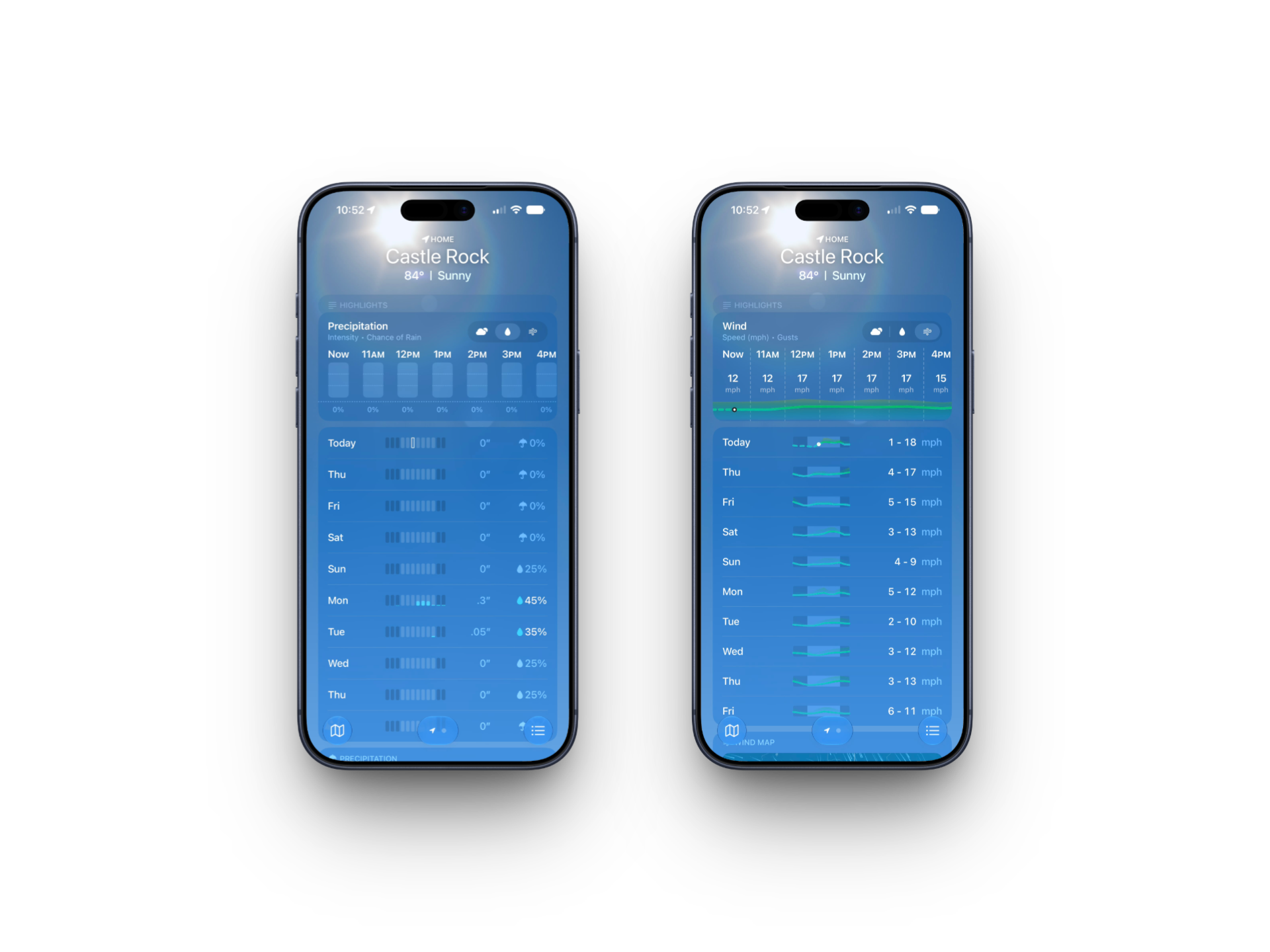
This is a small interaction change, but it removes a real point of friction. Checking whether rain will hit during a commute used to mean tapping into a secondary screen. Now it's one tap from the home screen, and it stays there until you switch back.
Why this matters and where it might still be heading
Both changes point at the same underlying problem Apple has had with Weather for years: the data was almost always there, but getting to it fast required too many steps. Highlights condenses that data into something closer to a verdict. The forecast view switcher just removes a layer of navigation that never needed to exist in the first place.
Neither feature is flashy, and Apple didn't put either one onstage at WWDC. That's consistent with how Apple has treated Weather generally, as a utility app that gets steady, unannounced refinement rather than headline treatment. Worth watching as the beta cycle continues: whether Highlights gets more specific over successive builds (current behavior suggests it's still being tuned), and whether Apple adds a fourth view beyond Conditions, Precipitation, and Wind before the public release in September.
iOS 27 is currently available through Apple's developer beta program, with a public beta expected to follow in July and a general release alongside new iPhones in September 2026. As with any beta, these features are subject to change before then.
What do you think of the new Weather app in iOS 27? Has Highlights actually been more useful than the old summary line for you?