


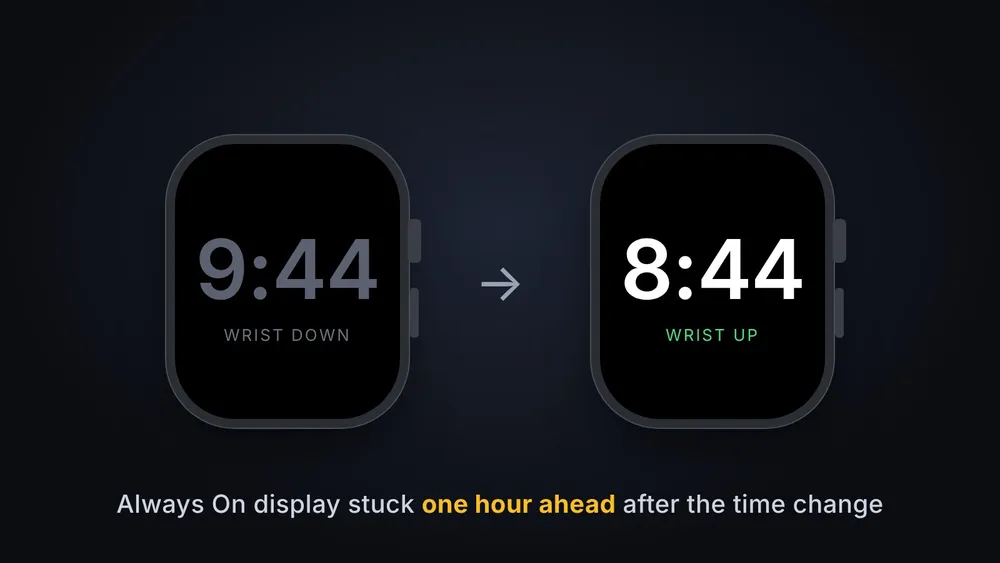


Clocks in most of the US fell back an hour at 2 AM today, and if your Apple Watch looked wrong at a glance this morning, you're not imagining it. On some watches the Always On display keeps showing the old time, one hour ahead, while your wrist is down. Raise your wrist or tap the screen and the right time comes back.
Apple posted a support page about it on October 30, a few days after watch owners in the UK and Europe hit the same thing when their clocks changed on October 25. Those European reports came from watches running watchOS 27. Apple's page doesn't name a watchOS version or list specific models.
How to fix it
Apple gives two fixes. Either one works, and neither changes any of your settings.
- Switch watch faces and back. Touch and hold the watch face, swipe to a different face and tap it. Then touch and hold again, swipe back to the face you normally use and tap it.
- Restart the watch. Press and hold the side button until the power button appears in the top right corner, tap it, then drag the slider to turn the watch off. Once it's dark, press and hold the side button until the Apple logo shows up.
You can also do nothing. Apple says the watch corrects itself at midnight after the time change, so it should look right by tomorrow morning even if you never touch it.
Your alarms still go off on time
The wrong hour only shows up on the dimmed Always On screen, and Apple says alarms aren't affected. The watch is keeping the correct time the whole way through, which is why the real hour comes back the moment you lift your wrist.
Will Apple patch it?
Apple's support page only offers the workaround and suggests keeping your watch updated. It doesn't promise a watchOS fix. The next time change in the US isn't until March 14, which leaves Apple plenty of runway to sort it out in a watchOS 27 update before it comes around again. If a fix ships, we'll update this post.
Apple's support page: If your Apple Watch shows the wrong time after daylight saving time changes.







Comments