


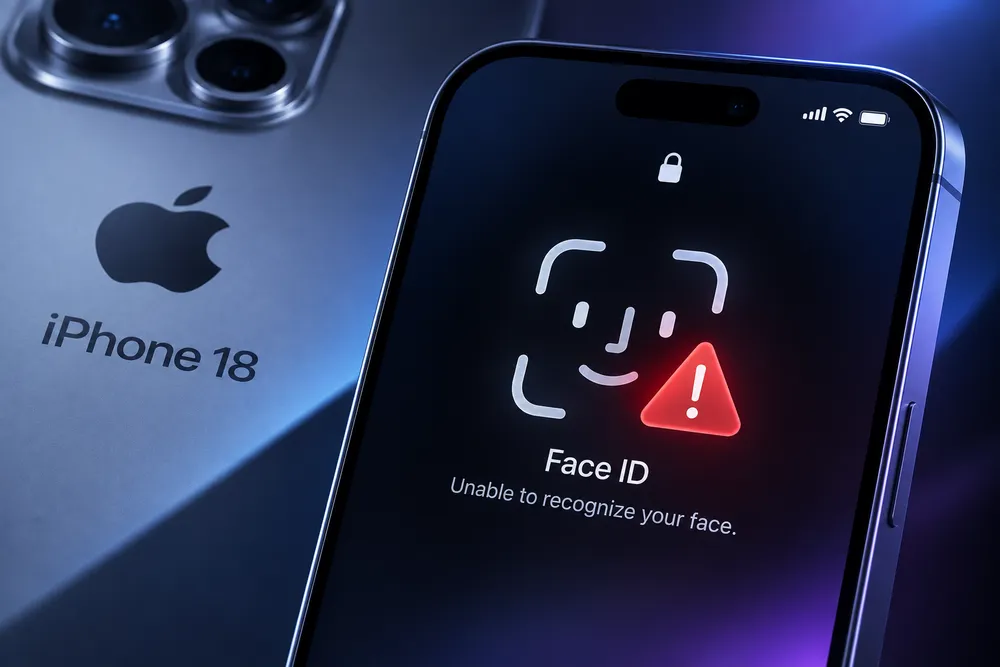


Cover your face with your hand. Fail the Face ID scan on purpose. Tap "Try Face ID Again." On a share of iPhone 18 Pro units, that's enough to freeze the screen and force a reboot. Elsewhere in Apple's lineup, a Series 12 or Ultra 4 wearer can trigger something similar just by opening Maps, switching a watch face, or doing nothing at all.
Two of Apple's most significant hardware redesigns this generation, both released September 18, 2026, are rebooting on their own within days of reaching customers. Apple hasn't issued a statement or confirmed a root cause for either. What the two bugs share is more telling: both trace back to components Apple rebuilt specifically for these devices rather than carried over from prior generations, which says something about how little runway existed to validate that hardware before shipping it.
The Face ID Freeze
The iPhone 18 Pro's headline change is where Apple hid the infrared camera, tucked beneath the display near the top-left corner, letting it shrink the Dynamic Island. It's a real design win, and an untested one against a specific failure path.
The bug never touches ordinary lock screen unlock, the interaction Apple tests hardest. It shows up when Face ID authenticates something inside an app: the Passwords app, a private Safari tab, an Apple Wallet payment, a locked note. Fail that scan once, tap to retry, and the phone can stop responding entirely, then panic and reboot a few seconds later. 9to5Mac reproduced it on a European 18 Pro unit, and MacRumors has tracked a growing forum thread, alongside separate reports of "Face ID is Not Available" errors during setup.
One owner says Apple Support diagnosed a hardware fault and offered a replacement. That's hard to square with the fact that lock screen unlock, using the same sensor, works fine for the same users. The more coherent read is that iOS 27 shipped without fully validating the redesigned Face ID pipeline against in-app authentication, a code path Apple hasn't had to touch since the lock screen challenge it built in 2017.
The Neural Engine Timeout
The Watch Series 12 and Ultra 4 share a less visible but more disruptive problem: reboots with no consistent trigger. Mid-Siri request, mid-workout, during a watch face edit, or while the watch sits idle.
The common thread is underneath the activity, not in it. Owners pulling "panic-full" logs from Analytics data are finding the same failure: a timeout on the Apple Neural Engine, the coprocessor behind Siri and workout detection. One shared log shows a Neural Engine command waiting 2,020 milliseconds against a hardware-enforced 2,000-millisecond limit, at which point a firmware watchdog forces the restart.
The build number isn't the explanation. Watches shipped with watchOS build 24R359 and Apple pushed 24R364 during setup, but owners report the same panic on both, and at least one replacement unit crashed identically. Forum members have traced an informal pattern: switching off the Siri modular watch face seems to reduce or eliminate reboots for some, suggesting the always-listening Siri face taxes the Neural Engine harder than other faces do. That's anecdotal, not confirmed, but specific enough to try.
Same Root Cause, Different Symptom
Neither bug is really about Face ID or Siri. Both are what happens when Apple rebuilds the physical hardware underneath a feature it spent years tuning in software, without the years of real-world telemetry that tuning was built on. Internal testing catches the obvious failure modes. The narrow ones, a failed retry, a Siri face left running for hours, only surface once millions of real devices run the software at once. That's not an excuse for shipping the bugs. It's why redesign generations produce more of them than incremental ones.
What to Do If You're Affected
If Face ID is freezing an in-app prompt, don't retry immediately. Back out, use your passcode, and try Face ID again once the app reloads. Keep iOS updated through Settings and file a report via Feedback Assistant. Lock screen unlock is unaffected, so there's no reason to disable Face ID over this.
If your Watch is rebooting, confirm you're on build 24R364 through the Watch app, since some units haven't received it automatically. Try disabling the Siri modular watch face. Then check Settings, Privacy & Security, Analytics & Improvements, Analytics Data for a file starting with "panic-full," which is what Apple Support needs to diagnose a hardware-level crash. If you're still inside the return window and reboots continue after updating, use it. A forced restart isn't a guaranteed fix; several owners who tried it saw the problem return within days.
Apple's silence on both bugs fits a familiar pattern: fixes tend to arrive as quiet point releases for iOS and watchOS rather than public acknowledgments. Until one lands, the honest read for anyone buying into this generation's hardware is that both devices work as advertised most of the time, and "most of the time" is carrying more weight than the marketing let on.




Comments