

What's New in iOS 27 Beta 5
Apple shipped iOS 27 beta 5 on August 10 with new Liquid Glass icons, expanded Siri voice customization, and Search updates. Here's the full rundown.


Apple released iOS 27 beta 5 on Monday, August 10, along with matching beta 5 updates for iPadOS 27, macOS Golden Gate, watchOS 27, tvOS 27, and visionOS 27. This one arrived three weeks after beta 4, a week later than the two-week cadence the cycle had settled into. We wrote about why that gap isn't really a "delay" in any meaningful sense, since Apple has never actually committed to a beta schedule in the first place. The perceived slip is a function of how consistent Apple's historical pattern has been, not anything Apple promised and missed.
Beta 5 itself is a mid-cycle refinement build. There's no single headline feature here, but there's a real list of interface tweaks and settings additions worth knowing about, especially around Siri's voice customization and Liquid Glass icon updates. Here's everything confirmed so far.
iOS 27 Beta 5 (Build 24A5408d)
Refreshed App Icons for Siri, Safari, and More
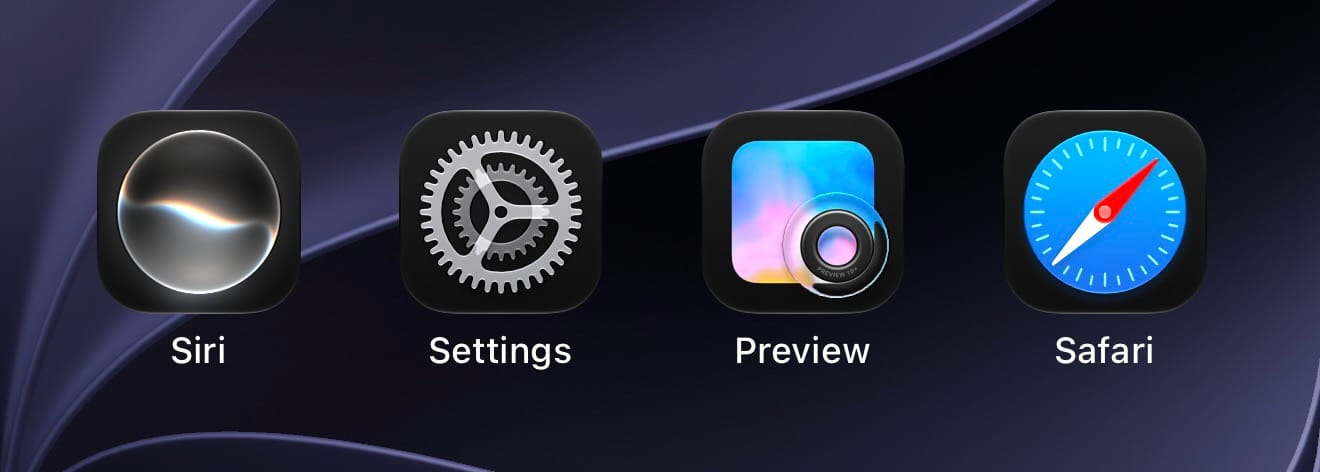
Apple continued its icon overhaul for iOS 27 with beta 5, shipping new Liquid Glass icons for the Siri app, Safari, Settings, Remote, App Store, and Preview. Some of these are full redesigns, while others just carry more visual detail than the versions in earlier betas. This follows icon updates already made to Maps, Photos, Wallet, and others earlier in the cycle, so Apple is still actively iterating on the icon set this close to release rather than treating it as finished.
Siri Voice Customization Expands to Every Voice
The Pace and Expressivity sliders that let you adjust how Siri's AI voice sounds are no longer limited to the two newest American voices. As of beta 5, customization is available across all seven American voices and all four British voices, for a total of eleven voices that support tuning how fast Siri talks and how much emotional inflection it uses.
To try it, go to Settings, then Siri, then Voice, and drag the Pace and Expressivity sliders under any supported voice. There are five levels available on each slider.
This customization still runs entirely on-device, so it's limited to hardware that can handle it: iPhone 17 Pro, iPhone 17 Pro Max, and iPhone Air for phones, plus iPad Pro (M4 and later) and Macs with an M3 chip or newer and at least 12GB of RAM. Siri AI itself works on any iPhone 15 Pro or later, but older or unsupported hardware gets the standard voice synthesis without the sliders.
Search and Ask Get a "Search the Web" Shortcut
The animation for pulling up Search or Ask has changed slightly in beta 5. Suggestions now appear as the search bar itself animates into view, rather than popping in a beat after the bar does. More practically, there's now a "Search the Web" option at the bottom of search results that wasn't there before, giving you a direct path to a web search without leaving the Search interface.
New Controls for App Results in Search
A new "Before Search" section has landed in Search Settings, giving you more control over what shows up on the Home Screen Search suggestion view before you start typing. You can turn off app results entirely, or choose to show four or eight suggested apps, and there's a separate toggle for app shortcut suggestions.
To adjust it, go to Settings, then Siri & Search, then Search Settings, and look for the new Before Search section.
Control Center Drops Cellular Info on Wi-Fi
When your iPhone is connected to Wi-Fi, Control Center no longer displays your cellular network type. It's a small change, but if you were using that indicator to keep tabs on what network you'd fall back to if Wi-Fi dropped, it's gone in beta 5.
5G+ Comes to Spain
5G+ support has expanded to carriers in Spain with this beta, joining the list of regions that can access Apple's enhanced 5G network type indicator.
Software Update Now Shows When You Last Updated
The About section in Settings, under General, now tells you when your device's current software version was installed. It's a small addition, but a genuinely useful one if you've ever needed to check how long it's been since your last update without digging through release notes.
Clock App Gets a Bolder Alarm Font
The Alarms and Timers section of the Clock app now uses a thicker font. It's a minor visual tweak rather than a functional one, but noticeable if you check alarms regularly.
Liquid Glass's Clearest Setting Gets Clearer
If you have Liquid Glass set to its clearest transparency level, beta 5 pushes that setting even further than it was in beta 4. Apple hasn't made a corresponding change to the most opaque end of the slider, so contrast between the two extremes has widened rather than shifted as a whole.
Mail Adds a Toggle for Personalized Smart Replies
Mail now has a dedicated toggle for its Personalize Smart Replies feature, found in the Mail section of Settings. It's off by default, so if you want Mail's suggested replies to draw on your own writing style, you'll need to turn it on manually.
Battery Settings Can Flag Poor Cellular Connections
The Battery section of Settings will now surface a notice when a weak cellular signal is contributing to battery drain. If you're in an area with spotty coverage, this gives you a more direct explanation the next time your battery drains faster than expected.
Contacts Shows Company Names in Lists and Search
If a contact has a company associated with it, that company name now appears underneath their name in the Contacts list and in search results. It saves a tap into the full contact card just to confirm who someone works for or which business a number belongs to.
Wallet's Create a Pass Feature Goes International
The Create a Pass feature in Apple Wallet, which lets you build a custom pass from scratch, is no longer limited to the US. It's now available to users outside the country as well.
New Splash Screens for Photos, Wallet, and Music
Apple added onboarding splash screens for the Photos, Wallet, and Music apps in beta 5, walking users through what's changed in each app under iOS 27. These typically show up the first time you open the app after updating.
iPadOS 27 Beta 5 (Build 24A5408d)
iPadOS 27 beta 5 shares iOS 27's build number and picks up the same cross-platform changes: the new Liquid Glass app icons, the expanded Siri voice customization, the Search and Ask updates, the Before Search controls, and the Contacts company name display all apply on iPad as well. No iPad-specific changes have surfaced yet in this beta.
macOS Golden Gate Beta 5 (Build 26A5406e)
macOS Golden Gate beta 5 shipped alongside the rest of the lineup on August 10. We're still combing through this build for Mac-specific changes beyond the shared iOS 27 features like the Liquid Glass icon updates and Siri voice customization on supported Apple Silicon Macs (M3 and later with at least 12GB of RAM). We'll update this section as more surfaces.
watchOS 27, tvOS 27, and visionOS 27 Beta 5
watchOS 27 (Build 24R5347a), tvOS 27 (Build 24J5346a), and visionOS 27 (Build 24M5348b) all moved to beta 5 alongside the rest of the platforms. No beta-5-specific user-facing changes have been confirmed on any of the three yet. At this point in the cycle, Apple's focus across the board is shifting toward bug fixes and performance work rather than new functionality, so a quiet showing here isn't unusual this close to release.
iOS 27, iPadOS 27, macOS Golden Gate, watchOS 27, tvOS 27, and visionOS 27 beta 5 are available now to registered Apple developers. You can install any of them by going to Settings (or System Settings on Mac) → General → Software Update, then selecting the relevant Developer Beta under Beta Updates. Public betas typically follow within a day or so of the developer release.
As always, we don't recommend running developer betas on your primary device. The public beta channel is the safer way to try iOS 27 with less risk to a phone, tablet, or Mac you rely on daily.
iOS 27 is expected to reach its public release in September alongside the new iPhone lineup. Based on how this cycle has been running, expect beta releases to shift to a weekly cadence from here on, which is Apple's typical pattern in the final stretch before launch.