


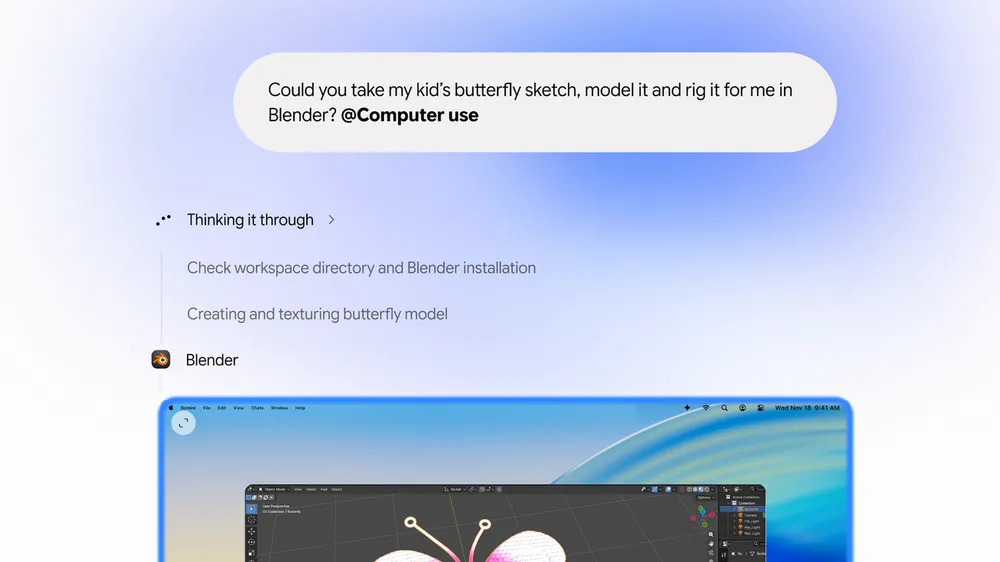


Would you let an AI click around your Mac while you keep working? On Thursday, November 19, Google added computer use to the Gemini app for Mac, which it says handles the clicking, typing, menus and forms in your desktop apps and on the web. Three days earlier, Apple put out the second macOS 27.3 beta with new controls over exactly that kind of access.
Update, Thursday, November 19: Apple is building its own agent like this. A job listing on Apple's site for a Senior Engineering Manager, Agentic AI, Proactive, spotted by Bloomberg, describes "an AI agent that can use a computer the way a capable person does," one that browses the web, works across apps, runs commands and writes code. Bloomberg's Mark Gurman also reported that in the macOS 27.3 beta, turning on ChatGPT's computer use support takes 14 distinct steps, up from four. A screenshot he shared shows the warning: "Your Mac will not be able to protect your data from" the Codex Computer Use app, followed by a list of what it could read, change, delete and export. Apple cites security, Gurman wrote, while some users see it as anticompetitive.
To try Gemini's version, you need a Google AI Plus, Pro or Ultra plan, a personal Google account for someone 18 or older, and an Apple silicon Mac running macOS Sequoia 15.0 or later. It's rolling out in English in the U.S. first. Google says Gemini works in an isolated background window with a live preview in your chat, so your own screen and cursor stay free, and that you choose which apps it can access, can pause it at any time, and approve key actions before they happen. To start a task, you add @Computer use to a prompt, 9to5Google reports.
Google's post doesn't say which macOS privacy permissions the app asks for. So after you set it up, open System Settings, click Privacy & Security, and see what you granted. That's also the list Apple is reworking.
What Apple is changing in macOS 27.3
In a developer news post on Monday, November 16, Apple said macOS 27.3 beta 2 splits the setting it calls Device Control and Data Access into two: System & App Protection Override, for apps that control other apps, and Accessibility, for assistive technology. You grant access by picking the requesting app from a list, you can set an app to ask every time it needs access, and an indicator shows when one app is controlling another. Apple's guidance pushes you to allow only the specific apps or folders a workflow needs.
Apple's reasoning is direct. "Before granting an app such extraordinary access, users should understand that it puts all of the data on their Mac at risk," the post says. Permissions you've already granted stay in effect, and Apple says known apps aren't affected for now, with backup and assistive apps able to request entitlements. macOS 27.3 is still in beta, so none of this reaches most Macs yet. It builds on the Full Disk Access changes Apple flagged in October.
Security, or a head start for Siri?
The security argument holds up. An agent that can click anything in any app can also send the wrong email or open a conversation the other person never agreed to share. Making that access visible and scoped per app is a reasonable fix, and the app choices and approvals Google describes look consistent with it.
Apple's developer post never mentions AI, agents or Siri, though, and it doesn't say whether Apple's own features go through the same prompts. Siri AI, which began rolling out in beta in September, takes actions through systemwide app actions and named app integrations, and Apple's description doesn't claim it can operate any app's interface the way Gemini does. If the new friction lands mostly on third party agents while Apple builds its own, rivals have an obvious complaint: that Apple is protecting its position as much as your data. Some users are already making it, according to Gurman, though we haven't seen an AI company say so on the record, and Apple hasn't published the rest of its entitlement rules.
Apple also says Siri AI's capabilities are powered by the next generation of Apple Foundation Models, "custom-built in collaboration with Google and its Gemini models," a deal we covered in January. So Google's own Gemini app is the one that operates Mac apps on its own, while the Siri built with Gemini's help doesn't promise to.
Whichever side you land on, the practical move is the same. Give any agent the fewest apps it needs, and when macOS 27.3 reaches everyone, use the ask every time option for anything that can act on your behalf. The next thing to watch is the entitlement detail Apple says is coming soon, and whether Apple ever says if its own assistant is held to the same prompts.






Comments