


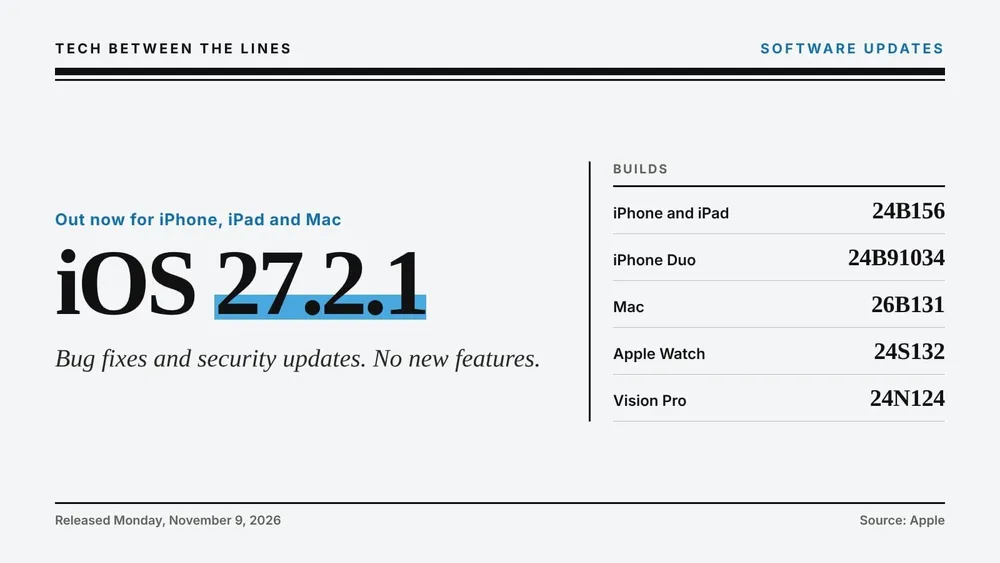


Apple released iOS 27.2.1 on Monday, November 9, two weeks after iOS 27.2. It's a small one. Apple's release notes, in full, say the update "provides bug fixes and security updates for your iPhone," and nothing else. There are no new features and no specific bugs named.
Something acting up? Our iOS 27 problems and fixes page tracks every known issue, what Apple has fixed, and what to do about the rest.
That leaves two questions for most people: what it fixes, and whether to install it right away. Apple posted its security details later on Monday: nine fixes, mostly for Bluetooth and AirPlay pairing and iMessage group chats, and none flagged as exploited. The details are below.
iOS 27.2.1 didn't ship alone. Apple also released iPadOS 27.2.1, macOS Golden Gate 27.2.1, watchOS 27.2.1 and visionOS 27.2.1, along with updates for iPhones, iPads and Macs still on older software. Every build is below.
iOS 27.2.1 (Build 24B156)
iOS 27.2.1 is available for every iPhone that runs iOS 27, which means iPhone 11 and later. iPhone Duo gets its own build, 24B91034, as it did with iOS 27.2. Apple's one line of release notes is all there is for now. When an update says only "bug fixes," Apple usually doesn't itemize them later either, so don't count on a list of what changed.
The update does include everything in iOS 27.2. If you skipped that one, installing 27.2.1 also gets you its features, like Siri AI in five more languages, profiles in the Apple TV app and Apple Pencil support on iPhone Duo, along with the more than 160 security fixes that came with it. Our iOS 27.2 explainer covers all of that and how to use each feature.
iPadOS 27.2.1 (Build 24B156)
iPadOS 27.2.1 shares its build number with iOS 27.2.1. The new OLED iPad mini gets its own build, 24B8156. Install it from Settings, General, Software Update.
macOS Golden Gate 27.2.1 (Build 26B131)
Most Macs get build 26B131. The newest Macs get their own builds: 26B7131 for the M6 MacBook Pro and iMac, and 26B8132 for the touchscreen MacBook Pro with the PROLED display. Install it from System Settings, General, Software Update.
watchOS 27.2.1 (Build 24S132) and visionOS 27.2.1 (Build 24N124)
Apple Watch and Apple Vision Pro get updates too. For the watch, open the Watch app on your iPhone and go to General, Software Update, with the watch on its charger. On Vision Pro, go to Settings, General, Software Update.
Updates for older iPhones, iPads and Macs
Apple also updated the software it still supports alongside iOS 27 and macOS 27:
- iOS 26.7.3 and iPadOS 26.7.3 (build 23H131)
- iOS 18.7.12 and iPadOS 18.7.12 (build 22H390), for iPhone XS, XS Max, XR and the 7th generation iPad
- macOS Tahoe 26.7.3 (build 25G342) and macOS Sequoia 15.8.3 (build 24H241)
- watchOS 26.6.1 (build 23U95)
If you're staying on an older version on purpose, these updates appear below the upgrade offer in Software Update. They carry security fixes too, which makes them worth installing even if you never plan to move to iOS 27 or macOS 27.
Security fixes
Apple's security notes for iOS 27.2.1 and iPadOS 27.2.1 list nine fixes across seven parts of the system. Apple doesn't say any of them may have been actively exploited.
Most of them are about pairing. Two fixes in CoreUtils stop a malicious Bluetooth device from pairing with your iPhone without you doing anything, including by getting around the limit on pairing attempts. Another closes a way for someone within Bluetooth range to get past the limit on AirPlay pairing code attempts, and a fix in rapportd does the same for someone on your Wi-Fi network. A separate Bluetooth fix covers memory corruption that an attacker in range could trigger.
The Messages fixes are the ones getting the headlines. One let a remote attacker join an iMessage group chat and receive its messages. The other let someone newly added to a group read messages sent before they joined. The last two are an App Intents fix for an app that could reach sensitive user data and a fix in the brotli compression library for memory corruption from maliciously crafted input.
Apple shares much of this code across its platforms, and 9to5Mac reports that the same fixes went out in Monday's other updates, from macOS Golden Gate 27.2.1 to iOS 18.7.12. Every release's notes are on Apple's security releases page. For context, iOS 27.2 fixed more than 160 vulnerabilities, including several used in a public iOS 27 jailbreak, and Apple did not flag any of them as exploited either.
Known issues
None reported yet. Apple's notes don't say whether 27.2.1 fixes the problems readers have flagged since iOS 27.2, like missing ringtones and an unresponsive touchscreen, so we can't tell you it does. If one of them clears up for you after updating, or a new one appears, add it on the problems tracker so other readers can see it.
Should you update?
Our call is now install it. We started at wait a day while Apple's security notes were missing. Now that they're out, the fixes are the kind worth closing soon: a Bluetooth device pairing with your iPhone without you doing anything, and an outsider getting into an iMessage group chat. None is flagged as exploited, so there's no need to stop what you're doing, but install it the next time your iPhone is on Wi-Fi and charging. That goes for iPhone Duo too. If early installers report a new problem, we'll update this page. You can always see where every Apple platform stands on Latest Apple Software.
How to update to iOS 27.2.1
- Open Settings
- Tap General, then Software Update
- Tap Update Now (or Download and Install)
Keep your iPhone on Wi-Fi and above 50 percent battery, or plugged in, while it installs. If you don't see the update yet, check back in a few hours, since Apple staggers rollouts. You can confirm your version under Settings, General, About. Before any update, our free iOS update checklist walks through the backup and the few settings worth checking.
Next up is iOS 27.3, which is in beta now and brings back the redesigned Health app. Our iOS 27 beta history tracks every build.





Comments