

Apple Releases iOS 27.2 Beta 3 with a New Apple Music Logo, Books Refresh, and Touch Mac Hints
Apple's third 27.2 betas bring a refreshed battery icon, Liquid Glass in Books, hidden Messages controls, and Dock animations that hint at touchscreen Macs.


Apple Releases iOS 27.2 Beta 3 with a New Apple Music Logo, Books Refresh, and Touch Mac Hints
Two weeks is a long wait between betas when the previous gap was five days. Apple seeded the first iOS 27.2 beta on September 16, followed with beta 2 on September 21, and then went quiet until Monday, October 5, when the third round arrived for iOS, iPadOS, macOS Golden Gate, watchOS, tvOS, and visionOS. After a pause like that, you might expect a big drop. What arrived is a polishing pass, plus a few code discoveries that point to what Apple is preparing next.
On iPhone, the visible changes are small but easy to spot: a redesigned battery icon in Settings, Liquid Glass touches and a new progress bar in Apple Books, and the first appearances of Apple Music's new logo. The more interesting finds sit under the surface, including a settings screen for controlling Messages Suggested Actions that Apple hasn't switched on yet, and a new Dock animation in macOS 27.2 that has people talking about touchscreen Macs.
If you're catching up on the cycle, the headline 27.2 features arrived in earlier betas: the redesigned Health app with its Insights, Longevity, and Browse tabs, Siri AI in French, Japanese, Korean, Portuguese, and Spanish, Apple TV app profiles on iPhone and iPad, Dual Capture for Group FaceTime calls, and the Podcasts split of Up Next into New Episodes and Continue Playing (see our [iOS 27.2 Beta 1 coverage](INTERNAL LINK)). Developers can install beta 3 now, and Apple pushed new public betas on Tuesday, October 6. Below is everything new in beta 3, platform by platform, with notes on what you can use today and what's still buried in code.
iOS 27.2 Beta 3 (Build 24B5099f)
A Redesigned Battery Icon in Settings
iOS 27 introduced a new battery glyph in the status bar, but the Battery section of Settings kept the old design. Beta 3 closes that gap. Open Settings → Battery and the icon now matches the one at the top of your screen. Apple also updated the battery symbols in the Shortcuts icon library to the new style, so any custom shortcut icons you build will match too.
The refresh isn't complete everywhere yet. The Low Power Mode control in Control Center still uses the previous icon, so expect Apple to finish the job in a later build.
Apple Books Gets a Liquid Glass Menu and a Reading Progress Bar
Books picks up two changes in its reading view. The Menu button, which used a bubble style that looked out of place next to the rest of iOS 27, now opens a standard Liquid Glass menu. Apple also added a progress bar along the bottom of the page that tracks how far you've read.
To see both, open any book in the Books app and tap the page to bring up the reading controls. The progress bar gives you a sense of where you are in a book at a glance, without opening the table of contents.
A Redesigned Readiness Widget in Fitness
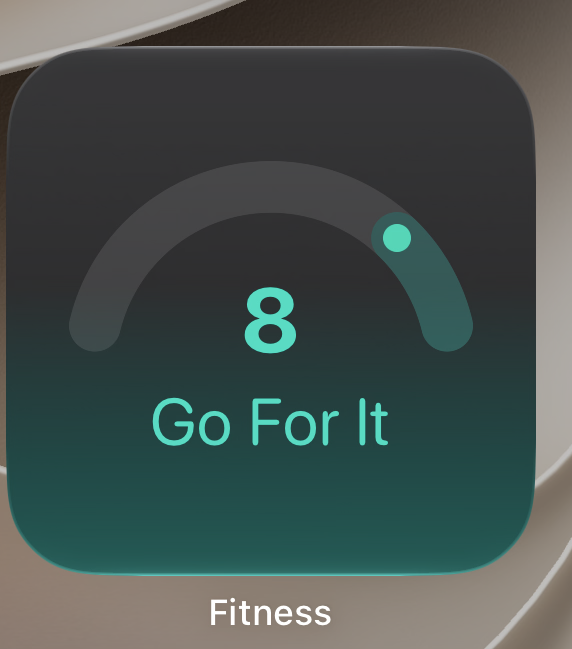
The Fitness app's readiness widget has a new look in beta 3. The small widget now centers on a semicircular gauge, with a dot marking where your score falls along the arc. Your readiness number sits in large type inside the gauge, with a short plain language label underneath, such as "Go For It." The background fades from dark gray at the top to a teal tint at the bottom that matches the gauge accent color.
The result reads at a glance from the Home Screen: the number tells you the score, the dot shows where it sits in the range, and the label tells you what to do with it. To add it, touch and hold an empty area of your Home Screen, tap Edit, then Add Widget, search for Fitness, and choose the readiness widget. Readiness relies on data from the Apple Watch Series 12 and Ultra 4, so you'll need one of those models paired for the widget to show a score.
The New Apple Music Logo Starts Appearing

Apple debuted a new Apple Music wordmark last month alongside Apple Music Hall, its new venue at London's Battersea Power Station, and beta 3 suggests that logo is headed to every Apple device. The new design uses a bolder typeface and a lowercase "m" in "music." 9to5Mac spotted it in the Apple Music signup flow in iOS 27.2 beta 3, and it also appears in macOS 27.2 beta 3.
Reports differ on how far the rollout goes in this build. Beta Profiles found references to the wordmark in code without seeing it throughout the app, and noted that the logo on Apple's own playlist covers could change on the server side without any software update. Either way, expect to see it everywhere once 27.2 ships, while Apple's Apple Music website and web player still show the old logo for now.
Granular Controls for Messages Suggested Actions (Found in Code)
Suggested Actions lets Messages offer a single tap button based on what's happening in a conversation, such as adding an event invite to Calendar or inserting a photo someone asked for. The feature appeared during the iOS 27 beta, was pulled before the final release, and returned in the iOS 27.2 betas.
Code in beta 3 reveals a settings screen that would let you switch individual suggestion types on or off, with separate toggles for Add to Calendar, Add to Reminders, Add to Notes, Show in Maps, and Flights and Packages. There's also a Hide Unused Suggestions switch. With it enabled, any suggestion you don't use stops appearing after 30 days, and you can bring a hidden one back by turning its individual toggle off and on again.
Apple hasn't enabled this screen in beta 3, so there's no way to reach it yet, and it could still change or disappear before release. If it ships as found, you'd be able to keep the suggestions you actually use and quiet the rest instead of choosing between all or nothing.
Smaller Interface Tweaks
Beta 3 includes a handful of refinements that bring older screens in line with the iOS 27 design:
- Display Zoom previews in Settings now show the Liquid Glass interface and the iOS 27 wallpaper.
- In Mail, the Done button in Mailboxes → Edit is now a standard checkmark button.
- The Games app account page swaps its checkmark for a standard X dismiss button.
- Maps renames the Options button during navigation to Time and Options.
Some testers also report that the Apple Intelligence Report section in Settings is now titled Private Cloud Compute Report with a new description, though the change isn't showing up on every device.
New Welcome Screens for Apple TV and Fitness
Launch the Apple TV app for the first time after updating and a What's New screen walks you through Apple TV profiles, which arrived on iPhone and iPad earlier in the 27.2 cycle. The Fitness app gets its own first launch screen too, titled "Your Fitness and Health Data is Private and Secure."
If you want to try profiles, open the TV app, go to your account settings, and create a new profile. Each one needs only a name, a content rating, and whether it belongs to a child. Child profiles default to PG content, and a Customize option lets you choose specific age ratings for movies and TV shows. It's a handy setup if you hand your iPhone or iPad to a kid to watch something.
Other Code Findings
Two more discoveries in beta 3 point to features that aren't live yet. MacRumors contributor Aaron Perris found code suggesting that nearby smart home accessories could show controls in the Dynamic Island, which would put things like lights or locks a tap away when you're close to them. Code in the build also includes four diagnostic instruction videos for iPhone Duo, Apple's foldable that launches October 23 with iOS 27.1.
iPadOS 27.2 Beta 3 (Build 24B5099f)
iPadOS 27.2 beta 3 shares its build number with iOS and picks up the same changes covered above, including the refreshed battery icon, the Apple Books updates, and the new Apple TV and Fitness welcome screens. No iPad exclusive changes have surfaced so far.
macOS Golden Gate 27.2 Beta 3 (Build 26B5101f)
The new Apple Music logo shows up on the Mac in this build as well, but the bigger macOS story in beta 3 is a set of changes that look built for touch.
A New Long Press Animation for Dock Icons
Click and hold any app icon in the Dock and it now grows slightly, similar to the animation you see when you long press an app on iPhone or iPad. To try it, press and hold on a Dock icon for a moment without releasing.
With a trackpad or mouse it's a subtle bit of feedback. It's also exactly the kind of response a touchscreen needs, which is why the change drew attention alongside reports that Apple is preparing touch enabled MacBook Pro models with OLED displays.
Touch Gesture Code in Safari, Photos, Notes, and Quick Look
Beta 3 adds new gesture recognition code to several Apple apps: a touch sentinel recognizer in Safari, PXGTouchDwellGestureRecognizer in Photos, ICTouchPressGestureRecognizer in Notes, and a dragTouch feature in Quick Look. Nothing changes for current Macs, since none of them have touchscreens.
The code may not be tied to new hardware at all. macOS Golden Gate brought full touch input to Sidecar, the feature that lets an iPad act as a second display for a Mac, so Apple could be expanding that experience instead. The launch version of Golden Gate also added pull to refresh in Safari, Mail, and Calendar, so this is the latest step in a pattern that started with the 27.0 release.
Fixes and Known Issues
Apple's release notes for beta 3 list a fix for an Xcode crash that could occur while using code completion. Two known issues are worth knowing before you install: connecting an external display may change your display arrangement, and a clean installation might not request notification permission for apps including Calendar, Maps, Find My, Home, and Weather.
If one of those apps never asks to send notifications, open System Settings → Notifications, select the app, and turn on Allow Notifications manually.
watchOS 27.2 Beta 3 (Build 24S5101f)
No new user facing features have turned up in watchOS 27.2 beta 3 yet, and Apple's notes for the build don't call out any. The biggest watchOS 27.2 change remains the redesigned Health experience that pairs with iOS 27.2, including a readiness score that draws on data from the Apple Watch Series 12 and Ultra 4. We'll update this section if testers find anything new.
tvOS 27.2 Beta 3 (Build 24K5103f)
An Improve Siri & Apple Intelligence Option (Found in Code)
Code in tvOS 27.2 beta 3 adds an Improve Siri & Apple Intelligence toggle to the Settings app. Its description asks permission for Apple to collect and use your text and audio interactions with Siri, Dictation, and Translate to improve Siri and its foundation models. Apple uses similar opt ins on its other Apple Intelligence devices, while hardware without Apple Intelligence shows a setting labeled Improve Siri & Dictation instead.
Because the new code sits alongside the existing Siri data sharing option, it will likely appear only on Apple TV hardware that supports Apple Intelligence. No current Apple TV model does.
A Siri Messages Framework (Found in Code)
tvOS 27.2 also includes a new Siri Messages interface framework. Siri on Apple TV can't read or send messages today, so this could eventually let Siri show messages sent to a linked iPhone on your TV, along with smart reply options. Apple hasn't announced anything like this, so treat it as groundwork rather than a coming feature. Both finds line up with reports that a new Apple TV 4K with Siri AI support is coming soon.
visionOS 27.2 Beta 3 (Build 24N5103f)
visionOS 27.2 beta 3 is available for Apple Vision Pro, but no new features or changes have been reported so far, and Apple hasn't detailed what the update adds. We'll update this section as testers dig in.
Apple released all six betas to registered developers on Monday, October 5, two weeks after beta 2, and followed with new public betas on Tuesday, October 6, for testers enrolled in the Apple Beta Software Program. On iPhone or iPad, go to Settings → General → Software Update → Beta Updates and choose the iOS 27 developer or public beta. On a Mac, the same option lives in System Settings → General → Software Update.
iOS 27.1 ships on iPhone Duo when it launches October 23, and Apple has committed to delivering the new Siri AI languages in October. Since those languages are part of 27.2, the public release should land shortly after the iPhone Duo launch, likely before the end of the month. As always, install betas on a secondary device rather than the iPhone, iPad, or Mac you depend on every day.