

Skylight Buddy Review: A Fast-Growing Chore Companion
An honest look at the chore engagement, the sleep and nightlight features that grew fast since launch, and what still needs work.


My son is five, and every night after he brushes his teeth, he sprints to a small screen on his dresser and slaps a button so hard I worry about the hinge. That's the Skylight Buddy doing exactly what it's supposed to do.
When I reviewed the Skylight Calendar 2, the pattern I kept running into was ambition outrunning execution. Features arrived thin and got patched in later, and the Stars and Rewards system in particular was a good idea in a stripped-down shell: app-only, text-only, not enough there to hold a kid's attention past the first week. Buddy is Skylight's answer to that specific problem. It takes the Stars and Rewards system out of the shared family calendar and hands your kid their own dedicated device to interact with it directly, so the chore chart comes to them instead of living somewhere they have to be reminded to check. And a few weeks and several updates into owning one, I've watched it follow the exact same arc the Calendar did: thin at launch, genuinely better now.
Setup and What You're Actually Buying
Setup took about ten minutes and caused zero problems. I bought the base unit with no case for $139.99, and Buddy Plus came bundled into my existing Calendar Plus subscription at no extra cost. That's worth flagging up front, because the free tier and Plus tier are not close. Free gets you Chores & Routines and Sleep & Wake. Plus adds Customize Buddy, Rewards, Nudges, and Timers. In practice, that means the free version gives your kid a task list and takes away the actual payoff. If you're buying Buddy standalone without a Calendar Plus subscription already covering it, budget for the $39/year add-on, because the Rewards loop is the entire point.
The case and button have taken weeks of a five-year-old jabbing at them with no cracks, no wobble, nothing that feels like it's on borrowed time.
The Chore Loop Actually Holds Up
This is where Buddy earns its keep, and it directly answers the complaint I had about Rewards on the Calendar: my son has fully bought into the routine, and it hasn't faded. Finish the task, walk over, hit the button, watch the little character react. It's a small ritual, but it's the kind of small ritual that gets a five-year-old to brush his teeth without three reminders, and weeks in, he still runs to it every night.
Putting the reward loop on a device that's his, instead of buried in an app on a shared kitchen calendar, is the fix the Calendar version needed. The character reactions and star accumulation give it enough texture to hold a kid's attention in a way plain checkmarks on a shared screen never did in our house.
Where the Reward Loop Still Needs a Parent in It
The flip side of handing a kid their own device is that Buddy currently has no gate between a kid marking something done and the reward for it landing. My son figured out early that "washing the dishes" can technically mean "washing one spoon," and the star shows up in the app either way.
I'm not the only one running into this. A thread on r/skylightcalendar has a parent asking for the same thing: let a parent approve or reject a checked task before the star counts, because kids are, in the OP's words, generous with their own definition of "done." Skylight's own account replied in that thread, confirming it's not built yet but is on their radar. In the meantime, parents in that thread are working around it: some skip star-assignment on tasks entirely and hand stars out manually at the end of the day, and one household built a literal "stars checked by mom" task their kid has to complete last, forcing a check-in before anything counts.
The same lack of a parent gate shows up on the device itself. There's no PIN or parental lock on Buddy's on-device settings, and my son has gotten into that menu on his own more than once, just messing around, and changed things like the time zone. Nothing catastrophic, but it shouldn't be one curious tap away from unsupervised access. The good news: Parental Controls is already sitting on Skylight's public roadmap as an in-progress item, aimed at letting parents lock down settings like WiFi so kids can't touch them. More on that roadmap below, but this is the one I'm watching closest.
Sleep and Sound Went From an Afterthought to a Genuine Asset
We already have a Hatch Rest 2nd Gen in the house for nightlight and sound, so I'm not coming into this section blind. This isn't a Buddy vs. Hatch review. Hatch is a dedicated sleep device and Buddy wasn't originally trying to be one. But this section has changed more than any other part of this review, because Skylight has shipped a run of updates since I first started writing this, and the sleep experience today isn't the one I started with.
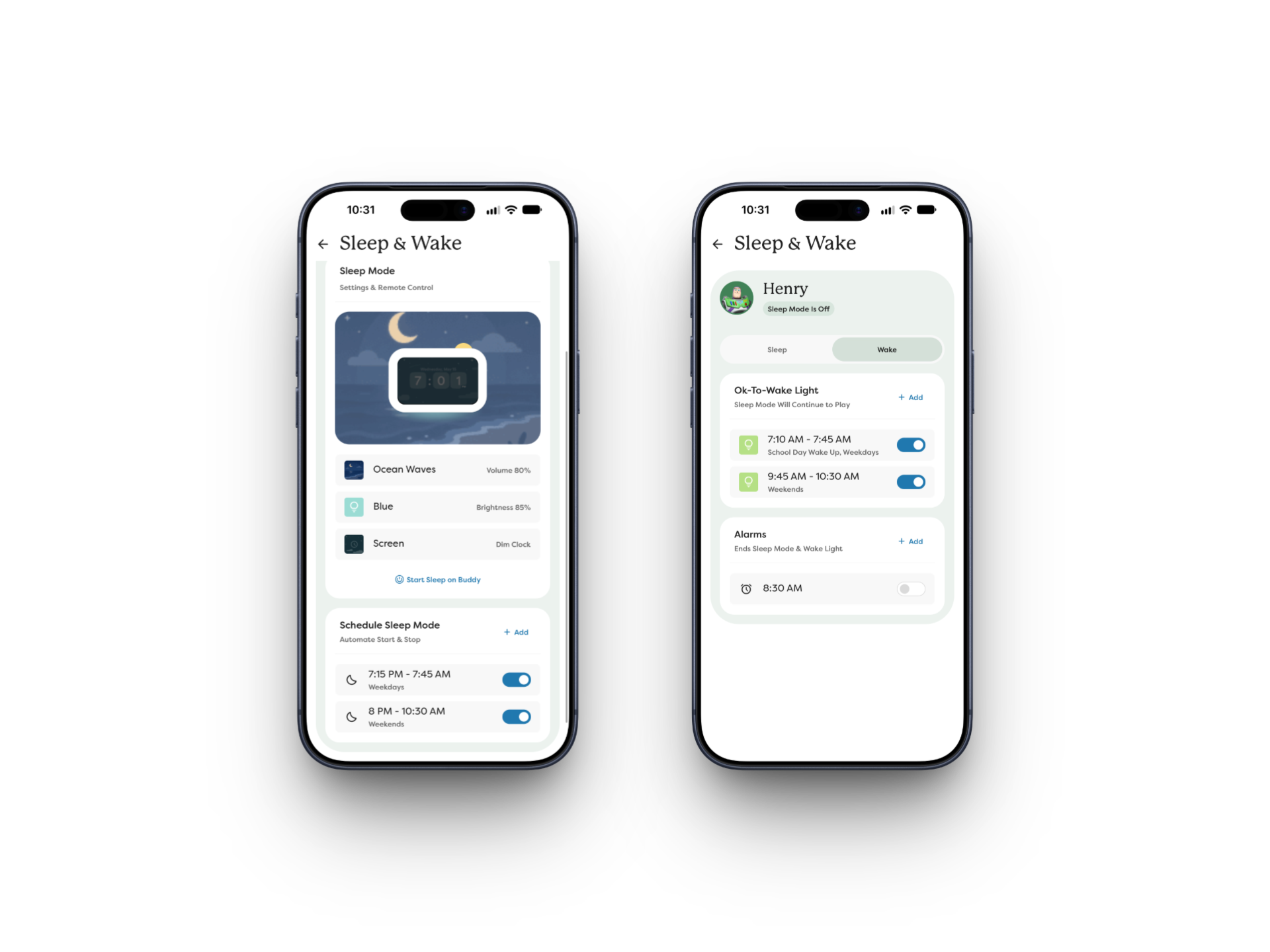
When I first got Buddy, the nightlight was a single dim warm-white glow with a brightness slider and nothing else. No scheduling, no color, manual on and off with the one exception that a morning alarm would shut it off automatically. That's no longer the case. Skylight added Scheduled Sleep Mode, so you can now set recurring start and stop times instead of touching the device twice a day, plus an Ok-to-Wake light that changes the nightlight's color between bedtime and morning to signal when it's actually okay to get up. What makes both of these useful rather than a checkbox feature is that they support multiple schedules. In our house that means one for school nights and a separate one for weekends, both running automatically without me touching anything. The nightlight itself also picked up real color options, more than what shows up in Skylight's own marketing screenshots. Between the scheduling flexibility and the wake-light signaling, this closed the exact gap I was most annoyed about early on.
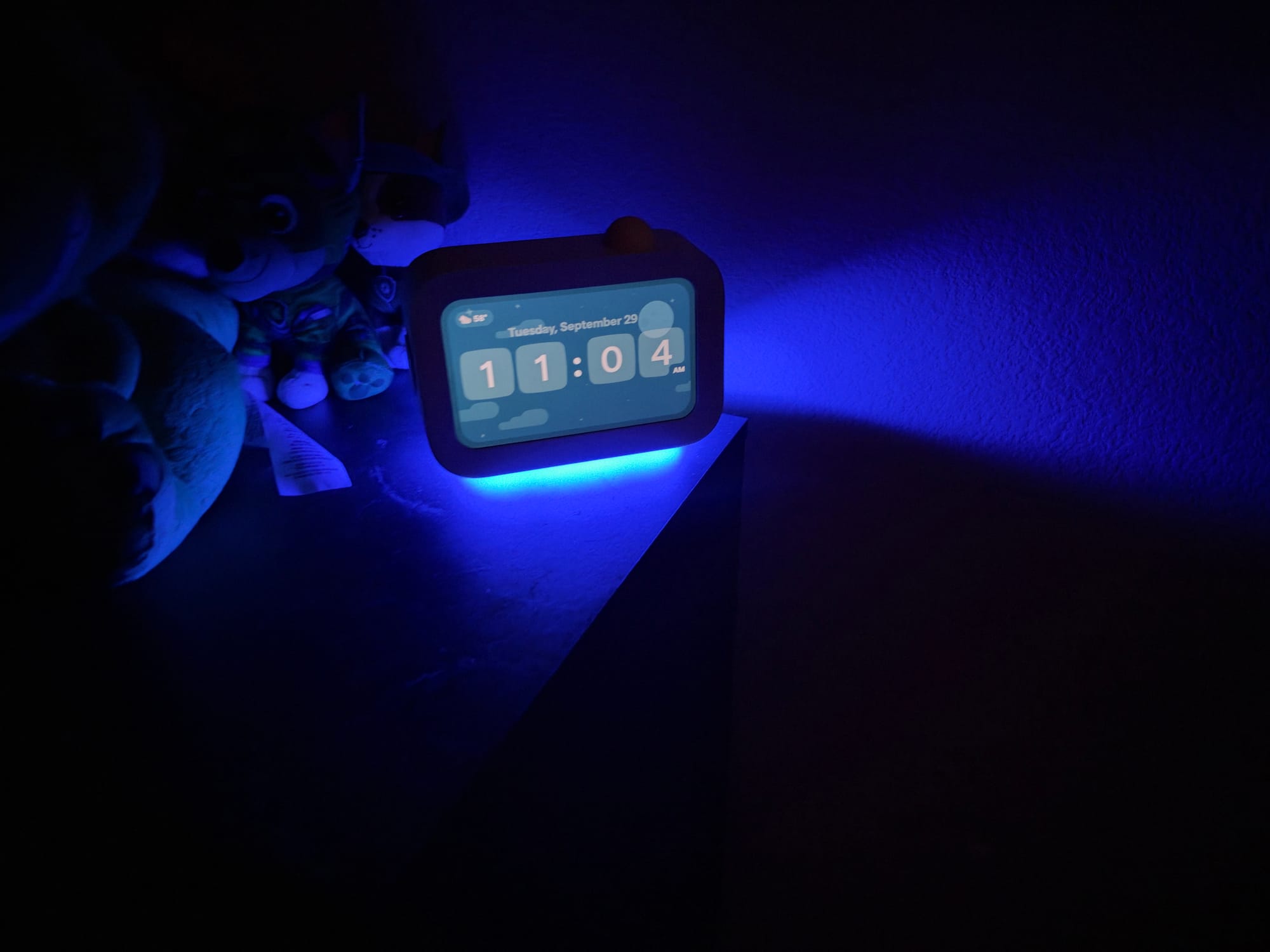
The sound library grew alongside it. Skylight added a batch of new options, including Twinkle, Lullaby, Storm, Jungle, Campfire, and Box Fan, on top of the existing lineup that already included white noise and brown noise. Brown noise has been a mainstream sleep and focus sound for a few years now, ever since it took off on TikTok, and a lot of older dedicated sleep machines predate that wave and never added it. Buddy did, and now has a meaningfully bigger library to pick from besides. The same round of updates fixed my other big complaint too: you can now adjust sleep sound volume remotely from the app, no more walking into the room and touching the device itself.
Sleep Mode itself gives you two display options alongside the light and sound settings: screen off entirely, or a dim clock face. Small detail, but a reasonable one to offer.
Between Scheduled Sleep, the Ok-to-Wake light, and remote volume control, Buddy has closed enough of the gap that it's genuinely making the Hatch feel less necessary in our house. I wasn't expecting that distance to close this fast.
What to Expect Next
Given how much has already changed since launch, it's worth looking at where Skylight says Buddy is headed next. Their public roadmap currently lists three items in progress: Parental Controls, the settings lock mentioned above; Quiet Hours, aimed at preventing kids from playing with Buddy during bedtime; and Calendar Events, which would surface the next upcoming event and the full day's list directly on Buddy. One more item, Up for Grabs, is listed as planned rather than in progress, and would let kids view chores that are up for grabs right on the device.
None of this comes with a timeline, but given how quickly Skylight moved on Scheduled Sleep and Ok-to-Wake, I wouldn't bet against these showing up before too long either.
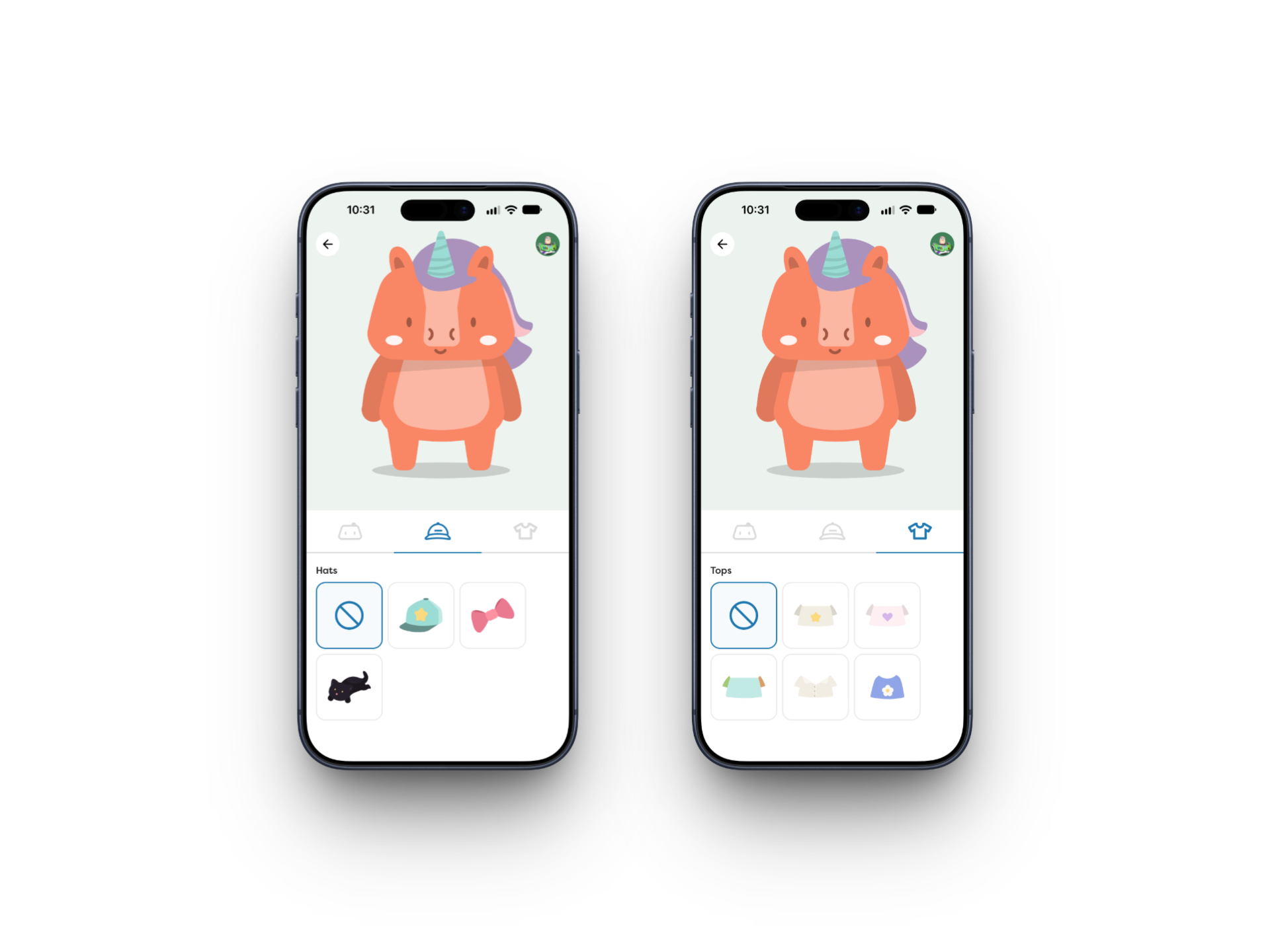
Skylight also shipped Character Accessories in a separate update, letting you dress up your kid's Buddy character with outfits and hats. It's purely cosmetic and won't move the needle on whether you buy this thing, but it's a fun touch for kids, and one more sign this product is still being actively built out rather than left alone after launch.
Timers Are Still an App-to-Device Disconnect
Not everything has caught up yet. The Plus subscription advertises Timers as a feature, and there is a timer section in the app, but it doesn't do what you'd expect. You can't set a new timer from your phone. The app's timer section only lets you start a timer that's already been attached to a specific task, and only if that task was built with a timer in the first place. Any actual timer creation has to happen on the device itself. It's a small thing, but it's the same pattern I ran into with the Rewards approval gap: a feature that sounds like it lives in the app but really requires a trip to the physical device.
Should You Buy It?
If you're already a Skylight Calendar household running the Stars and Rewards system, Buddy is an easy yes. It solves the exact problem I flagged with Rewards on the Calendar, extending a system you're already using into something your kid owns directly. The bundled Plus subscription sweetens the deal, and the engagement payoff has stuck around well past the novelty phase in my house.
You don't need a Skylight Calendar to get value out of this, either. Buddy and its companion app can run their own Stars and Rewards loop independently. Having a Calendar already just makes the whole thing feel more connected; it's not a requirement.
I was ready to write off the sleep side entirely when I started this review. Skylight closed that gap fast. Scheduled Sleep and the Ok-to-Wake light were the two features I wanted most when I first got Buddy, and having them now, plus remote volume control on top, means this genuinely comes close to replacing a dedicated device like the Hatch. If you'd told me a few months ago that Buddy would get this close this quickly, I wouldn't have believed you.
Pros
- Chore and rewards engagement genuinely works and hasn't worn off after weeks of use
- Case and button have held up to weeks of a five-year-old's handling without a mark or a wobble
- Buddy Plus comes bundled at no extra cost for existing Calendar Plus subscribers
- Setup took about ten minutes with no issues
- Sound library now includes brown noise and six additional new options, a gap on many older dedicated sleep devices
- Scheduled Sleep Mode, the Ok-to-Wake light, and remote volume control close the biggest early gaps
- Sleep and wake schedules support multiple profiles, so school-night and weekend routines run automatically without manual switching
- Nightlight now has real color options beyond the original single warm-white
- Skylight has shipped multiple substantial updates since launch, showing real ongoing investment
Cons
- No parent approval step before a completed task banks a star
- No parental lock on device settings; my son has changed settings like the time zone on his own
- The app's Timer feature can't create timers, only start ones already built into a task on the device
- Free tier drops Rewards, Nudges, Timers, and Customization entirely
Meta description: [TBD]