


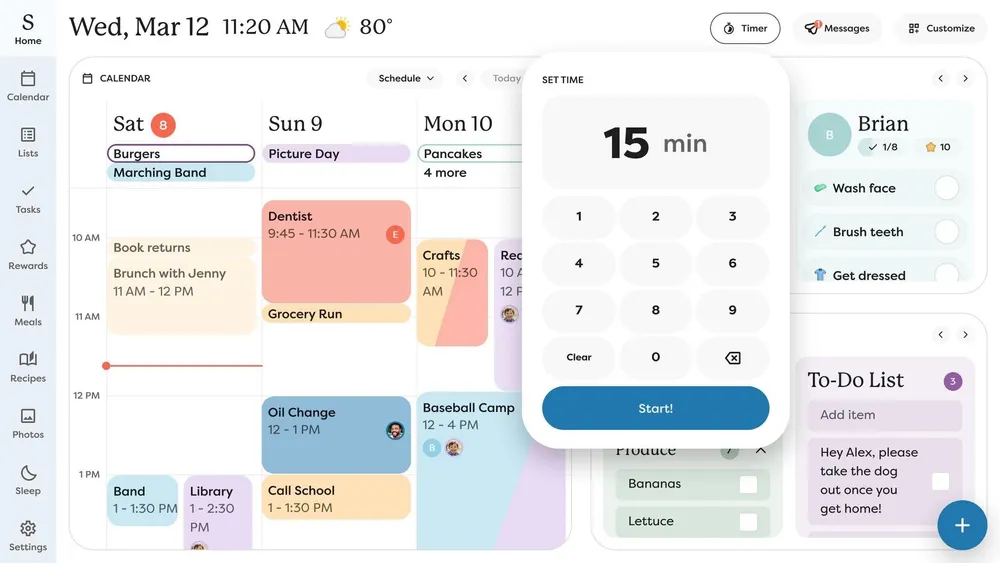


Skylight started rolling out Timers to the Skylight Calendar on November 5, and it's free for every Calendar owner. Tap Timer in the Home screen's top toolbar, enter the minutes and tap Start. A colored pie shrinks as time runs out, so kids can see how much homework or cleanup time is left without anyone counting it down for them. If the button isn't there yet, give it a few days.
It's a feature families have been asking for, and it's far from the only one Skylight has shipped lately.
The team at Skylight has been busy
Since late August, our two Skylight reviews have logged nine separate updates. The highlights:
- Screensaver that keeps the calendar: photos now show the weather, time and your next two events (free).
- Device Navigation: hide the sidebar tabs your family never uses (free).
- Feature pop up control: see new feature announcements immediately, weekly or never (free).
- Messages: send a typed or recorded note from your phone to the Calendar, now or scheduled (Plus).
- Screensaver Schedule: separate weekday and weekend hours for photos (Plus).
- Skylight Buddy: calendar events, tomorrow's schedule, and parental controls with Quiet Hours and a PIN lock, all free.
Most of it landed in the free tier, which matters on a device that costs $299.99 up front with an optional $79 a year Plus plan. Several rough edges we flagged in July have been smoothed out since, and a couple are still works in progress.
Our Skylight Calendar 2 review has every update logged at the top, along with our full verdict. If you have kids, the Skylight Buddy review covers how the two work together.






Comments