


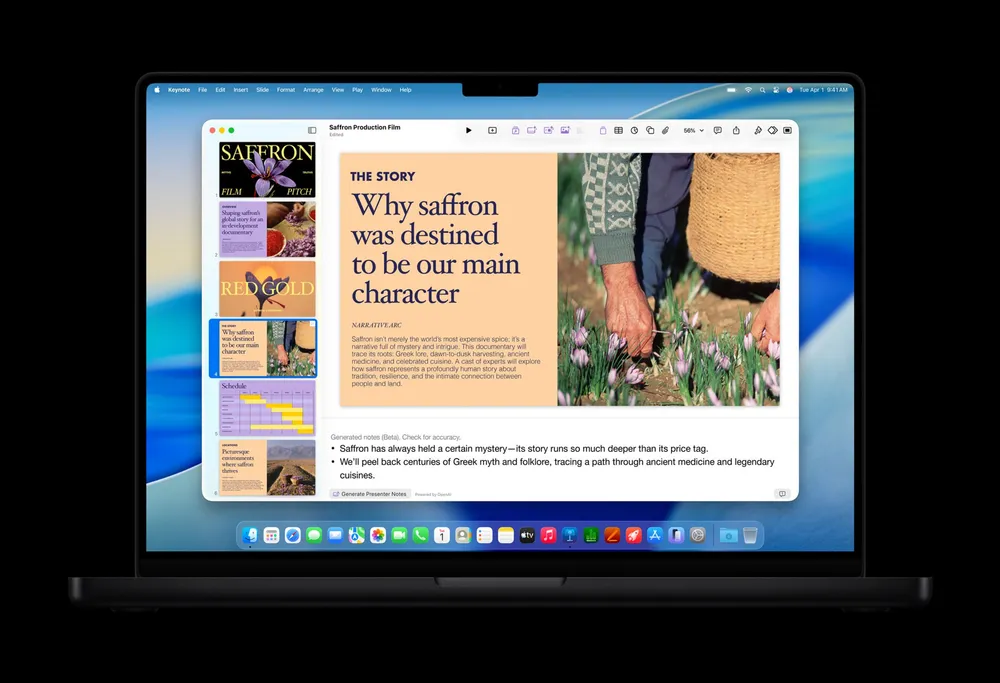


Keynote, Pages and Numbers have been free on every iPhone, iPad and Mac for years, and that doesn't change with Thursday's update. What changes is that they now come in two versions. Anyone can still write, edit and collaborate in them at no cost. Subscribers to Apple Creator Studio also get a beta Intelligent Assistant that can draft a document, build slides or write a formula for you.
The update, version 15.4.1 for iPhone and iPad, is the biggest change to the iWork apps in a while, and it's also a clear look at how Apple plans to price AI inside its own apps. Below is what the assistant does in each app, what you need to use it, and a smaller Keynote change that every user gets.
What the Intelligent Assistant does
Apple describes the assistant as working from an understanding of the file you have open, so it's meant to help with the document in front of you rather than answer general questions. All three apps share a few abilities: the assistant can look up current information on a topic and add it to your file, walk you through advanced features, and suggest things to try. Each app also gets its own set of tools.
Pages
Pages can start a first draft and then help edit and organize what you've written. You can ask it to draft a section, adjust the tone, or generate images and shapes from a plain language request.
Keynote
Keynote's assistant helps shape the story of a presentation and refine individual slides. It can generate slides and presenter notes, add animations, and create images and shapes on request.
Numbers
Numbers gets the most practical version for a lot of people. It can build tables, suggest charts, help with complex formulas, and point out patterns in your data. Writing a formula by describing what you want, instead of remembering function names, is the kind of help spreadsheet users have wanted for a long time.
9to5Mac noted the assistant appears to be separate from Siri AI and works only inside these three apps.
Who can use it
The assistant has a short list of requirements, and all of them have to be true:
- An Apple Creator Studio subscription, which costs $12.99 a month or $129 a year in the US
- iOS 27 or iPadOS 27 or later, on a device that supports Apple Intelligence
- Your device language set to US English, since the beta is English only for now
- Version 15.4.1 of the app on iPhone or iPad
The Mac versions hadn't received the update as of Thursday night, so for now the assistant is an iPhone and iPad feature. Subscribers also get new templates in Pages and Numbers, new Keynote themes, and curated videos in the Content Hub.

The rollout had a bumpy start. Apple briefly pulled all three apps from the App Store shortly after the update went out, then restored them, and by Thursday evening the assistant was live for subscribers. If you've updated and don't see it yet, check the requirements above before anything else, especially the language setting.
The same update adds iPhone Duo support to all three apps for everyone, free or paid. Apple didn't list it in the release notes, but Keynote, Pages and Numbers now use the Duo's larger inner screen. Our guide to the apps ready for iPhone Duo on launch day covers what else is ready.
The Keynote change everyone gets
The update also adds the Keynote Interchange Format, saved as a .keyx file, as a beta for all users, not only subscribers. Apple describes it as an open format for importing and exporting presentations and says it will make Keynote files easier to edit in other apps.
That one is easy to overlook next to the AI news, but it's the part most likely to matter to anyone who sends decks to people working in other presentation apps. How much it helps depends on other apps adding support, and Apple hasn't named any yet.
What this says about Apple's apps
iWork has been free for years, and it still is. The assistant draws a line inside the same apps: the core tools stay free, and the AI layer sits in a paid bundle alongside Apple's pro creative apps. Microsoft and Google already sell AI as an upgrade to their office apps, so the model isn't new. What's new is Apple using it for software that ships on every device it sells.
For most people, the free apps are unchanged and the decision is simple. If you already pay for Creator Studio for Final Cut Pro or Logic Pro, the assistant is a free addition worth trying. If you only use Pages and Numbers a few times a month, $12.99 is a lot to pay for writing help, and the beta label and English only limit are fair reasons to wait.
The bigger thing to watch is the Mac. Long documents and big spreadsheets still mostly get built on a Mac, and the assistant isn't there yet. When it arrives, and whether it stays inside Creator Studio once it's out of beta, will say a lot about how Apple prices AI in the rest of its apps.










Comments