





iOS 27, iPadOS 27, and watchOS 27 are rolling out today, September 14, as free updates, the first stable release of Apple's fall software cycle, with 27.1 already expected in October alongside the iPhone Duo. After three months of developer and public betas, the release candidate that shipped to developers on September 9 is very likely close to what's landing on your devices right now, aside from whatever last minute changes Apple made before today's release.
The headline story across all three platforms is Siri AI, Apple's rebuilt assistant that moves from rigid commands to genuine back and forth conversation, personal context awareness, and the ability to act inside apps rather than just launching them. But Siri AI isn't the whole release. iOS 27 also brings a meaningfully more readable Liquid Glass, smarter Photos editing tools, and the most substantial parental control overhaul in years. iPadOS 27 focuses on making the iPad feel faster and more desktop capable without reinventing windowing again. watchOS 27 puts Siri AI on your wrist for the first time and reworks how the watch surfaces the apps and widgets you actually use.
Siri AI itself arrives in beta, in English only, with French, Japanese, Korean, Portuguese, and Spanish support promised for October. It is also not available at launch in the EU or in China, so what you get today depends on where you are as much as what device you own. Everything below reflects what actually shipped in the RC and what Apple has confirmed for launch day, not what was rumored during the beta cycle.
iOS 27
Siri AI Takes Over
Siri AI
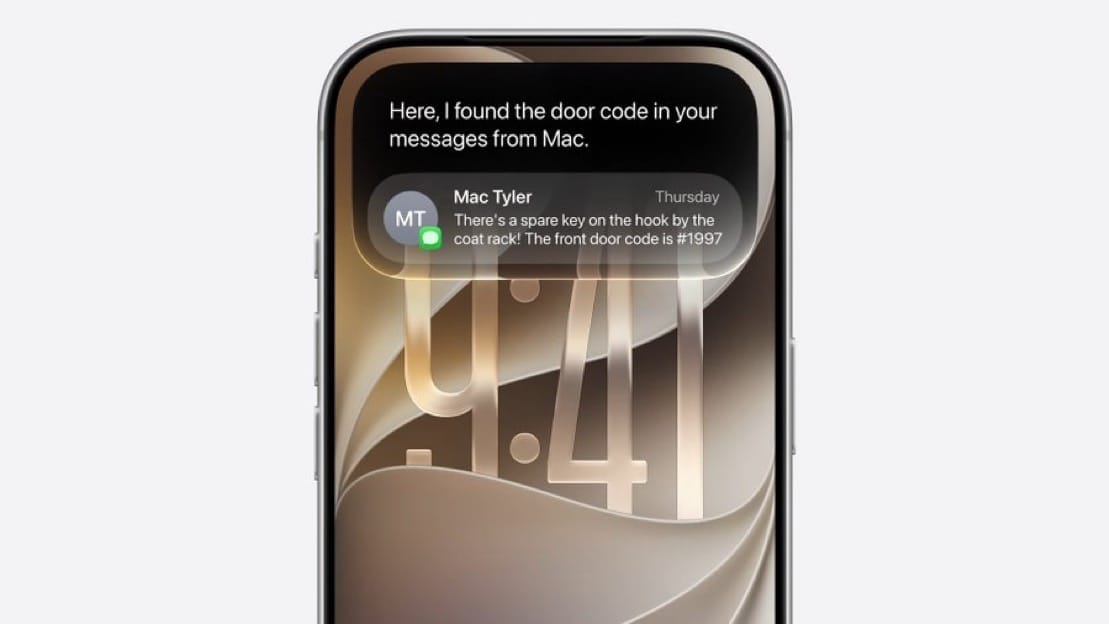
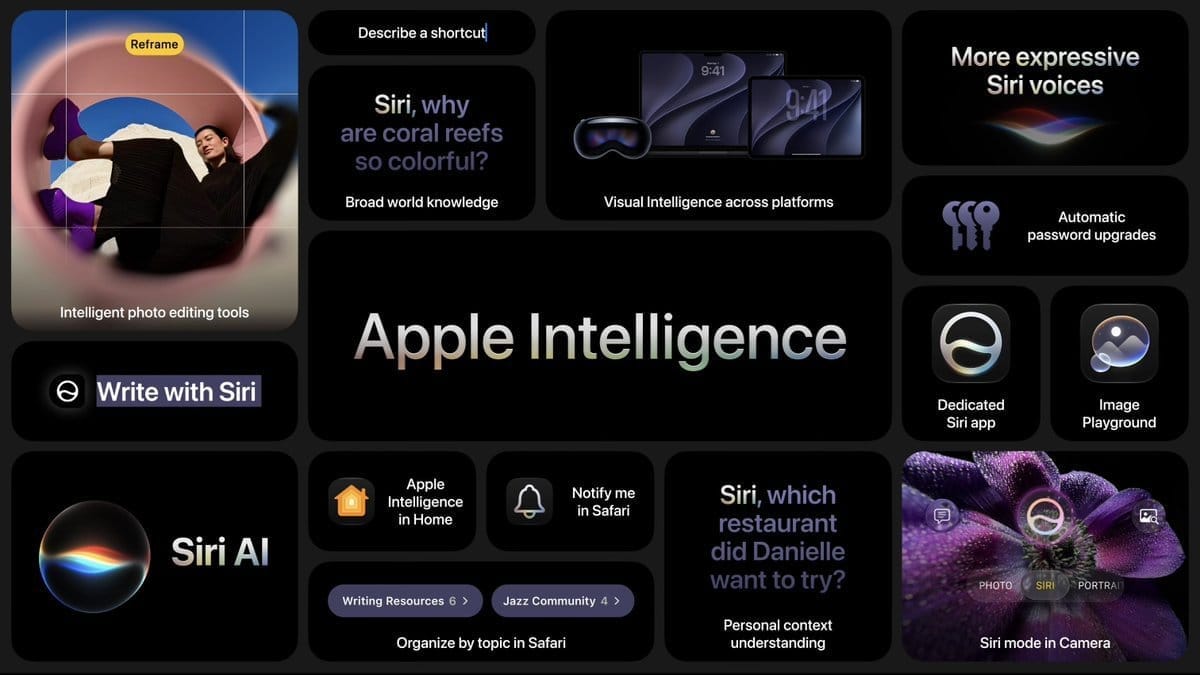
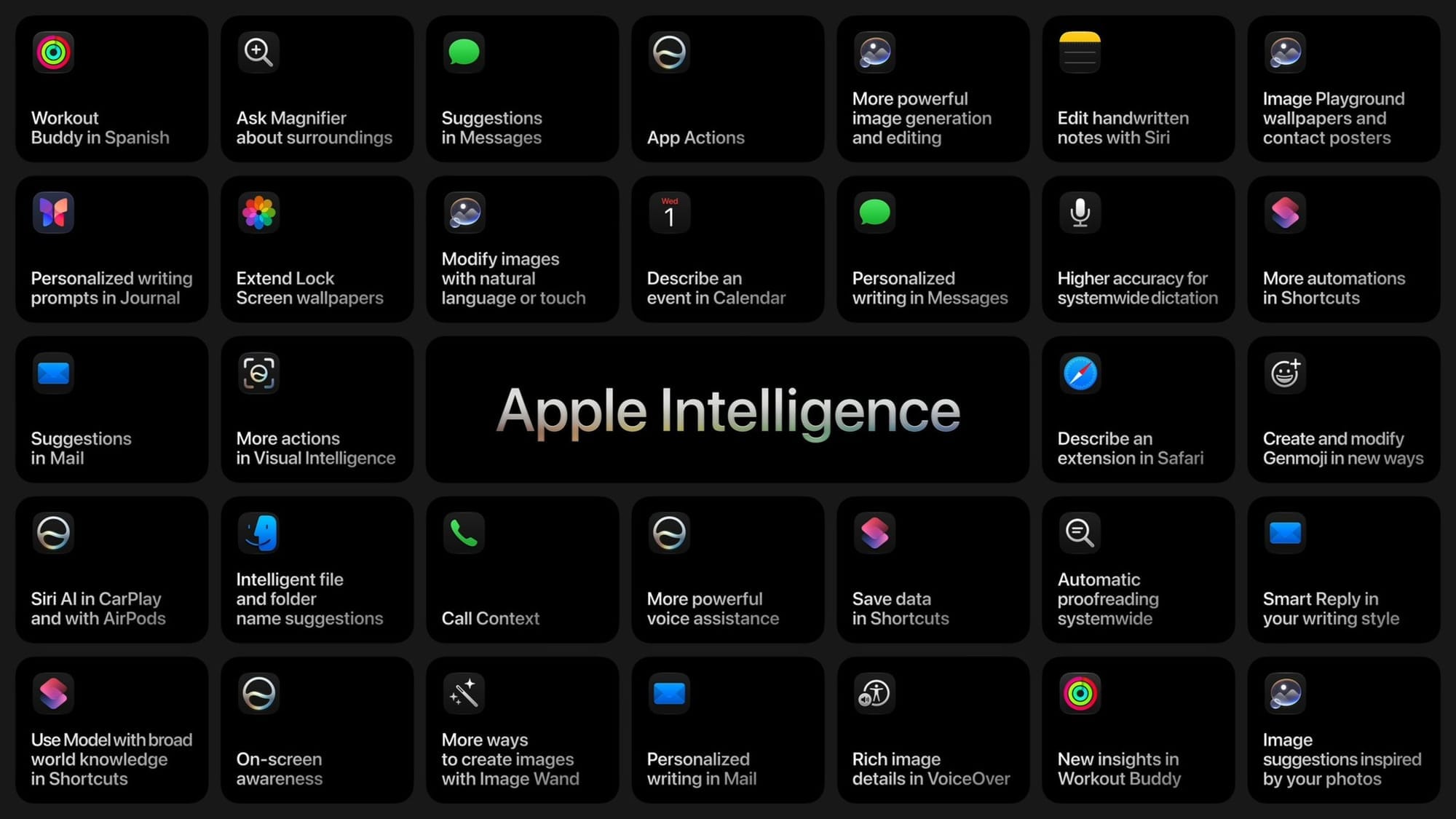
Siri gets rebuilt from the ground up in iOS 27, and it's the reason this release exists. The new assistant, which Apple brands Siri AI, moves Siri out of the shadow of rigid, single shot commands and into genuine conversation. You can ask a follow up question without restating context, and Siri AI will remember what you were just talking about.
A dedicated Siri app. Siri is no longer just a voice layer that appears over whatever you're doing. It now lives in its own app, where conversations are saved and can be revisited later. That history syncs privately across your devices through iCloud, so a conversation you start on your iPhone can be picked back up on your iPad or Mac.
Personal context and onscreen awareness. Siri AI can pull from information already stored across your apps, including Mail, Messages, and Photos, to answer questions that reference things you've already told your phone. It can also see what's currently on your screen and act on it, which is what makes tasks like summarizing an article you're reading or replying to a message with relevant context actually work without you switching apps.
Search or Ask. A new interface, summoned by swiping down from the Dynamic Island, lets you jump straight into either a traditional search or a Siri AI conversation depending on what you need.
Siri in Camera. Point your camera at something and ask Siri AI about it directly. Apple has specifically called out splitting a restaurant bill through Apple Cash and getting nutrition information as two of the use cases this mode is built around.
Highlight to Search. A new toggle in Siri's settings, off by default, that automatically searches the web for visually similar results whenever you highlight a subject using Siri in Camera or in a screenshot.
Not every iPhone that can install iOS 27 gets Siri AI, and it's worth being precise about where the line actually falls, because Apple splits compatibility into three real tiers rather than a simple yes or no.
| Tier | Requirement | What you get |
|---|---|---|
| iOS 27 only | A13 Bionic or newer (iPhone 11 and later, iPhone SE 2nd gen and later) | The full operating system update, without Apple Intelligence or Siri AI |
| iOS 27 with Siri AI | A17 Pro chip, 8GB RAM (iPhone 15 Pro and Pro Max, iPhone 16 series and later, iPhone Air) | Apple Intelligence and the conversational Siri AI experience |
| iOS 27 with advanced Siri AI | 12GB RAM (iPhone 17 Pro and Pro Max, iPhone Air, iPhone Duo) | Custom Siri voice selection and the most capable on device models |
If you're on an iPhone 11 through an iPhone 14, or the standard iPhone 15, you'll get every non-AI improvement in this article, including the redesigned parental controls and Liquid Glass changes, but Siri stays roughly what it was. We broke down this same tier structure in more detail back at the public beta stage, and processing itself is worth understanding too, since Siri AI's speed depends more on Apple's infrastructure than your device.
Liquid Glass Gets More Readable
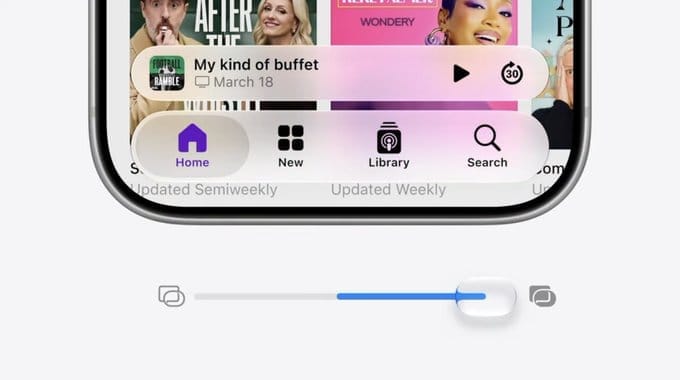
Liquid Glass isn't going anywhere in iOS 27, but Apple used this cycle to address the biggest complaint about it: readability. A new system-wide slider lets you adjust how intense the glass effect is across menus, widgets, and app icons, rather than living with a single fixed level of transparency. Apple had already built a version of this for the Lock Screen clock in iOS 26 but ran into engineering problems extending it system-wide at the time. That work is finished now, and the result is sharper app icons and better contrast in the places Liquid Glass previously made text hard to read.
Smarter Photos Editing
Photos picks up three new AI-assisted tools built around fixing composition problems after the fact rather than requiring a reshoot.
Spatial Reframing lets you adjust the framing and composition of an existing photo, effectively giving you a second chance at a shot you already took. Extend expands the borders of an image beyond its original edges, generating plausible content to fill the new space. And an upgraded version of Clean Up removes distractions from a photo with results that read as more realistic than the version introduced in iOS 26.
Redesigned Parental Controls
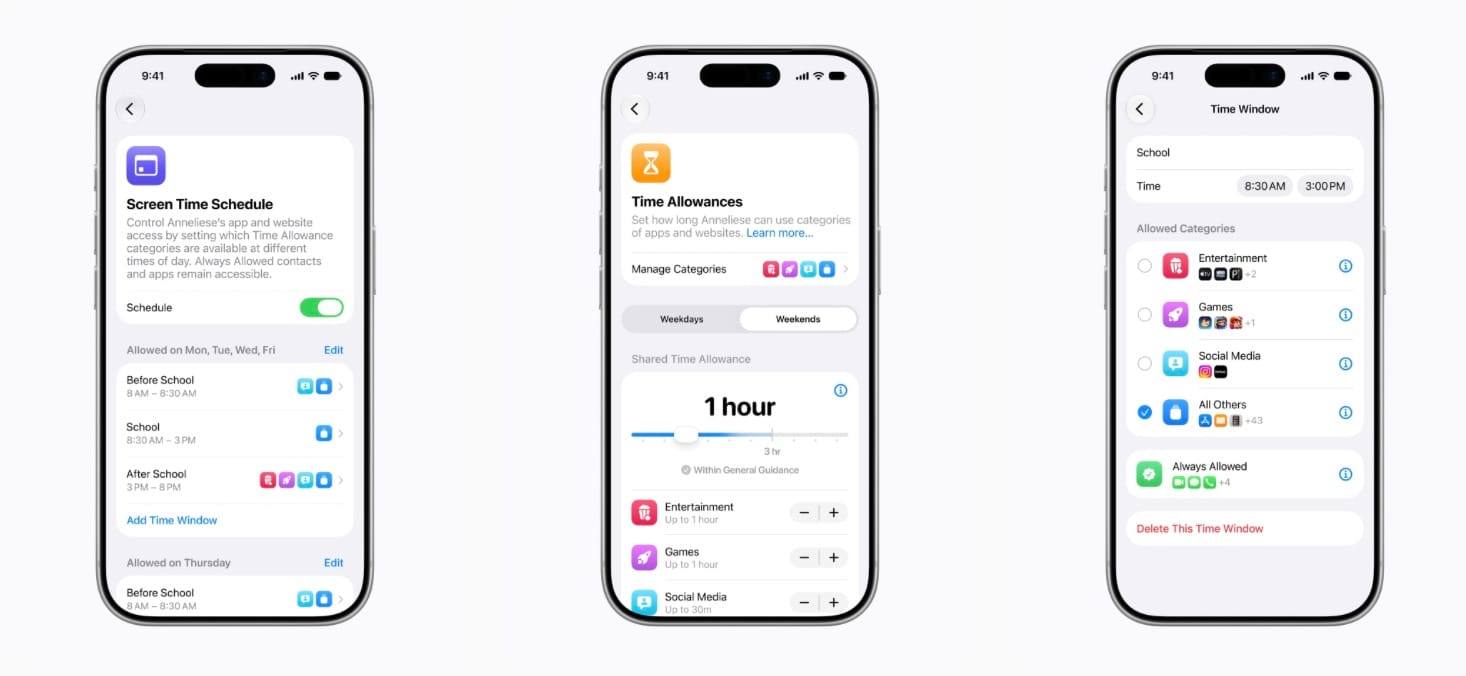
This is the most substantial rework of Screen Time and family safety tools in recent memory, and it applies regardless of which Siri tier your device falls into.
Ask to Browse requires a child's device to get parental approval before visiting a new website, extending the existing Ask to Buy model to web browsing itself rather than just App Store purchases. Time Allowances give parents a way to grant specific pools of extra time for individual apps or categories, instead of the all or nothing extensions Screen Time previously offered. Contact approvals and app schedules round out the toolkit, alongside a redesigned Screen Time interface that Apple says consolidates these settings into one place instead of scattering them across the Settings app. We went deep on the full rollout, including the violence detection Apple added to Communication Safety, in our dedicated child safety breakdown.
One requirement worth flagging before you go looking for these: every device in a Family Sharing group needs to be running iOS 27, iPadOS 27, or watchOS 27 for the new controls to actually enable. If even one family member's device is still on an older OS version, these features won't turn on for the group. Apple itself confirmed Time Allowances by name back in July, ahead of the beta cycle even reaching them.
Safari's New Toolkit
Opening Safari in iOS 27 for the first time surfaces a highlight screen calling out four new features, and each is worth understanding on its own.
Safari can now automatically organize your open tabs into groups without manual sorting, and bookmarks can be browsed by topic rather than as one long undifferentiated list. A new Notify Me option tracks a specific page for changes and alerts you when something updates, useful for anything from a product restock to a news story developing. And Safari now supports creating custom extensions rather than relying only on what developers have published, opening the door to browser customization that previously required a third party app. We first spotted this highlight screen during the beta 3 cycle and have been testing all four features since.
Everyday App and Performance Improvements
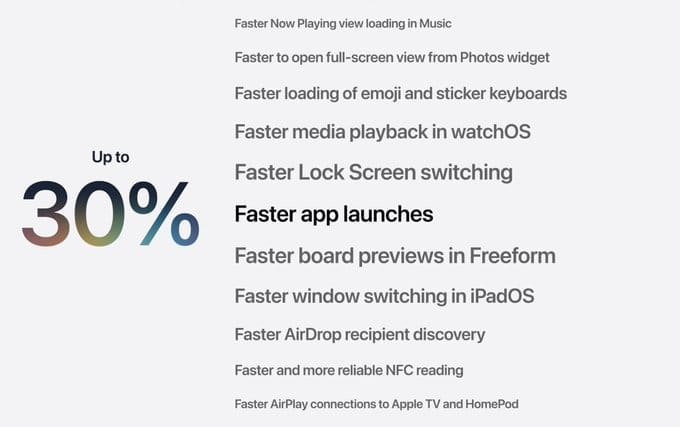
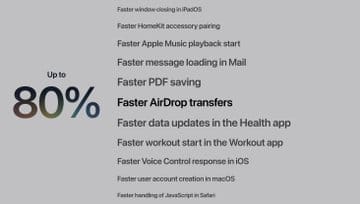
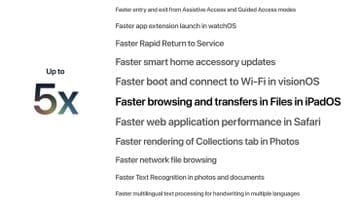
Beyond the headline features, iOS 27 brings a broad sweep of changes to the apps you use daily. Spotlight and Mail search have both been improved for more accurate results. The Phone app has been redesigned. Apple has separated certain volume controls that were previously tied together, and a general performance pass makes the system feel more responsive, a change Apple specifically says should benefit older, non-AI-tier iPhones as much as the newest models. We covered what's actually driving that performance work earlier this cycle, and the search speed piece of it specifically comes from the same indexing rebuild behind the "Optimizing Search and Siri" banner you may have seen during setup.
iOS 27 Availability
iOS 27 supports iPhone 11 and later, along with the iPhone SE, 2nd generation and later. It's a free update available now in Settings, then General, then Software Update. The download runs roughly 8 to 12GB depending on your device and what's already cached, and your iPhone will restart once to finish installing it. Siri AI's staged language and regional rollout means what you see on day one may expand over the following weeks, so don't be surprised if some of what's described above isn't fully live in your region yet.
iPadOS 27
iPadOS 27 ships alongside iOS 27, and much of what's new on iPad, including Siri AI, the Liquid Glass slider, and the Photos tools above, is the same feature running on a larger screen. Rather than repeat that coverage, this section focuses on what iPadOS 27 does differently, which this cycle is almost entirely about making the iPad feel faster and more capable as a desktop-class device, not about reinventing how multitasking works.
A Persistent, macOS-Style Menu Bar
The biggest interface change is a new toggle under Multitasking and Gestures in Settings, labeled Automatically Show and Hide Menu Bar. Turning it on brings a menu bar to the top of the screen that behaves much closer to the one on a Mac, giving you faster access to app-level commands without digging through touch-first menus. This builds on the windowing system iPadOS 26 introduced last year rather than replacing it, and Apple has focused this cycle's multitasking work on making that existing system faster and more responsive, including quicker window switching, closing, and dragging.
iPad Gets Noticeably Faster
Apple leaned hard into performance this cycle, and it shows in places you'll notice immediately. Context menus open faster when you're using a cursor. Files transferring to an external drive are up to five times faster than before, which Apple says brings iPad file handling in line with Finder on the Mac. App launches and general system animations have also been tightened up across the board.
iPadOS 27 Availability
iPadOS 27 supports the iPad Pro 11-inch, 2nd generation and later, the iPad Pro 12.9-inch, 4th generation and later, the iPad Air, 4th generation and later, the iPad, 9th generation and later, and the iPad mini, 6th generation and later. That cutoff drops the A12 and A12X generation entirely, including the original 11-inch iPad Pro, the 3rd generation 12.9-inch iPad Pro, the 3rd generation iPad Air, the 5th generation iPad mini, and the 8th generation standard iPad.
As with iPhone, getting iPadOS 27 and getting Apple Intelligence on iPadOS 27 are two different questions, and the split falls along three tiers.
| Tier | iPads | What you get |
|---|---|---|
| iPadOS 27 only | iPad Pro 11-inch (2nd generation) and 12.9-inch (4th generation), iPad Air (4th generation), iPad (9th and 10th generation), iPad mini (6th generation) | The full iPadOS 27 update, including the new menu bar toggle and performance gains, without Apple Intelligence or Siri AI |
| iPadOS 27 with Siri AI | iPad Air (5th generation and later, M1 chip and newer), iPad mini (A17 Pro), iPad Pro (M1 chip and later) | Apple Intelligence and the conversational Siri AI experience |
| iPadOS 27 with advanced Siri AI | iPad Pro (M4 and later) and iPad Air (M4) with at least 12GB of RAM | The most capable on-device models, plus custom Siri voice selection on M4 iPad Pro and iPad Air configurations with at least 1TB of storage |
watchOS 27
Siri AI Comes to Your Wrist
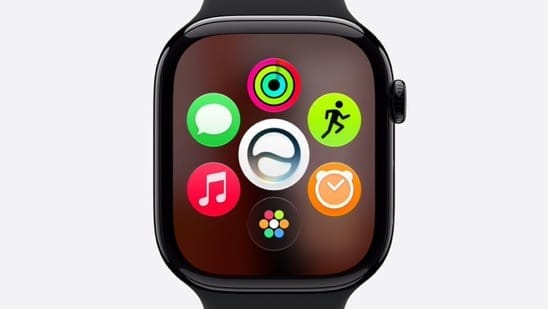
For the first time, Siri AI's conversational capabilities extend fully to Apple Watch. You can ask open-ended questions, follow up without repeating context, and pull information from your notes and personal data, all from your wrist, though processing happens on a nearby iPhone rather than on the watch itself. Apple's own example has a user asking for post-run recovery stretches and getting a detailed, specific answer back rather than a generic search result. Conversations started on your watch sync to the same Siri app iOS 27 introduced, so a request you made on your wrist is waiting for you on your phone later. Siri AI actually arrived on Apple Watch back in beta 3, after sitting dark through the first two betas.
A Dynamic App Grid and a New Gesture
Pressing the Digital Crown now opens a dynamic app grid rather than a static list. When Siri AI is enabled, the Siri app takes the center position, surrounded by apps chosen based on how recently and how often you actually use them. There's also a new tap gesture, touching your index finger and thumb together to select a widget in the Smart Stack, giving you a way to interact with the watch one-handed.
Smart Stack Gets More Proactive
The Smart Stack now surfaces a wider range of contextual suggestions without you asking for them. New widget types include a parked car locator, birthday messages and celebrations, pinned messages, and Siri conversations you can pick back up. Location plays a bigger role too. Theater Mode can appear automatically at a concert, and an ID can surface when you're at the airport.
Workout Buddy and Health Updates
Workout Buddy, Apple's AI-driven coaching feature, gains the ability to deliver Apple Intelligence coaching without your iPhone nearby, along with better recognition of longer-term progress in your pace, distance, and workout duration. Spanish language support is new this cycle as well. Separately, Cycle Tracking now includes alerts for perimenopause and menopause, surfacing a notice when tracked patterns suggest those signs.
One thing worth clearing up now, before confusion sets in: the broader Health app updates Apple showed off alongside the new iPhone and Apple Watch models at last week's event are not part of today's 27.0 release. Apple has said that work is coming later, in its words, "late 2026," as a separate update rather than something bundled into this launch. If you install watchOS 27 today expecting those specific Health changes to be waiting for you, they aren't there yet.
Battery Optimization Suggestions
watchOS 27 introduces proactive notifications suggesting you disable features you aren't using, aimed at extending battery life without you having to dig through settings to find what's draining your watch.
watchOS 27 Availability
This is the cycle's steepest compatibility cut of the three platforms covered here. watchOS 27 supports the Apple Watch SE, 3rd generation, Series 9 through Series 12, and Ultra 2 through Ultra 4. That leaves the Apple Watch Series 6, 7, and 8, the original Apple Watch Ultra, and the 2nd generation Apple Watch SE without this update, even though all of those models were supported as recently as watchOS 26. Apple has attributed the cutoff to the processing demands of Siri AI and the new tap gesture, both of which the company says need the performance headroom of the S9 chip or newer. If your Watch isn't on the supported list, it will keep working and continue receiving basic security updates, but it's done receiving new features. watchOS 27 also requires an iPhone 11 or later, or an iPhone SE 2nd generation or later, running iOS 27.
If you're updating today, do it through the Watch app on iPhone for watchOS, or directly in Settings on iPhone and iPad. Siri AI's staged rollout means the exact feature set in front of you may still be filling in over the coming weeks depending on your language and region, so if something described here isn't showing up yet, that's expected rather than a sign anything installed incorrectly.
Which of these changes are you noticing first, the Siri AI conversations, the Liquid Glass slider, or something smaller Apple didn't put in the headlines? Let us know in the comments.
Meta description: iOS 27, iPadOS 27, and watchOS 27 are officially out with Siri AI, a readable Liquid Glass slider, smarter Photos tools, and reworked parental controls.







Comments